Money agreement: a short written note of how you share each kind of cost
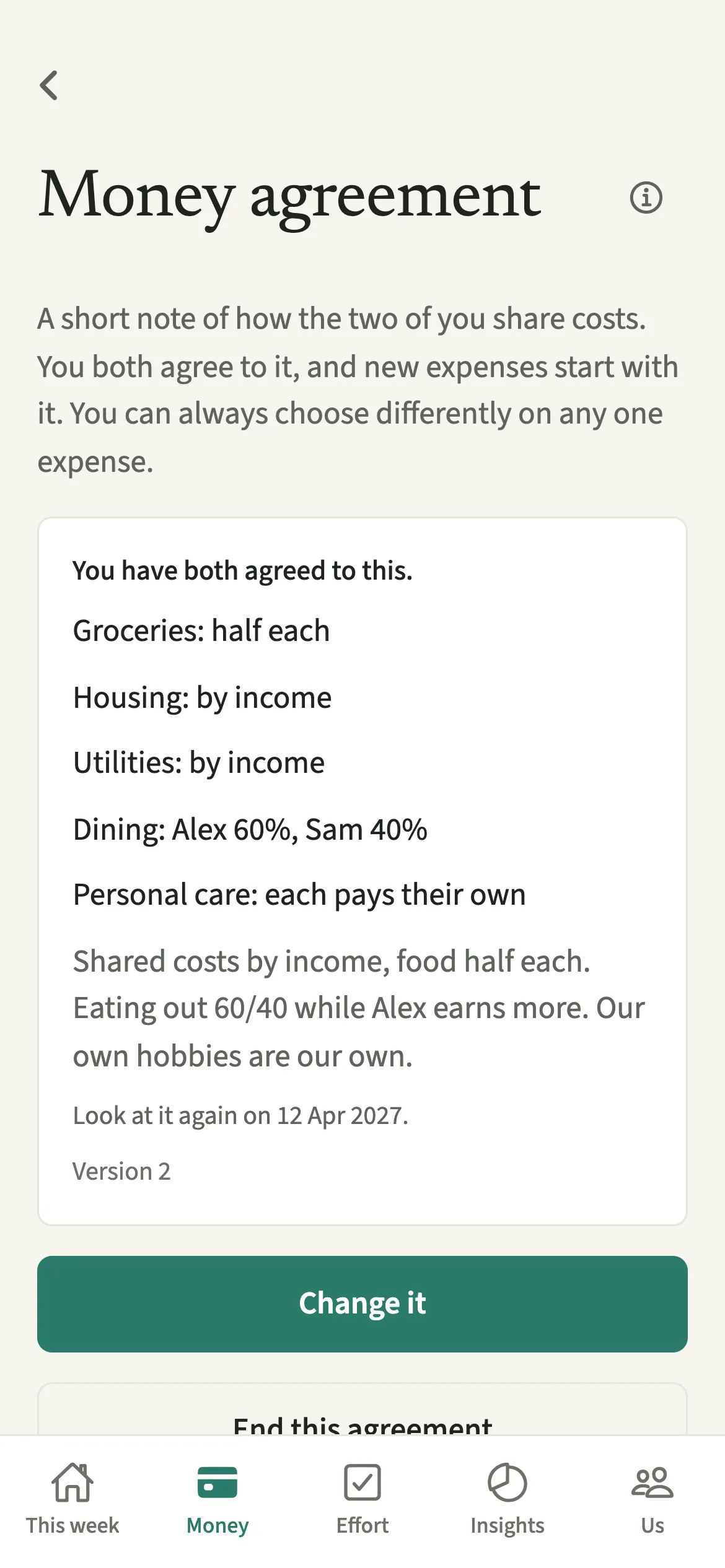
A money agreement in EvenUS is a short written note of how a couple shares each kind of cost: by income, half each, your own percentage, or each paying their own. You write it together, and it starts once you have both tapped to agree. From then on, a new expense in a covered category starts with the split you chose, and you can still choose differently on any one expense.
What does a Money agreement do?
It turns a conversation you have already had about money into a default the app follows, so you do not have to repeat it at every expense. Many couples decide over dinner that rent is split by income, food is half each and hobbies are each their own. A month later, two people remember the same chat slightly differently.
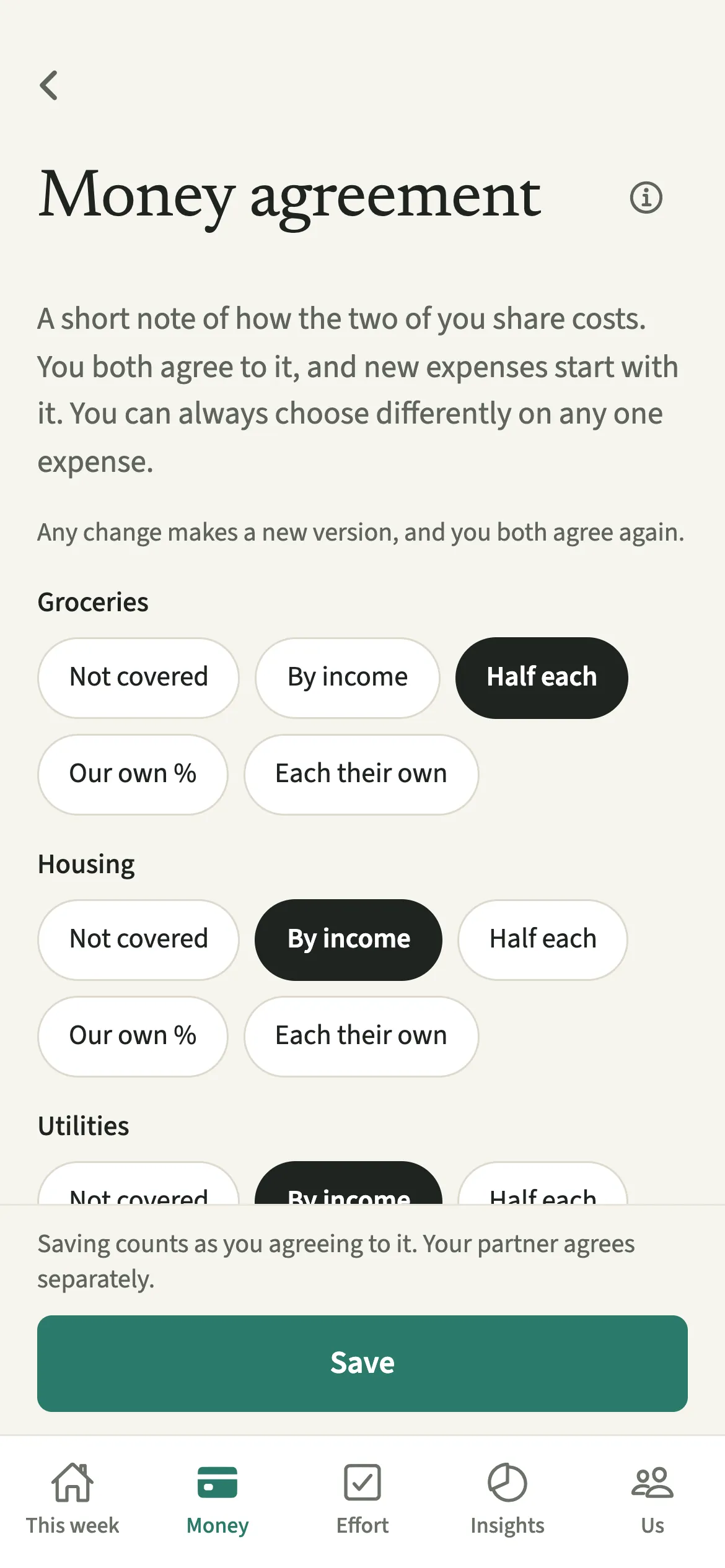
In EvenUS, the agreement lists each expense category with one choice beside it: Not covered, By income, Half each, Our own % or Each their own. There is room for notes in your own words and a date to look at it again. Once you have both agreed to the current version, a new expense in a covered category starts with that split.
It sits on top of How costs split: the household setting is the general rule, and the agreement lets particular categories follow a different one.
Who is a Money agreement for?
Couples who have talked through who covers what and want new expenses to start that way, especially those who share some costs and keep others separate, or whose arrangement changed after a new job, a baby or a move.
How do you write a money agreement in EvenUS?
Open Money, tap “Money agreement” under Plan, tap “Write one together”, choose a split for each category, save, and your partner taps “I agree”.
- Start the agreementOpen the Money tab, then under Plan tap “Money agreement”, then “Write one together”.
- Choose a split for each categoryFor each category choose Not covered, By income, Half each, Our own % or Each their own. With Our own %, set each of your percentages.
- Add notes and a review date if you likeWrite anything else you agreed under Notes, in your own words. Under “Look at it again”, pick 3, 6 or 12 months, or leave it at No date.
- Save, then your partner agreesTap Save. Saving counts as you agreeing to it. Your partner opens the same screen and taps “I agree”.
- Let new expenses follow itOnce you have both agreed, a new expense in a covered category starts with the split you chose. You can still pick a different split on any one expense.
What does your partner see?
You both see the same agreement and whether each of you has agreed to this version. The screen says plainly where things stand, for example that you have agreed and it starts once your partner agrees too.
Each of you agrees only for yourself. Nothing is scored, there is no record of whether the agreement is kept, and no reminder is sent from one of you to the other about it. Either of you can tap “End this agreement”; it stops for both of you, and new expenses go back to your usual split.
Tips for a money agreement that works
- Expenses already saved keep their split, and you can still choose differently on any one new expense. An agreement is a starting point, not a lock.
- Any change makes a new version, which you both agree to again. Until you do, the previous version is no longer in force, so agree soon after a change.
- Use Not covered for categories you have not discussed yet. Those expenses start with your usual split.
- A review date sends one ordinary reminder to both of you. Six or twelve months suits most couples.
- Talk it through first and write it down second. How to talk about money without fighting has ideas.
What do the five choices mean?
- By income: each of you covers a share in proportion to income, as in Split by income.
- Half each: an even split, whatever either of you earns.
- Our own %: a percentage you set together, like 70 and 30.
- Each their own: costs in that category are personal, and each of you pays your own.
- Not covered: the agreement says nothing, and your household setting applies.
Because the split is saved on each expense when it is added, changing or ending the agreement later never rewrites history.
Is Money agreement free?
Money agreement keeps working after the 7-day free week, whether or not you subscribe. The computed views, such as the household balance and this week’s idea, are part of EvenUS Pro: $9.99 a month or $79.99 a year, with one subscription covering both partners. The free week needs no card, and nothing is charged when it ends.
Questions about Money agreement
Does a money agreement change expenses we already added?
No. Expenses already saved keep their split. The agreement only sets the starting split for new expenses in covered categories, and whoever adds an expense can still choose a different one.
What if my partner has not agreed yet?
The agreement is not in force until you have both agreed to the current version. Until then, new expenses start with your usual household split, and the screen shows that it is waiting for your partner.
Does EvenUS track whether we keep our money agreement?
No. Nothing is scored and there is no kept or broken record. The agreement is a default for new expenses and a note you both wrote. Choosing differently on one expense is not flagged.
How do we change a money agreement?
Open it and tap Change it. Any change to a split, the notes or the review date makes a new version. Saving counts as your agreement, and your partner taps I agree to put the new version in force.
Can either of us end a money agreement?
Yes. Either of you can open it and tap “End this agreement”, then confirm. It stops for both of you, new expenses go back to your usual split, and expenses already saved keep theirs. You can write a new one any time.
Related features
Other parts of EvenUS that work alongside Money agreement.
Related reading
Articles on the questions behind this feature.