How costs split: four ways to share household costs, tried on your own figures
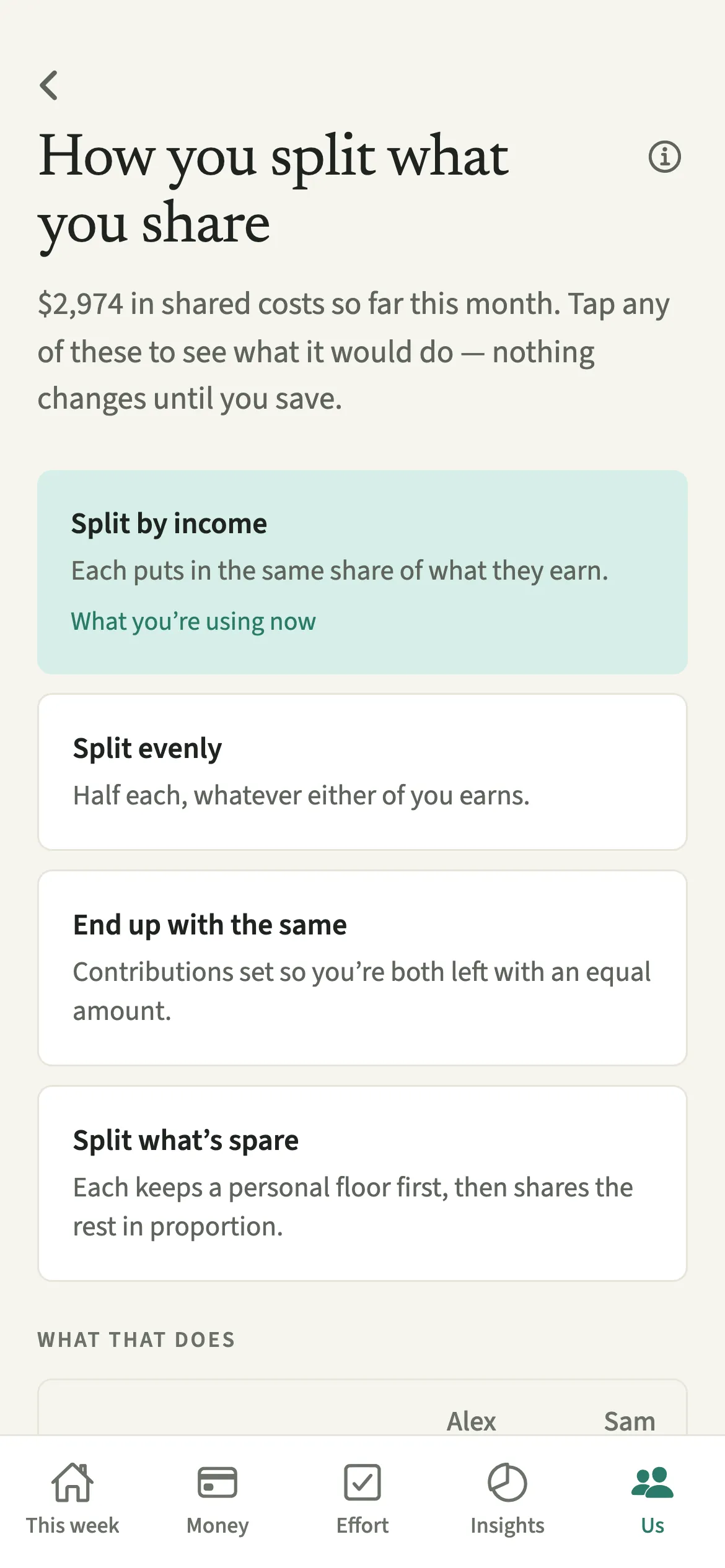
How costs split is the household setting in EvenUS that decides how shared costs are divided between partners. There are four options: Split by income, Split evenly, End up with the same, and Split what’s spare. Before you choose, each one shows what it would do with this month’s real figures: each share of what you earn together, what each of you puts in, and how what’s left over divides.
What does How costs split do?
It sets the rule every shared expense follows, and lets you see the consequences of each rule before you pick one. Most couples arrive at a split by habit, rarely with the numbers in front of them.
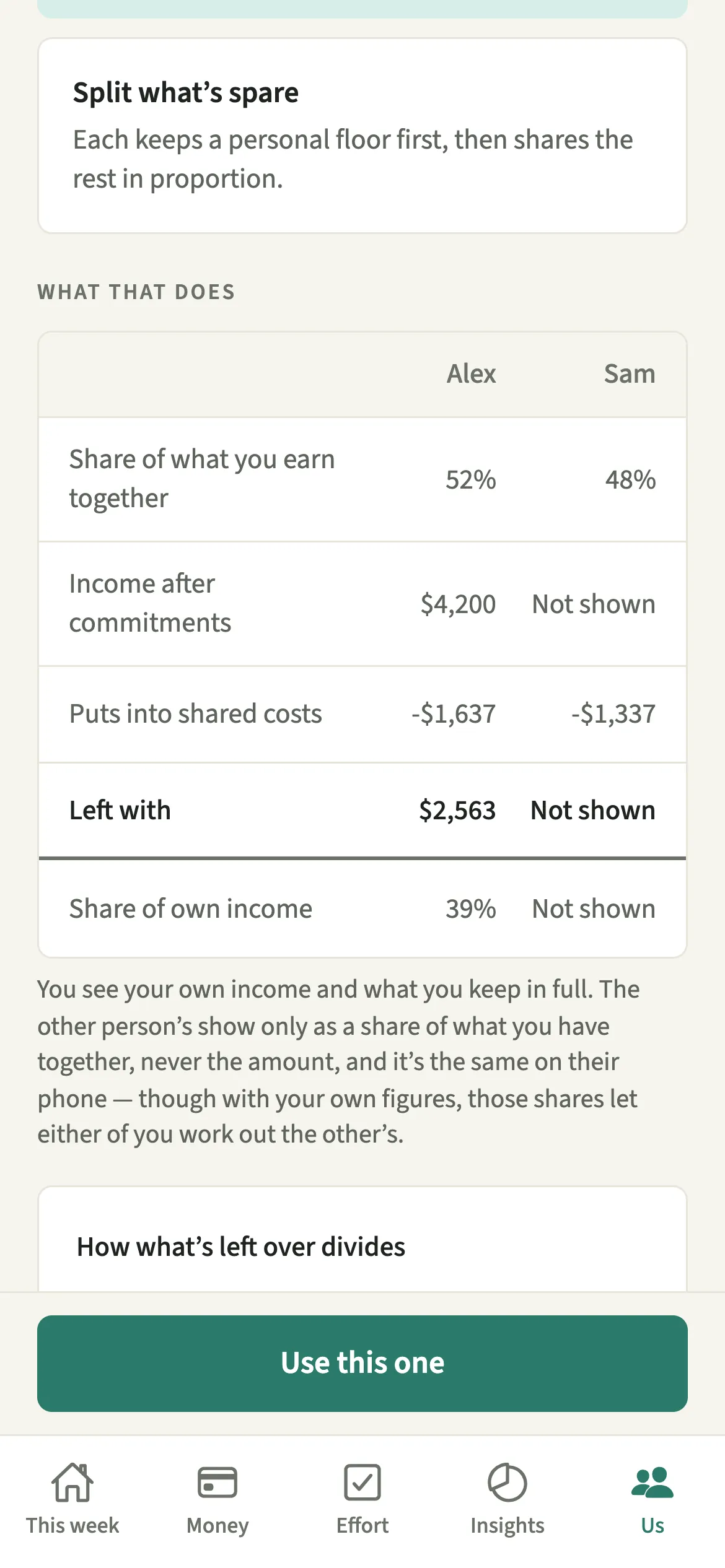
Tap any of the four options and read “What that does”: each share of what you earn together, what each of you would put into shared costs, and how what’s left over would divide. Your own Income after commitments and what you are left with show in full; your partner’s read “Not shown”. The figures come from this month’s shared costs and your own incomes after tax.
Whatever you choose then flows through shared expenses, the Even up card and the money half of the household balance.
Who is How costs split for?
Couples setting up EvenUS, and anyone whose situation has changed: a new job, a pay cut, parental leave, a partner going part-time. It is a good screen to open together, because it turns “is this fair?” into four sets of numbers.
How do you choose how costs split?
Open “How costs split”, tap each option to read “What that does” with your figures, then tap “Use this one” on the one you both want.
- Open the settingOpen Us → Household → “How costs split”, or tap Change beside the split on Money.
- Try each optionTap any of the four: Split by income, Split evenly, End up with the same, or Split what’s spare.
- Read what it doesUnder “What that does”, read each share of what you earn together, what each of you puts into shared costs, how what’s left over divides, and your own Income after commitments and what you keep, from this month’s real figures.
- Adjust the amount kept firstFor Split by income you can set an amount you each keep first. For Split what’s spare you can set the floor each of you keeps. The figures move with it.
- SwitchTap “Use this one” to switch. Nothing changes until you do.
What does your partner see, and can either of you change it?
It is one setting for the household, so you both see the same choice. Each of you sees your own Income after commitments and what you keep in full, and the other person’s only as a share, never the amount. Either of you can change it, and the activity feed notes the change.
To keep each month’s numbers steady, each of you can change the split up to four times in 30 days; switching straight back within a day does not count. Both incomes are used to work out the split, so with your own income, the other person’s share lets either of you work out theirs exactly.
Tips for choosing a split together
- None of the four is marked as recommended. Each answers a different question about fairness, so talk about the question first.
- Child support, money sent to family and loan repayments can come off income first, under Payments and support.
- If one cost is different on purpose, change the split on that expense rather than the household setting.
- Once you have settled on a split, a money agreement can write down which kinds of cost it covers.
What do the four options do with the same numbers?
Take Alex with 3,000 a month income after tax, Sam with 2,000, no other commitments, and 2,000 of shared costs.
- Split by income: each puts in the same share of what they earn, 40%. Alex puts in 1,200 and Sam 800, leaving 1,800 and 1,200.
- Split evenly: 1,000 each, leaving 2,000 and 1,000.
- End up with the same: both are left with 1,500, so Alex puts in 1,500 and Sam 500. This one moves the most money.
- Split what’s spare: each keeps a floor first, by default a quarter of your average income (625 here), and the rest is shared by income. Alex puts in about 1,267 and Sam about 733.
The screen does this sum with your real figures. Read more in how to split bills when you earn different amounts.
Is How costs split free?
How costs split keeps working after the 7-day free week, whether or not you subscribe. The computed views, such as the household balance and this week’s idea, are part of EvenUS Pro: $9.99 a month or $79.99 a year, with one subscription covering both partners. The free week needs no card, and nothing is charged when it ends.
Questions about How costs split
Which split does EvenUS recommend?
None. All four are shown without a recommendation, because each answers a different question: same share of pay, same amount, same left over, or a protected floor first. The screen shows what each does to your own figures.
Can I split one expense differently from the household setting?
Yes. On any expense, How should it be shared? lets you choose By income, Half each, just one of you or Custom for that one cost. The household setting is the starting point.
Will my partner know if I change the split?
Yes. It is one setting for the household, so you both see the new choice straight away, and the activity feed notes the change.
What is the floor in Split what’s spare?
An amount each of you keeps before the rest is shared by income. Left blank, it is a quarter of your average income and moves with it. If costs are too high for both floors, it works out to both of you having the same left over.
Is choosing a split part of EvenUS Pro?
No. How costs split keeps working after the 7-day free week, with or without a subscription. The household balance that reads your split is part of EvenUS Pro.
Related features
Other parts of EvenUS that work alongside How costs split.
Related reading
Articles on the questions behind this feature.