Where the money goes: shares of what you earn, shared costs and what’s left over
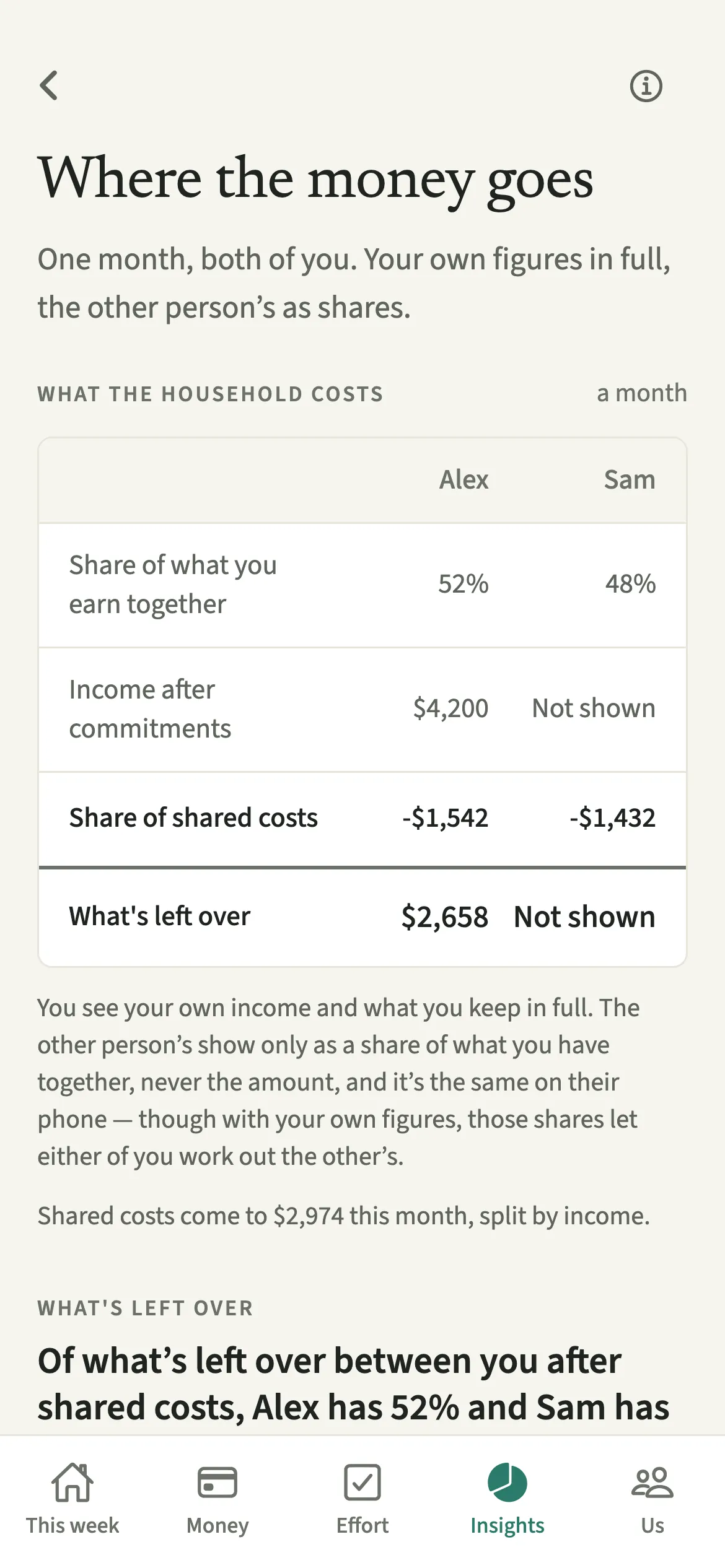
Where the money goes is a screen in EvenUS that shows one month for both partners side by side: each share of what you earn together, each share of shared costs, and how what’s left over divides. Your own Income after commitments and what you keep show in full; your partner’s show only as shares. You can see how your chosen split lands, and try another if it no longer fits.
What does Where the money goes show?
It shows what your way of splitting costs actually leaves each of you with, as a short sum you can check line by line. Most conversations about splitting bills stop at the percentages.
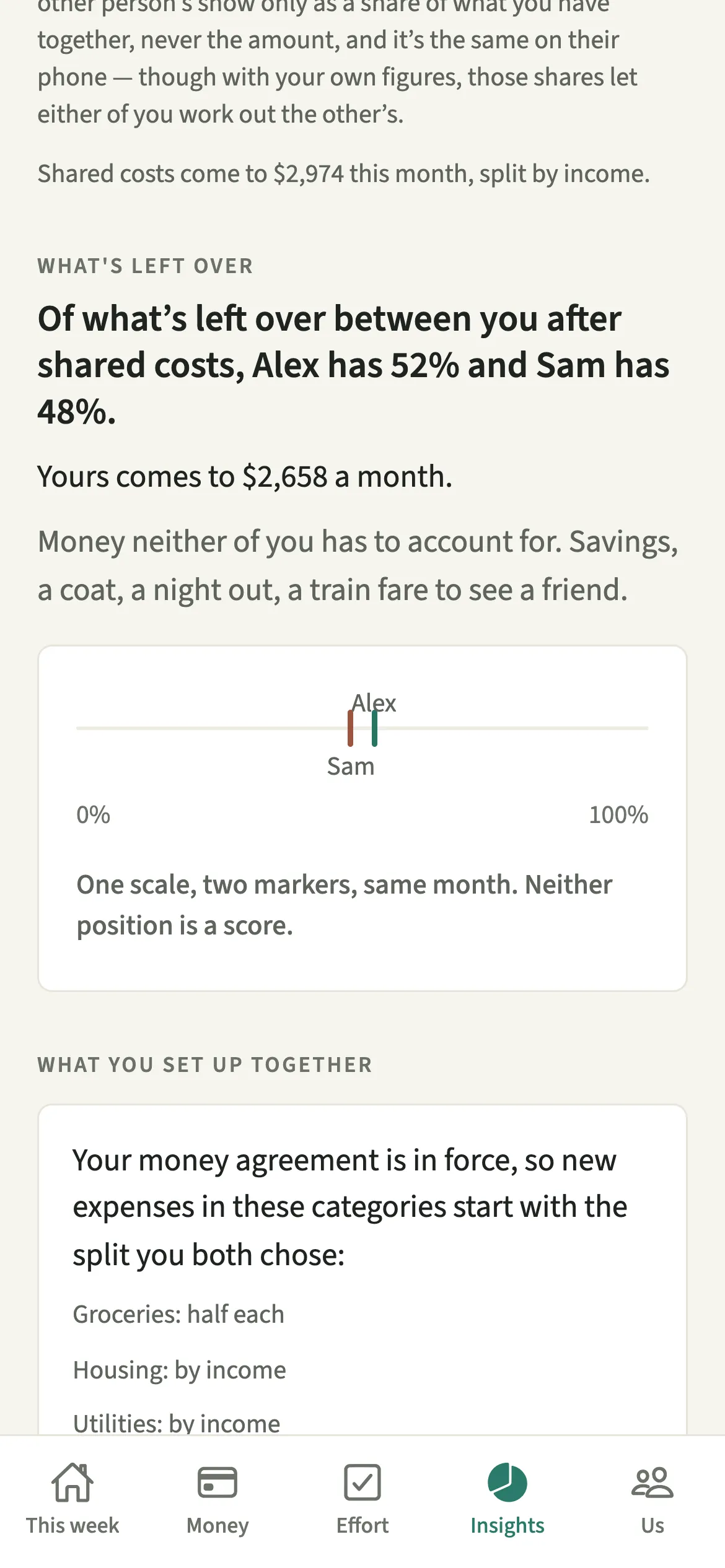
The screen has two columns, one for each of you. It starts with each share of what you earn together, then Income after commitments (your income after tax, less money already promised such as child support or loan repayments), then each share of this month’s shared costs, and ends with what’s left over. In your own column every figure shows in full; in your partner’s, the amounts read “Not shown”. A line below says how what’s left over divides, as two percentages, and what yours comes to a month, with a scale that is never a score.
If you have a Money agreement or a Joint account, a short section explains how each one shaped this month’s figures.
Who is Where the money goes for?
Couples who want to see how the split lands on two incomes, line by line. It is most useful when your incomes differ, when one of you has changed jobs or hours, or when a new cost such as childcare has arrived.
How do you use Where the money goes?
Open Insights, tap Money, and read down from each share of what you earn together to what’s left over.
- Open the screenOpen the Insights tab and tap Money.
- Read the sumRead down the rows: Share of what you earn together, Income after commitments, Share of shared costs, then What’s left over. Your own figures show in full, your partner’s as shares.
- Check how what’s left over dividesRead what shared costs came to and how they were split, then how what’s left over divides between you, and what yours comes to.
- Try a different splitTo compare another way of splitting, tap “Change how shared costs split”. It opens How costs split, where you can see what each option would do first.
What does your partner see?
Your partner sees the same screen from their side: their own Income after commitments and what they keep in full, and yours only as a share, never the amount. Both phones use both incomes to work out the split, so with their own figures the shares let them work out yours exactly, and you theirs, and the app says so.
If one of you has very little left that is not already accounted for, a calm note says so about the arrangement, not about either person. It never names who.
Tips for reading Where the money goes
- It needs both of you, and a month of shared costs to work from. Until then the screen explains what it is waiting for.
- The last card lists what one month can’t see, like pensions and anything held before you lived together.
- Money that leaves before the household sees it, such as child support or loan repayments, comes off income first when you record it in Money that’s already promised.
- Pair it with the money side of the household balance, which measures how costs were shared against the split you chose.
What does one month not show?
The screen ends with three things a single month cannot see. Anything held before you lived together, like savings, property or loans you brought in. Pensions and long-term saving: time out of paid work costs money that shows up decades later. And whether the spare money is really spent on yourself, because free on paper is not always free in practice. These are left as plain words, as prompts for a conversation.
A worked example
Say Alex has 3,000 a month income after tax and Sam 2,000, with no other commitments, and shared costs come to 2,000. Each share of what you earn together is 60% and 40%. Split evenly, each puts in 1,000, so what’s left over divides 67% to Alex and 33% to Sam. Split by income, Alex puts in 1,200 and Sam 800, and what’s left over divides 60% and 40%. Alex sees “Yours comes to 1,800 a month”; Sam sees 1,200. The worked examples for unequal incomes go further.
Is Where the money goes free?
Where the money goes keeps working after the 7-day free week, whether or not you subscribe. The computed views, such as the household balance and this week’s idea, are part of EvenUS Pro: $9.99 a month or $79.99 a year, with one subscription covering both partners. The free week needs no card, and nothing is charged when it ends.
Questions about Where the money goes
Can my partner see my income on Where the money goes?
Not as an amount. Your partner sees your share of what you earn together as a percentage, and your Income after commitments and what you keep read “Not shown” on their phone. Both incomes are used to work out the split, so with their own income, your share lets them work out yours exactly, as theirs lets you work out theirs.
Why does Where the money goes say there is not enough yet?
It needs both of you in the household and a month of shared costs to work from. Invite your partner if they have not joined, and keep adding shared expenses. The screen fills in once there is a month to show.
Does this screen change how our costs are split?
No. It only shows how your current split lands. To change it, tap Change how shared costs split, which opens How costs split. Nothing changes until you choose a new option there.
Is Where the money goes part of EvenUS Pro?
No. Where the money goes keeps working after the 7-day free week, with or without EvenUS Pro. The household balance itself is part of EvenUS Pro after the free week.
Related features
Other parts of EvenUS that work alongside Where the money goes.
Related reading
Articles on the questions behind this feature.