Money that’s already promised: support and commitments counted first
Money that’s already promised is where each partner in EvenUS records money that leaves before the household sees it: child or spousal support, money sent to family, loan and card repayments or a student loan. Support received is recorded too. EvenUS takes these off income before shares are worked out, so a split by income reflects what each of you actually has to share.
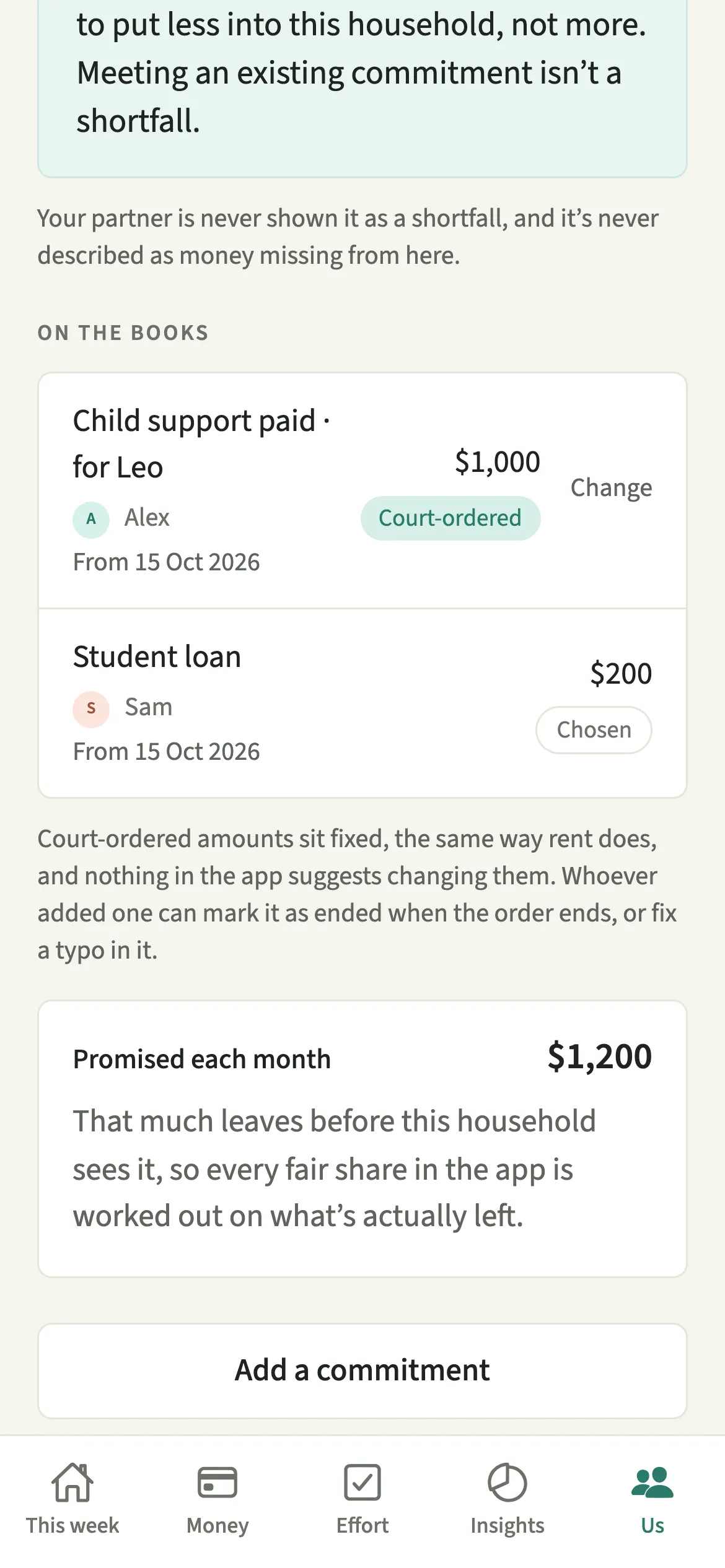
What does Money that’s already promised do?
It makes income-based splits fair for people who already have money committed elsewhere. If one of you earns a good salary but pays a large child support order every month, a split based on the full salary asks too much of them. The money was spoken for before it reached this household.
Each commitment you add comes off your income after tax before shares are worked out. Support you receive is added in the same way. Every share that depends on income, from How costs split to the money side of the household balance, is then based on what is actually left, and Insights shows it as “Income after commitments”.
Recording a commitment means the app expects you to put a smaller share into this household, not a bigger one. Meeting an existing commitment is never treated as a shortfall.
Who is Money that’s already promised for?
Anyone paying or receiving child support or spousal support, sending money to family, or repaying a loan, a card or a student loan. It matters most in blended families and for couples who split by income, where an uncounted commitment quietly tilts every share.
How do you record child support or another commitment?
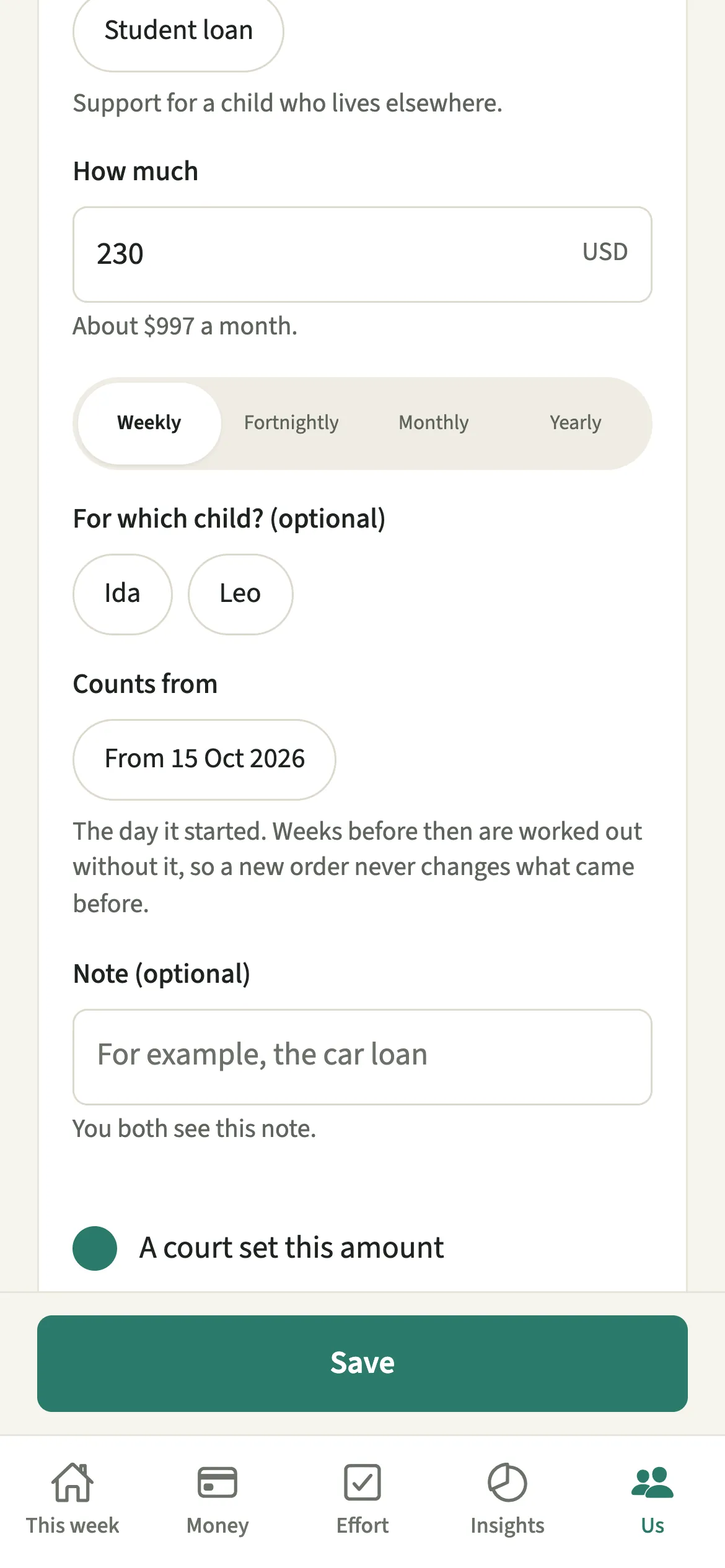
Open Us, go to Household, then Money already promised, tap “Add a commitment”, choose what kind it is, enter the amount and how often, and tap “Save”.
- Open Money already promisedOpen the Us tab, then Household → Money already promised.
- Choose what kindTap “Add a commitment” and, under What kind, pick Child support you pay, Child support you receive, Spousal support you pay or receive, Money you send to family, Loan and card repayments, or Student loan.
- Enter how much and how oftenType How much, as it is usually paid, and choose Weekly, Fortnightly, Monthly or Yearly. EvenUS shows it as a monthly figure. For child support, you can name the child it is for.
- Mark it if a court set itTick “A court set this amount” if a court set it. Court-ordered amounts sit fixed, like rent.
- Save itTap “Save”. It appears under On the books, and shares across the app are worked out on what is left.
What does your partner see?
Your partner sees what kind it is, whose it is and the monthly amount. It is never shown to them as a shortfall, and never described as money missing from here.
Only the person who added a commitment can change it. A court-ordered one is never removed: it can be marked as ended or have a typo corrected, and the row shows your partner when either happened. Removing any other commitment asks first, and it stops counting from that day. Changes also appear in the activity log.
Tips for recording commitments
- When an order ends, tap “Change” on its row, then “This order has ended”, and pick the day. It still counts for the weeks before that day.
- If the order itself changed, mark the old one as ended and add the new one from the day it started, so earlier weeks keep the figure that applied then.
- Use “Correct a typo”, also under Change, only for a figure entered by mistake. The new amount replaces it for every week, past ones included.
- If support you receive pays for a child’s costs, set that child to Covered by support under Children, so their costs stay out of the shared split.
How does a commitment change your shares? A worked example
Alex has $4,000 a month after tax and Sam $3,000. Split by income, Alex covers about 57% of shared costs and Sam 43%.
Alex also pays $1,000 a month in court-ordered child support. Once it is recorded, Alex’s income for working out shares is $3,000, the same as Sam’s, so each covers 50%. On $2,000 of shared monthly costs, Alex’s share moves from about $1,143 to $1,000. It is the same household, counted on the money that is really there.
Why does EvenUS never suggest changing a court order?
A court-ordered amount is a fixed cost, like rent, not a household choice for a couple to renegotiate, so nothing in the app suggests changing it. It simply sits underneath the numbers: each share in Where the money goes is worked out after it.
Is Money that’s already promised free?
Money that’s already promised keeps working after the 7-day free week, whether or not you subscribe. The computed views, such as the household balance and this week’s idea, are part of EvenUS Pro: $9.99 a month or $79.99 a year, with one subscription covering both partners. The free week needs no card, and nothing is charged when it ends.
Questions about Money that’s already promised
Does child support count as income in EvenUS?
Child support you receive is added to your income, and child support you pay is taken off it, before shares are worked out. That way a split by income reflects what each of you actually has for this household.
Can my partner change a commitment I added?
No. Only the person who added a commitment can change it. Your partner sees what kind it is, whose it is and the monthly amount, and the row shows them when it was ended or corrected.
What happens when a support order ends?
Tap Change on its row, then This order has ended, and pick the day. It stays on the books and still counts for every week before that day. From that day on, shares are worked out without it.
Does recording support change anything if we split half each?
A half-each split does not depend on income, so each share stays at half. Commitments change the splits that are worked out from income, and the money side of the household balance.
Related features
Other parts of EvenUS that work alongside Money that’s already promised.
Related reading
Articles on the questions behind this feature.