Splitwise vs Tricount (2026): Which Is Better for Couples?
Splitwise and Tricount both split shared bills. One has a 4-a-day free limit and paid Pro, the other is free with no ads. Which suits a couple?
Splitwise and Tricount both keep track of who paid for what in a shared group, and both work for a couple as well as for trips and housemates. Tricount is free with no ads, no expense limits and no paid plan, which suits occasional splitting and travel. Splitwise has a free tier capped at 4 expenses a day and a paid Splitwise Pro (no price published on its website, checked 29 October 2026), and suits couples who log a lot, want more ways to split, or want to settle up inside the app in the US or parts of Europe.
- Choose Splitwise if you want the widest choice of split methods, recurring expenses, a web version, and paying each other back from inside the app where it is offered.
- Choose Tricount if you want something completely free with no ads and no limits, mostly for trips, dinners or a shared home, and you like that others join by link and you can try it without signing up.
- Choose EvenUS if you are two partners who earn different amounts and want costs split by income, alongside how much free time each of you has and who carries the household planning.
A word on where this comes from. We make EvenUS, the third column in the table below, and we have no affiliate arrangement with Splitwise or Tricount. Everything we say about them comes from their own websites, help pages and store listings, read on 29 October 2026. Prices and features change, so check each app before you commit.
Splitwise vs Tricount at a glance
| What matters | Splitwise | Tricount | EvenUS |
|---|---|---|---|
| Best for | Partners, housemates and groups who log often | Trips, dinners, shared homes, couples | Two partners sharing a home |
| Free plan | Yes, up to 4 expenses a day | Yes, no daily expense cap | 7-day free trial, no card |
| Paid plan and price | Splitwise Pro, priced per plan in the app; no price on its website | None (Premium discontinued) | $9.99 a month or $79.99 a year (US reference prices) |
| Platforms | iPhone, Android, web | iOS and Android | iPhone and Android, with Apple Watch and Wear OS companions; in closed testing |
| Sharing with a partner | Shared groups and friend balances | Join by link; up to 50 people | Both partners in one household; one subscription covers both |
| How costs are split | Equal, exact amounts, percentage, shares, adjustment, itemized | Equal, custom shares, exact amounts | By income, evenly, "end up with the same" or "split what's spare" |
| Bank connection | Optional and regional (transaction import with Pro in select countries; Splitwise Pay for US residents in dollars) | bunq accounts; no other bank described | None |
| Recurring items | Weekly, every two weeks, monthly, yearly | Not described on its pages | Regular bills, added once |
| Currencies | 100+; conversion is Pro | Multi-currency, converted at a daily market rate; included | USD, GBP, EUR or INR per household |
| Ads | Ad-free is part of Pro | "No ads" | None |
| Export | Spreadsheet export; JSON backup with Pro | CSV or ODF by emailing support | JSON and CSV from the app |
What Splitwise does well
Splitwise, made by Splitwise Inc. in Providence, Rhode Island, is the long-standing name in shared expenses, and its own homepage speaks to couples directly: "Less stress when sharing expenses with your partner".
Its main strength is choice in how a cost is divided. You can split equally, by exact amounts, by percentage, by shares, with an adjustment, item by item, or as a reimbursement on the web. Simplify Debts cuts a tangle of balances down to fewer payments.
Settling up is the other strong point. Tap Settle Up and you can either pay through an integration or record a payment you made elsewhere. The integrations are Splitwise Pay (US residents, in dollars), PayPal and Venmo (US only), and Pay by Bank in select European countries, with the UK, Germany and France given as examples. It also runs on the web as well as phones, has an offline mode, handles more than 100 currencies and repeats expenses on a schedule.
Where Splitwise is limited
Free users can add up to 4 expenses each day. A busy Saturday of small shared purchases can reach that. Unlimited expenses sit in Splitwise Pro, along with currency conversion, charts, receipt scanning, itemization, expense search, default split settings, transaction import (select countries only) and an ad-free experience. There is no Pro price on Splitwise's website; the plans (Individual and Duo, each with a Trip Pass, plus Monthly) are priced in the app.
There is no split by income. If one of you earns more, you work out the percentages or shares yourselves and type them in. Splitwise is also about money only: nothing on its official pages covers chores, time or other unpaid work.
What Tricount does well
Tricount is owned and run by bunq B.V., the Amsterdam bank, which it joined in May 2022. It describes itself as a way to split expenses "with friends, on trips or at home", and its US App Store listing says "Great for roomies, couples, friends, or any shared situation".
The headline is cost: free, with "No ads. No limits." There is no subscription, no daily expense cap, and up to 50 people (including you) can share one tricount. You can try it without signing up, and others join through a link.
It is well set up for travel. Expenses in other currencies are converted at a daily market rate, with conversion included rather than paid for, you can add costs offline and they sync later, and a Splitwise importer brings existing groups across. Balances come with suggestions for who should pay whom.
Where Tricount is limited
Tricount Premium was discontinued with the new app, and some features went with it: export now happens by emailing support (CSV or ODF), personal mode is gone, saved custom splits are listed as planned, and statistics have come back as a Spending Insights pie chart. Split methods are equally, by amount or custom shares; its pages do not describe a percentage mode or an income-based option.
Its bank features come from bunq. Card payments from a linked bunq account are added to tricounts automatically. Request links, which let others pay you back, work only in the Netherlands, Germany, France and Belgium, with a 2.5% fee on card payments. Its pages describe no link to any other bank. Tricount's pages state iOS and Android, and bunq's reply to a Google Play review (January 2024) says the web version was discontinued. Like Splitwise, it tracks money only, with no chores, time or mental load.
Price: free limits against no limits
For a couple, this is the clearest difference. Tricount costs nothing and has no ceiling, and the paid items on its pages are separate bunq products such as a travel eSIM and a bunq card. Splitwise is free up to 4 expenses a day, and anything beyond that, plus no ads and currency conversion, comes with Pro at a price shown in the app rather than on the website (checked 29 October 2026).
A handful of shared costs a week fits Splitwise's free tier comfortably. Recording every small purchase, or wanting charts and receipt scanning, points to Pro, whose plans include a Duo option.
Sharing with a partner
Both apps treat a couple as a small group. Tricount is quicker to start: send a link and your partner joins from it, and Tricount can be tried without signing up. Splitwise offers more once you are set up, including a web version and, with Pro, default split settings.
How each one splits costs
Splitwise offers seven ways to divide a cost (one of them web only), Tricount three. Both can handle an unequal arrangement, but neither asks for your incomes. Tricount's own couples guide says that equal splits work when incomes are similar and proportional splits work when one partner earns more, and its help pages describe setting each person's share or amount by hand. In Splitwise you would enter a percentage, such as 60/40, or shares.
That works, though the numbers stay fixed until you change them, so a pay rise or parental leave is not reflected on its own. Our guide to income-proportional bill splitting shows the arithmetic, and the fair split calculator will work out the percentages for you to type into either app.
Privacy and bank linking
Splitwise says it "doesn't actually handle any real money" and cannot pay your bills for you. Transaction import with Pro (select countries) and Splitwise Pay (US residents, in dollars) are optional and depend on where you live.
The only bank link Tricount's pages describe is to bunq. If you bank with bunq, card payments flow into your tricounts on their own, which saves typing. Otherwise it is entirely manual. Request links for getting paid back work only in the four countries listed above.
Moving your data or switching
Tricount can import your Splitwise groups, so moving from Splitwise to Tricount keeps your history. Going the other way is less clear: Tricount's CSV or ODF export now happens by emailing its support team, and the Splitwise pages we read describe a spreadsheet export of your own data but no importer for Tricount. If you might switch later, ask Tricount support for an export early so you have a copy.
Which should you choose?
You split a trip or a group bill
Tricount fits well: free, no limits, up to 50 people, join by link, free currency conversion and offline entry. Pick Tricount.
You live together and log lots of small shared costs
Tricount has no daily cap; Splitwise's free tier allows 4 a day. Splitwise adds recurring expenses and a web version. Pick Tricount for free and simple, Splitwise if you will pay for Pro's extras.
You want to pay each other back inside the app
Splitwise settles through Splitwise Pay, PayPal or Venmo in the US and Pay by Bank in select European countries. Tricount's request links cover the Netherlands, Germany, France and Belgium. Pick by country: Splitwise in the US, Tricount if you live in one of those four.
You earn different amounts and want that reflected
Both carry a 60/40 split if you enter it by hand; Splitwise's percentage mode makes that more direct. Pick Splitwise for percentage splits, or look at an app that splits by income, below.
Where EvenUS fits
This part is us talking about our own app, so weigh it accordingly. EvenUS is built for two partners in one home rather than for groups. You choose how shared costs are divided: by income, evenly, "end up with the same" or "split what's spare", and EvenUS shows what each would do with your real figures before you switch. Neither Splitwise's nor Tricount's pages describe a split by income.
It also looks past money. EvenUS measures the free hours each of you has after sleep, paid work, travel, the house and the children, and maps who owns which areas of household planning, the mental load. A private check-in each week asks two questions about how the week felt, answered for you alone, and a separate weekly idea suggests one thing to move between you. Neither shows one partner a score about the other. If you are coming from Splitwise, Import from Splitwise brings a two-person group's history across.
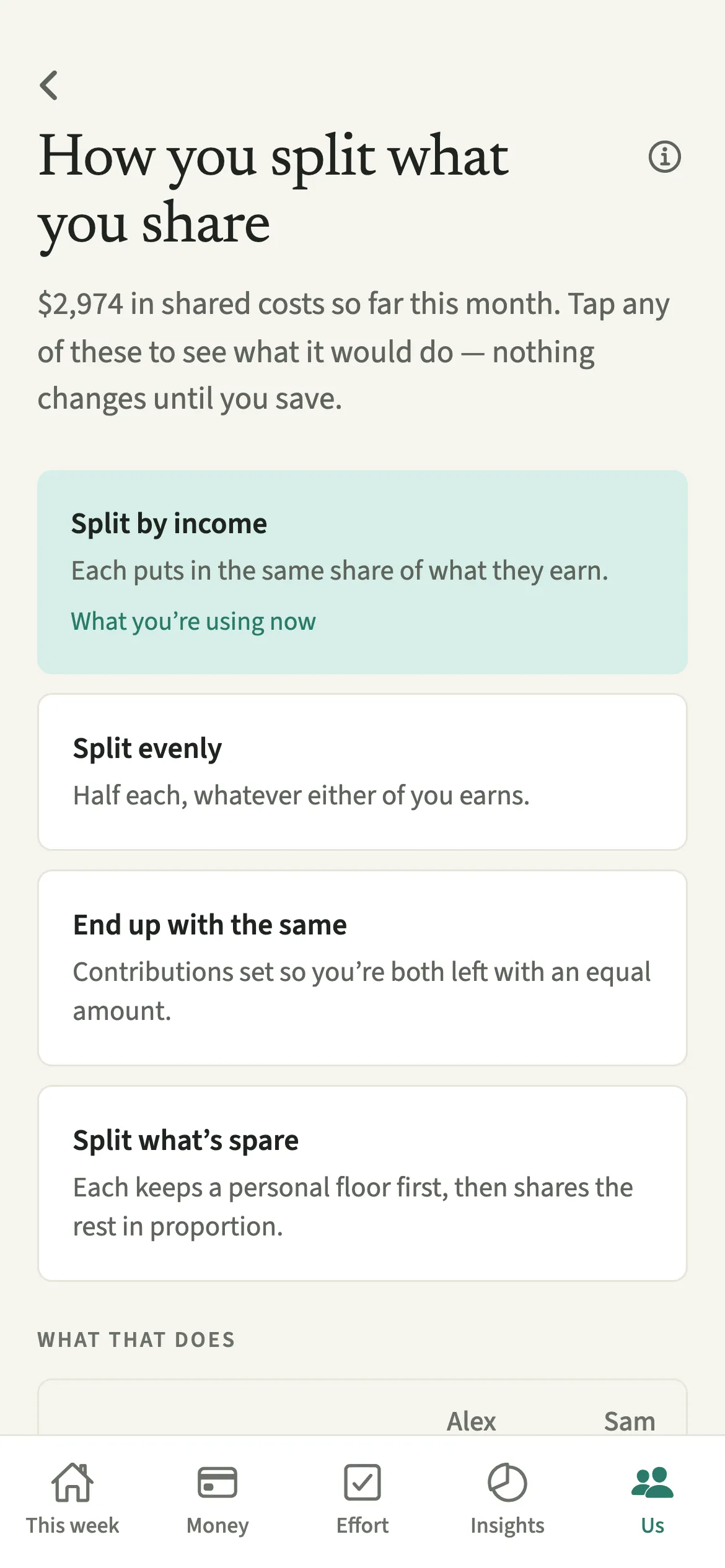
What it lacks, honestly: no live bank connection (you import a statement file instead), no groups or trips, and it needs both partners to join. It is in closed testing, so it is not yet on the App Store or Google Play. After a 7-day free trial with no card, it costs $9.99 a month or $79.99 a year, covering both of you, and everything you recorded stays readable and exportable if you stop. For a weekend away with friends, either of the other two suits better. Unsure whether money or unseen work is the bigger issue? The mental load quiz takes a couple of minutes.
Common questions
Is Splitwise free in 2026?
Splitwise has a free tier that lets you add up to 4 expenses each day. Unlimited expenses, currency conversion and an ad-free experience come with Splitwise Pro, priced in the app rather than on its website (checked 29 October 2026).
Is Tricount completely free?
Yes. Tricount says "No ads. No limits.", with no subscription and no daily expense cap. Tricount Premium was discontinued with the new app, so there is no paid plan today (checked 29 October 2026).
Which is cheaper, Splitwise or Tricount?
Tricount, because it costs nothing at any level of use. Splitwise is also free if you stay within 4 expenses a day; beyond that you would need Splitwise Pro, priced per plan in the app.
Can I move my data from Splitwise to Tricount?
Yes. Tricount has a Splitwise importer that brings existing groups across. EvenUS can also import a two-person Splitwise group from Splitwise's own spreadsheet export.
Does Tricount work without an account?
Partly. Tricount says you can try it without signing up, and people join a tricount by tapping a shared link. Its pages do not say whether adding expenses to a shared tricount needs an account.
Which is better for couples who earn different amounts?
Neither splits by income automatically: in both you set the shares or percentages yourselves. Splitwise has a percentage mode and Tricount's pages describe none, so a 60/40 split is slightly simpler to enter in Splitwise. EvenUS is built to split by income if that is what you both want.
Which is more private?
Both work without any bank connection. Splitwise's card and bank links are optional and regional, and the only bank link Tricount's pages describe is to bunq.
How we compared them
We read Splitwise's and Tricount's official websites, help centers and app store listings on 29 October 2026, and took prices and ratings only as they were published there. Ratings are from the US App Store only. We have not run a timed test of either app. EvenUS facts come from our own feature documentation. If anything here is out of date or wrong, email support@evenus.app and we will correct it. For more options, see Splitwise alternatives for couples.
Want to try EvenUS with your partner?
It is in closed testing on iPhone and Android. Leave an email and we will send you both an invite. The first 7 days are free, with no card.
EvenUS is our own app. We have no affiliate deals with any app on this page and earn nothing if you choose one of them. Prices change, so check the store listing before you pay.