Previous household: a fresh start with someone new, your records kept
Previous household in EvenUS is a private, read-only copy of your earlier household, kept for the person who stayed once someone new joins. The two of you start fresh in an empty household, and nothing from before is shared with the new partner. You can look back through the spending, chores and weeks that were recorded, export a copy, or delete it for good.
What is a Previous household?
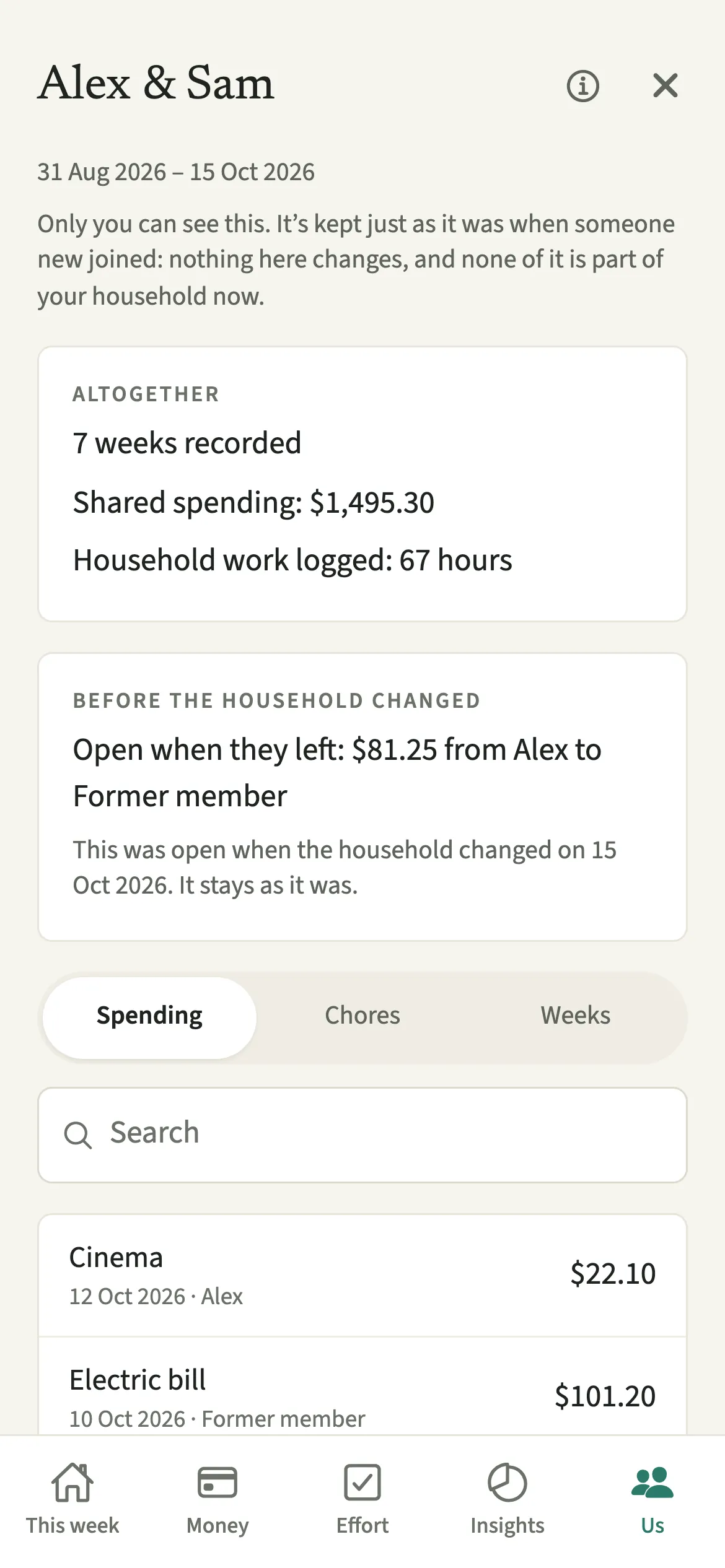
It is your earlier household, kept exactly as it was on the day someone new joined, visible to you alone and closed to changes. When a partner leaves, everything you recorded together stays with you, as described in When someone leaves. If that same person comes back, nothing starts again. But if someone new joins, the two of you begin with an empty household, and the earlier one moves to Us, then Previous household. A new partner should never be measured against history built by two other people.
The screen opens with “Only you can see this.” Below are the period it covers, the totals (weeks recorded, shared spending, hours of household work logged), and three searchable lists: Spending, Chores and Weeks.
Nothing here can be added, changed or removed, and nothing from it is part of your household now. It does not affect the household balance or any report in the new household.
Who is Previous household for?
For the person who stayed after a partner left, once someone new has joined them, who wants to keep the record of shared costs and housework from before without bringing any of it into the new household. If nobody new joins, you never see it, because the records simply stay in your household.
How do you open and use your Previous household?
Open the Us tab and tap Previous household. The row shows only while one is kept for you. From there you can read, search, export or delete it.
- Open itOpen the Us tab and tap Previous household (“Private to you, read-only”). If more than one is kept for you, pick one from All previous households.
- Read the period and the totalsAt the top you see the dates it covers and, under Altogether, the weeks recorded, the shared spending and the hours of household work logged.
- Look through the listsSwitch between Spending, Chores and Weeks. Type in Search to find an entry, and tap “Show more” to load older ones.
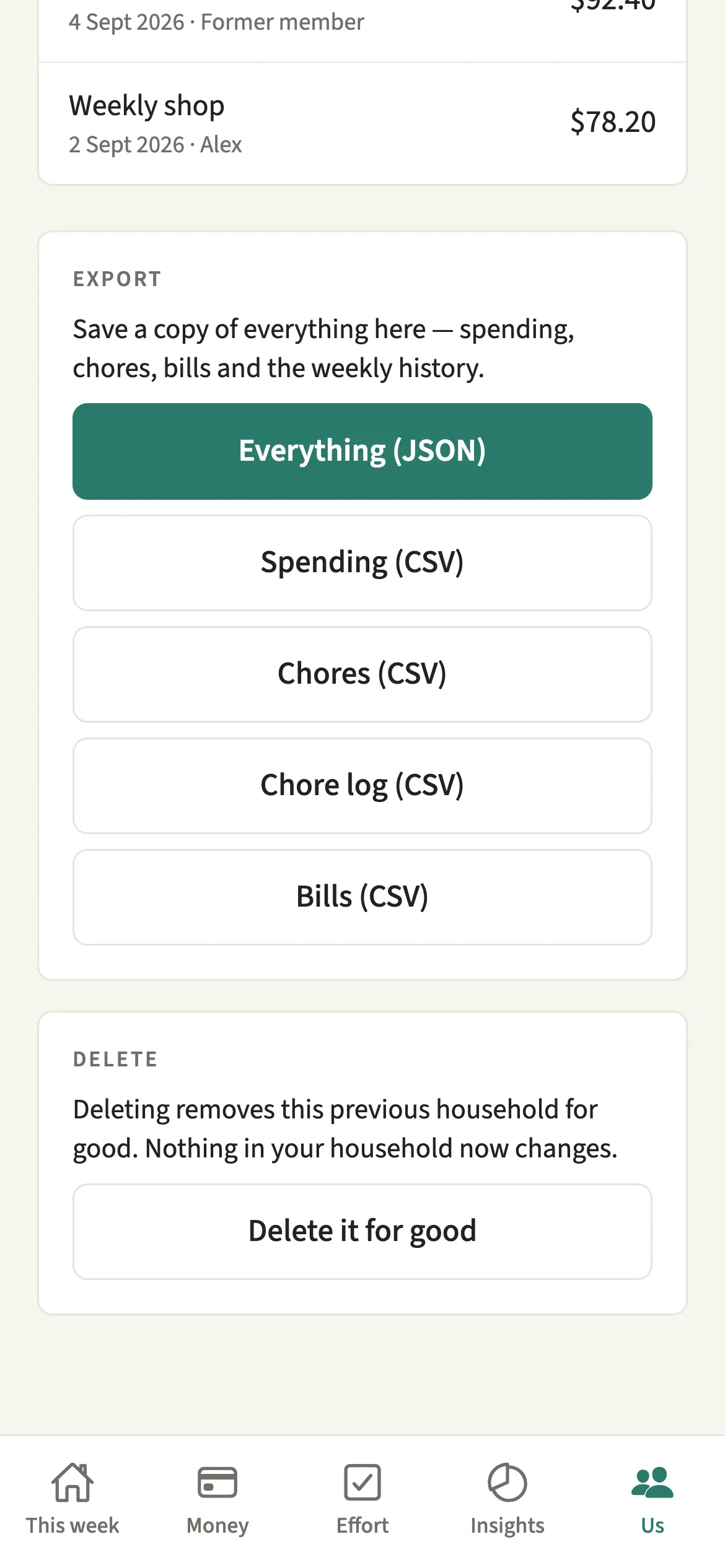
- Export a copyUnder Export, choose Everything, or Spending, Chores, Chore log or Bills as a CSV file, and save or share it.
- Delete it, if you wantAt the bottom, tap “Delete it for good”, then Delete to confirm. Nothing in your household now changes.
What does your new partner see?
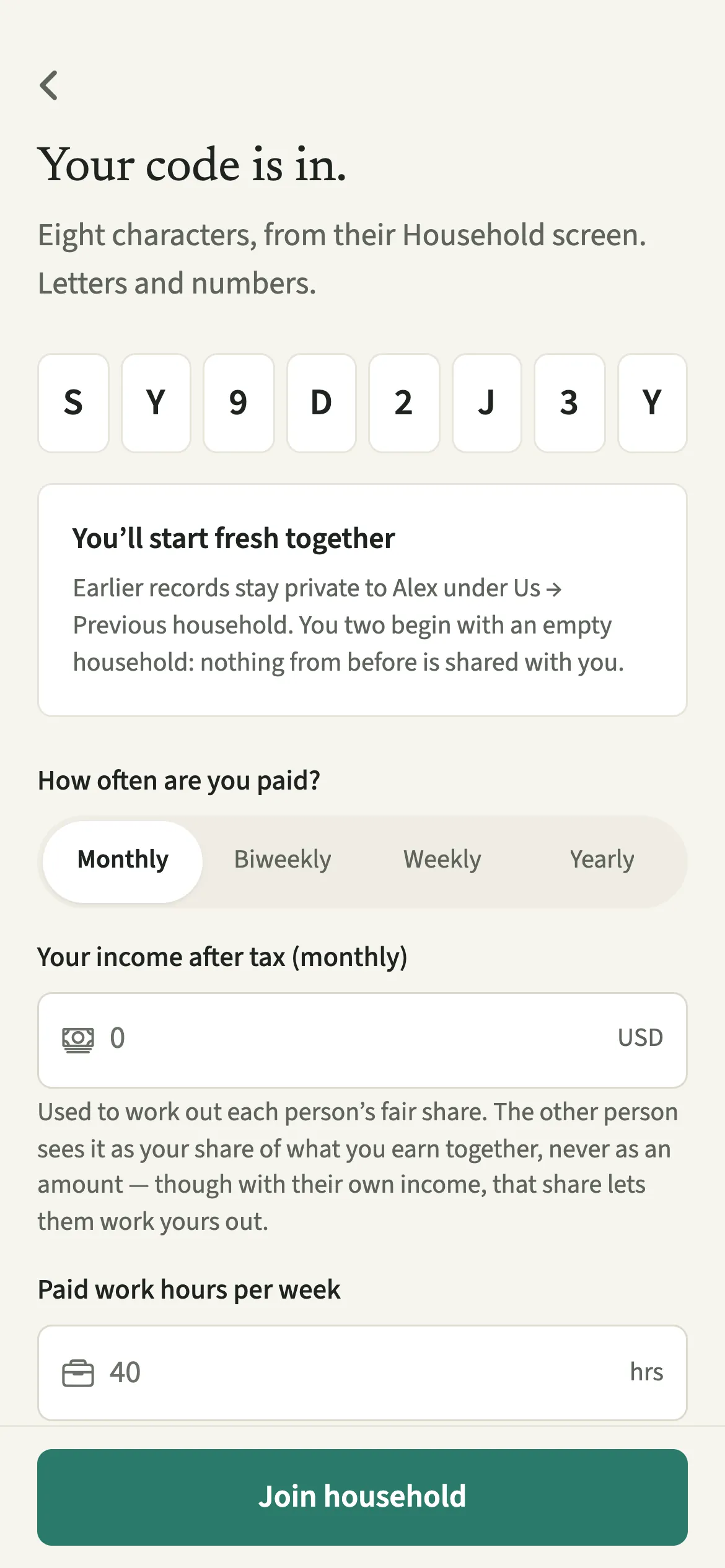
Nothing. Your new partner never sees anything from before, and the person who left cannot see it either. This is enforced by the database rules, not only hidden in the app.
Both of you are told before anyone joins. The person joining reads “You’ll start fresh together” and that earlier records stay private to the person who invited them. The person who stayed sees “Someone new starts fresh with you” on the invite screen, with a reminder that if the person who left comes back instead, everything stays as it is.
Tips for a Previous household
- Export a copy before you delete it. Deleting is for good and cannot be undone.
- Your own data export from Us includes any Previous household kept for you, so one file can hold everything.
- Deleting your account deletes your Previous household too. Nobody else holds a copy.
- Children are not carried into the new household. Add them again under Us, then Household, then Children, if they are part of it.
What comes with you into the new household, and what starts fresh?
Only your own settings and the household's basic details come with you: your name and colour, your income after tax and how often you are paid, your hours, commute, sleep and time of your own, your tags, payment details and privacy choice, and the household's name, currency and time zone.
Everything shared starts empty: expenses and bills, chores and their history, weekly results, reminders, goals, budgets, the joint account, the money agreement, Sunday talks, survey answers, children, pets, events, household help, the shopping list, activity and imports. All of that stays in your Previous household, read-only, until you delete it.
Is Previous household free?
Previous household keeps working after the 7-day free week, whether or not you subscribe. The computed views, such as the household balance and this week’s idea, are part of EvenUS Pro: $9.99 a month or $79.99 a year, with one subscription covering both partners. The free week needs no card, and nothing is charged when it ends.
Questions about Previous household
Can my new partner see the expenses from my previous relationship in EvenUS?
No. When someone new joins after a partner has left, the two of you start with an empty household. Earlier records stay in your Previous household, private to you and read-only, and the database rules refuse anyone else.
What happens if my former partner comes back instead?
Nothing starts again. If the same person who left rejoins, everything stays where it was, in the same household, and no Previous household is made. A fresh start only happens when someone new joins.
How long is a Previous household kept?
Until you delete it from Us, then Previous household, or delete your account. There is no time limit, and it is included in your own data export while it exists.
Do I need EvenUS Pro to see my Previous household?
No. Reading, searching, exporting and deleting a Previous household keep working after the 7-day free week, with or without a subscription.
Related features
Other parts of EvenUS that work alongside Previous household.
Related reading
Articles on the questions behind this feature.