Pay with Venmo: even up with your partner’s username already filled in
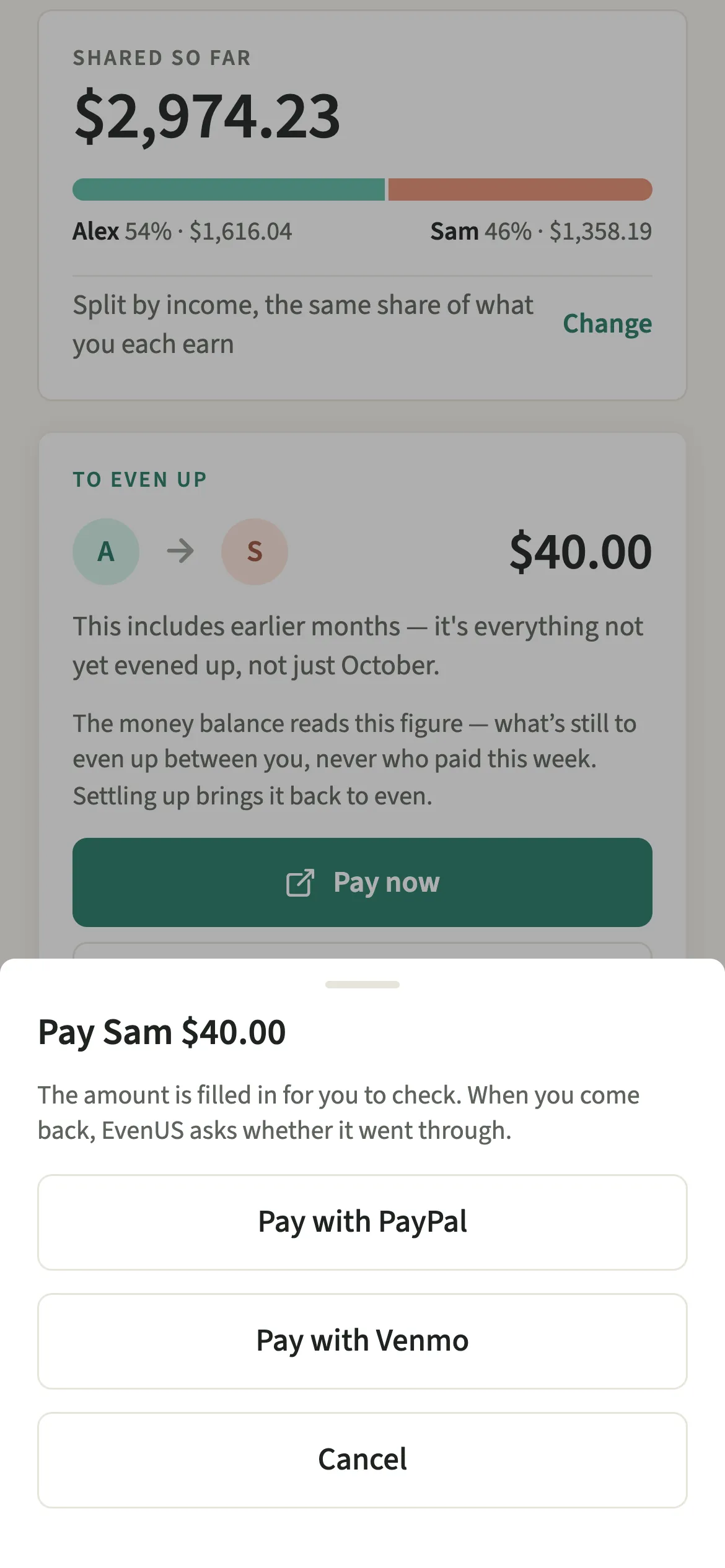
Pay with Venmo is the Venmo option behind the Pay now button in EvenUS, offered in US dollar households. When the To even up card shows you as the sender, it opens Venmo with your partner’s username, the amount and a note saying EvenUS filled in. You send it in Venmo, then EvenUS asks whether it went through and records it only if you say yes.
What does Pay with Venmo do?
It opens Venmo ready to pay your partner the exact amount to even up, so you only have to check it and send. Without it, settling up means reading a figure in one app, opening Venmo, searching for your partner and typing the amount, which is where a misplaced digit or the wrong Sam creeps in.
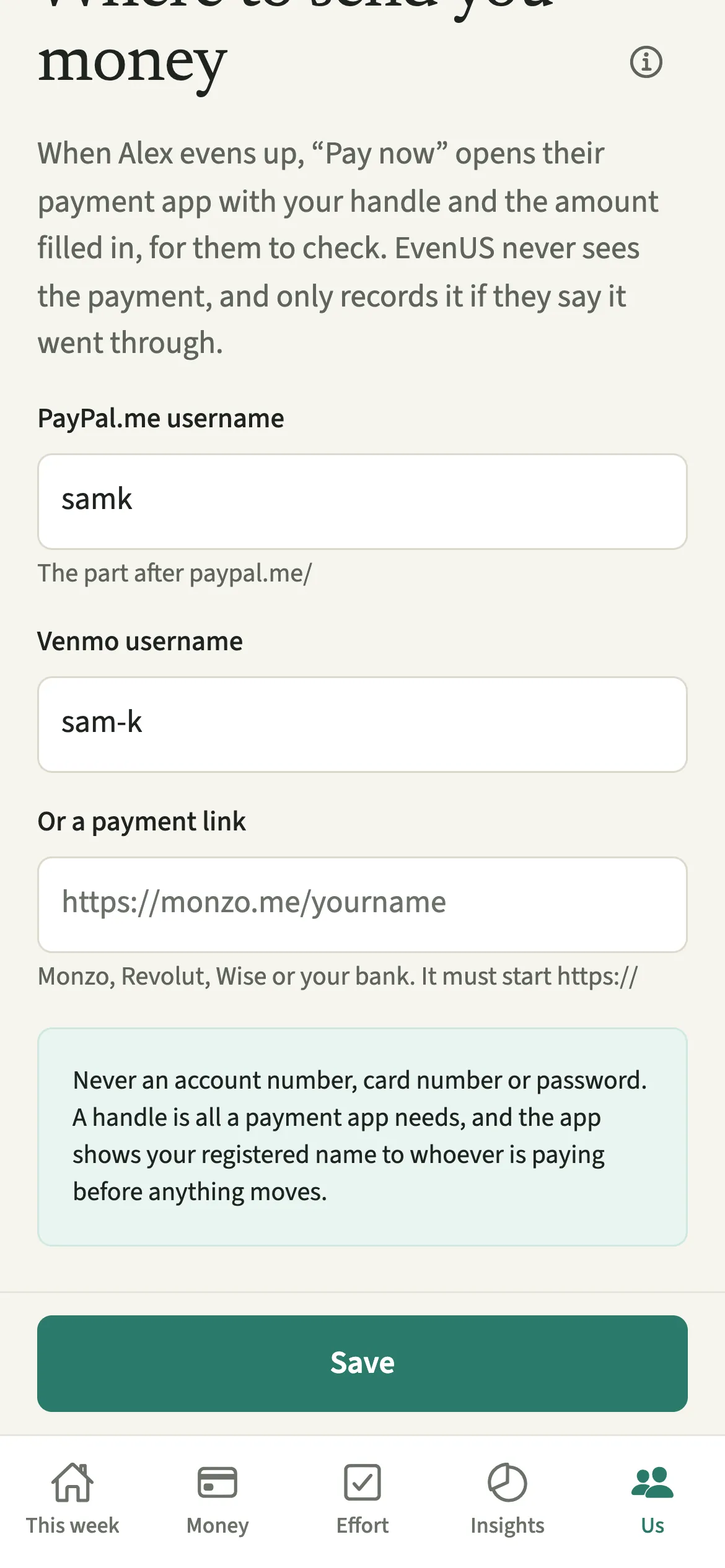
Your partner saves their Venmo username once. When the To even up card names you as the sender, Pay now builds a Venmo payment with that username, the amount in dollars and the note EvenUS. If the Venmo app is on the phone it opens there. If not, the Venmo website opens instead.
EvenUS cannot see Venmo. When you return, it asks “Did the payment go through?”, and the payment is recorded as evening up only after a yes.
Who is Pay with Venmo for?
US dollar households where you both already use Venmo, and who keep separate accounts and square up now and then. It suits couples who settle often, after a weekend or a big shop, because each payment is a tap, a check and a send.
How do you pay your partner back on Venmo with EvenUS?
The partner being paid saves their Venmo username under “Your payment details”; the sender taps “Pay now”, then “Pay with Venmo”, sends it in Venmo and confirms on return.
- Save the Venmo usernameThe person being paid opens Us → Your details → “Your payment details”, enters their Venmo username and taps Save.
- Tap Pay nowOn Money, when the “To even up” card shows you as the sender, tap “Pay now”, then “Pay with Venmo” if there’s a choice.
- Check it in VenmoVenmo opens with the amount and a note saying EvenUS. If the Venmo app isn’t on the phone, the Venmo website opens instead. Check the recipient and the amount.
- Send it and confirmSend it in Venmo, then come back and answer “Did the payment go through?”. Only a yes records it.
What does your partner see, and who can see your Venmo username?
Your Venmo username is used only to build the link your partner uses to pay you. Their Venmo shows your username when they pay, as it would for anyone paying you. EvenUS does not display it anywhere else.
Each of you can change only your own username, so neither of you can redirect the other’s money. When a payment is recorded, both phones show the To even up card clear, and the payment appears under Expenses as evening up rather than as household spending.
Tips for evening up on Venmo
- You can paste your username with or without the @, or as a venmo.com link. EvenUS keeps just the username.
- Venmo usernames are 5 to 30 letters, numbers, hyphens or underscores. If EvenUS says the shape is wrong, copy it from your Venmo profile.
- Check the profile picture and name in Venmo before you send, since the app is where the payment really happens.
- Closed Venmo without sending? Come back and tap “Not yet”. Nothing changes until you say yes.
Does Pay with Venmo work outside the US?
No. It is only for households whose currency is USD, because Venmo works in the US only. The Venmo field on “Your payment details” appears in US dollar households, and Pay with Venmo is offered only there.
Couples in other countries can use Pay now with PayPal or a bank payment link, and rupee households can use Pay with UPI.
Why doesn’t EvenUS mark the payment as sent automatically?
Because it has no way to know. EvenUS never connects to Venmo or to a bank. It can open Venmo with the details filled in, but it cannot see whether you pressed Pay, whether Venmo accepted it, or whether you changed the amount. Recording a payment the moment Venmo opened would put a guess on both phones. Asking keeps the To even up card honest, and you stay the one who decides that money has moved.
Is Pay with Venmo free?
Pay with Venmo keeps working after the 7-day free week, whether or not you subscribe. The computed views, such as the household balance and this week’s idea, are part of EvenUS Pro: $9.99 a month or $79.99 a year, with one subscription covering both partners. The free week needs no card, and nothing is charged when it ends.
Questions about Pay with Venmo
Does EvenUS connect to my Venmo account?
No. EvenUS never signs in to Venmo or connects to a bank. It only opens a Venmo payment with your partner’s username, the amount and the note EvenUS, and you send it yourself in Venmo.
What if Venmo isn’t installed on my phone?
The Venmo website opens instead, with the same username and amount. If neither suits, pay however you like and tap Record a payment afterwards, where you can change the amount and the day.
Why don’t I see Pay with Venmo?
It appears only when your household currency is USD, the partner being paid has saved a Venmo username, and the To even up card shows you as the sender. The receiving phone never shows payment buttons.
Can I use Venmo and PayPal both?
Yes. Your partner can save a Venmo username and a PayPal.me username, and Pay now then offers a choice each time. Whichever you use, EvenUS asks afterwards whether the payment went through.
Is Pay with Venmo free to use in EvenUS?
Yes. Pay now, Pay with Venmo and Record a payment keep working after the 7-day free week, with or without EvenUS Pro. The subscription covers computed views such as the household balance and the weekly idea.
Related features
Other parts of EvenUS that work alongside Pay with Venmo.
Related reading
Articles on the questions behind this feature.