Away: add your time away so a trip is never read as a quiet week
Away in EvenUS is where each of you adds the days you are away from home: a work trip, a hospital stay, a few weeks with family. While either of you is away, household work logged then is not compared, and the week is compared over the days you were both home. Nothing is made up for the days away.
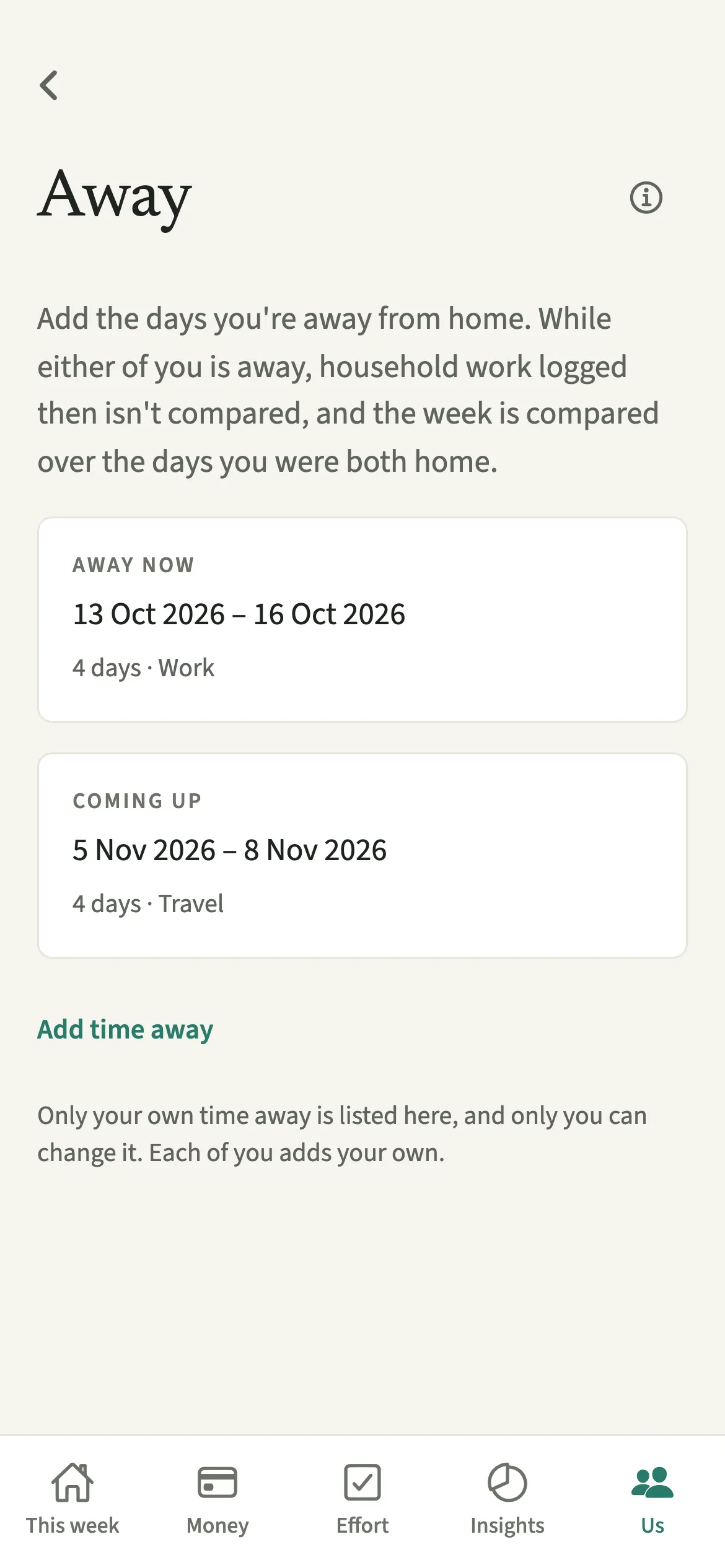
What does Away do?
It tells EvenUS which days one of you was not at home, so those days are left out of the comparison instead of counting against anyone. Without it, a week where one of you spent five days at a conference would look like a week where that person did almost nothing.
With a period added, the household work line of the household balance (the fairness score) compares only the time you were both home. Housework logged while either of you was away does not count for anyone. Nothing is stretched or estimated to fill the gap: any number made up for the missing days would be a guess aimed at the person who was not there.
Away is not a pause button for the app. Expenses, bills and money keep working as usual, because a bill falls due whether you are home or not. It only changes how the time side of the week is read, and it pauses a few notices for the person who is away.
Who is Away for?
For anyone whose time at home is broken up: people who travel for work or on rotation, people in hospital or recovering somewhere else, and people staying with family for a while, for example to look after a parent. Each of you adds only your own time away.
How do you add time away in EvenUS?
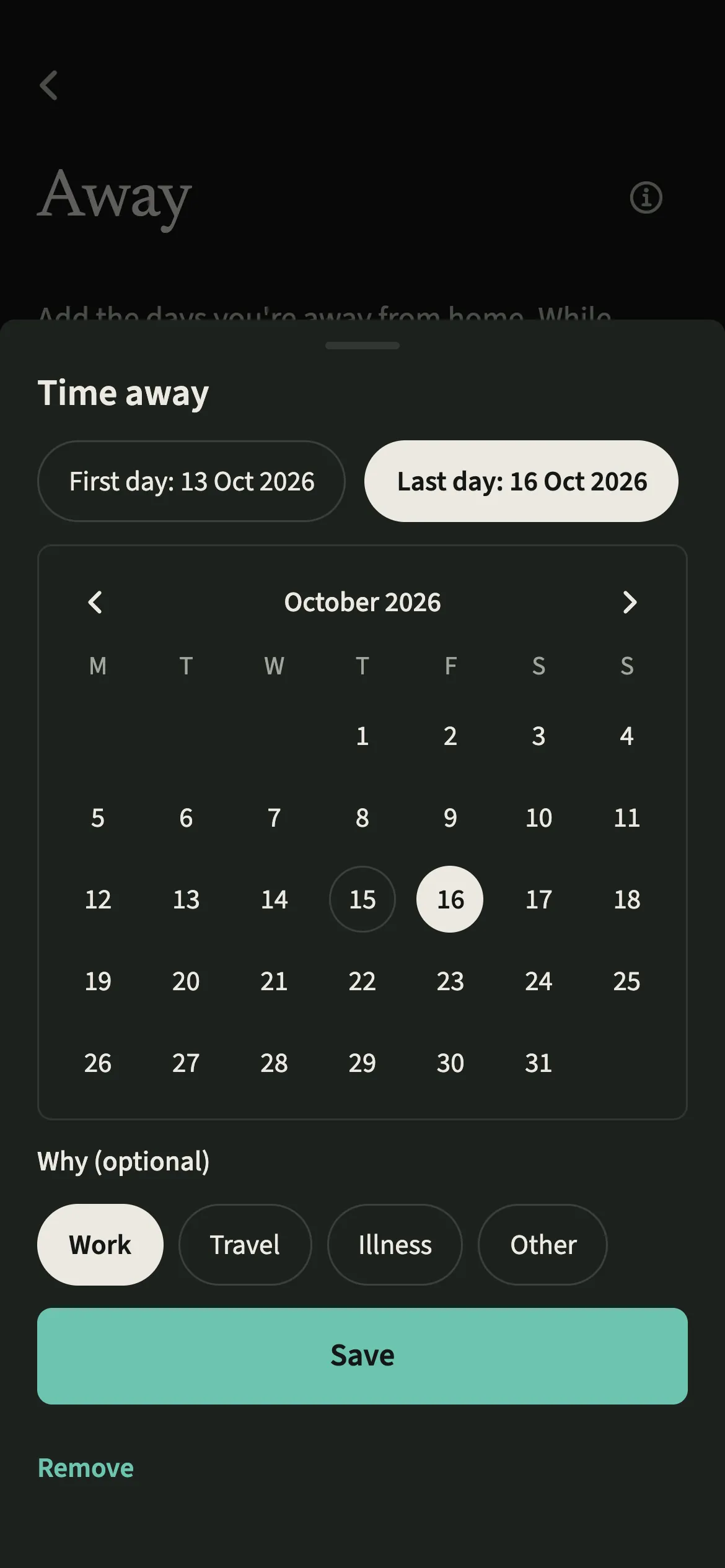
Open Us, then Household, then Away, tap “Add time away”, pick the first and last day, and tap Save.
- Open AwayOpen the Us tab, tap Household, then the Away row (“Work trips, hospital stays, time away from home”). Tap “Add time away”.
- Pick the first and last dayTap “First day” and pick it on the calendar, then “Last day”. A period can start up to 29 days ago and last up to a year.
- Choose why, if you likeUnder “Why (optional)”, choose Work, Travel, Illness or Other, or leave it blank. The reason is only a label.
- Save itTap Save. The period shows on your list as Coming up, Away now or Ended, with the dates and number of days.
- Change or remove it laterTap a period to change it, or tap Remove and confirm. One that started more than 29 days ago can only be removed.
What does your partner see?
Your partner sees a line in the activity feed when you add, change or remove time away, such as “Alex added time away”, and the week is compared over the days you were both home. They cannot change your periods: each of you adds and changes only your own, and the Away screen lists only yours. Removing a period takes it off the list for both of you.
Tips for using Away well
- Add a trip before you leave if you know the dates. You can move them later if the trip changes.
- Forgot to add it? A period can start up to 29 days ago, so last week's trip can be put right this week.
- Your own chore reminders, and the notices about what your partner adds, pause while you are away.
- Skipping a single chore because you were not there? Long press it, choose skip this one, and pick “Was away”. Use Away for whole days.
- The list holds up to 20 periods between the two of you. If it is full, remove one of your own that has ended.
How does a week with time away work? An example
Sam is away on a work trip from Tuesday to Friday and adds it in Away before leaving. On Monday, Sam logs 20 minutes emptying the dishwasher; Alex logs an hour for the weekly shop. From Tuesday to Friday, Alex is home alone and logs the cooking and the school run.
For that week, the household work line compares only Monday, Saturday and Sunday, the days both were home. Alex's logs from Tuesday to Friday are not counted against Sam, and Sam's Monday logs are not scaled up to a full week. The shared costs, including Sam's hotel and Alex's shop, are recorded and split as usual.
Is Away free?
Away keeps working after the 7-day free week, whether or not you subscribe. The computed views, such as the household balance and this week’s idea, are part of EvenUS Pro: $9.99 a month or $79.99 a year, with one subscription covering both partners. The free week needs no card, and nothing is charged when it ends.
Questions about Away
Does adding time away in EvenUS stop shared expenses from being split?
No. Away only changes how the household work line of the week is read. Expenses, bills, settle-up and budgets keep working as usual while either of you is away, because shared costs do not stop.
How far back can I add time away?
A period can start up to 29 days ago, and one stretch can last up to a year. A period that started more than 29 days ago can no longer be changed, only removed, so add trips soon after they happen.
Do I still get chore reminders while I am away?
No. Your own chore reminders pause during your time away, and so do the notices about what your partner adds. They start again on their own once the period ends.
Is Away part of EvenUS Pro?
No. Adding, changing and removing time away keeps working after the 7-day free week, with or without a subscription. The household balance that reads it is part of EvenUS Pro.
Related features
Other parts of EvenUS that work alongside Away.
Related reading
Articles on the questions behind this feature.