Add to calendar: put household reminders in the calendar you use
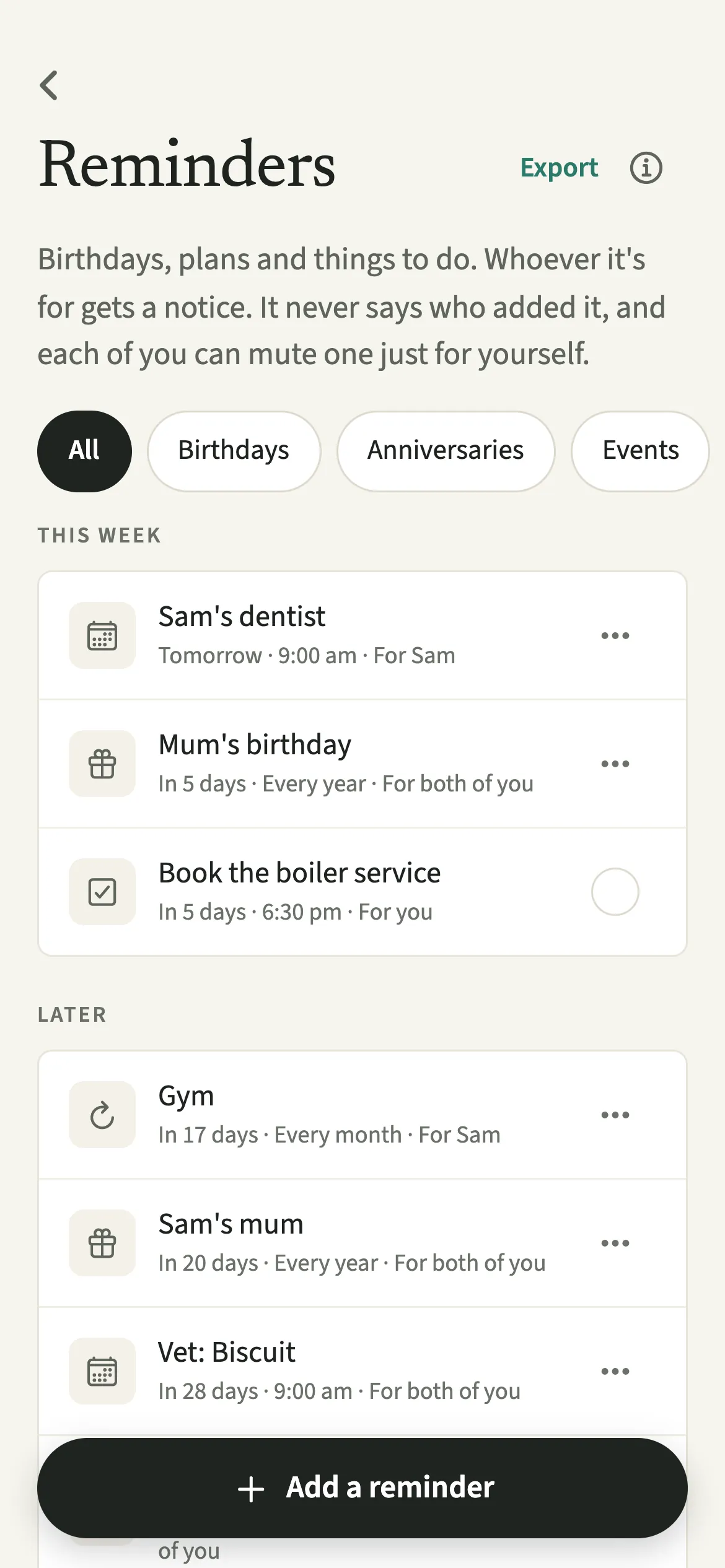
Add to calendar in EvenUS copies your household reminders into the calendar app you already use, such as Apple Calendar, Google Calendar or Outlook. Tap Export on the reminders list to share them all as one .ics calendar file, or “Add to calendar” on a single reminder. The file is made on your phone, nothing is uploaded, each entry carries the reminder’s note, and it never says who set a reminder.
What does Add to calendar do?
It puts the household's dates next to everything else in your day, without asking you to keep two calendars by hand. Many people plan their week from one calendar app. If birthdays and the parents' evening live only in EvenUS, they are easy to miss when you are booking something else on the same evening.
EvenUS writes your reminders into a standard .ics calendar file and opens your phone's share sheet. From there you pick Calendar, Google Calendar, Outlook, Files or a message, and the entries land where you already look.
It is a one-way copy, made at the moment you tap. EvenUS keeps sending its own notifications as before, so the calendar entries are an extra view, not a replacement.
Who is Add to calendar for?
Anyone who lives by their phone's calendar, Google Calendar or Outlook and wants birthdays, anniversaries and plans there too. It also helps when one of you keeps a shared family calendar elsewhere and would like the EvenUS dates in it, or when you want a document's expiry date in a work calendar to plan time off for the renewal appointment.
How do you add EvenUS reminders to your calendar?
Open Reminders and dates from the Us tab, tap Export for all of them or “Add to calendar” on one, and pick your calendar app from the share sheet.
- Open your remindersOpen Us, then Household → Reminders and dates.
- Export everything at onceTap Export at the top of the list to share all of the household's reminders as one .ics file.
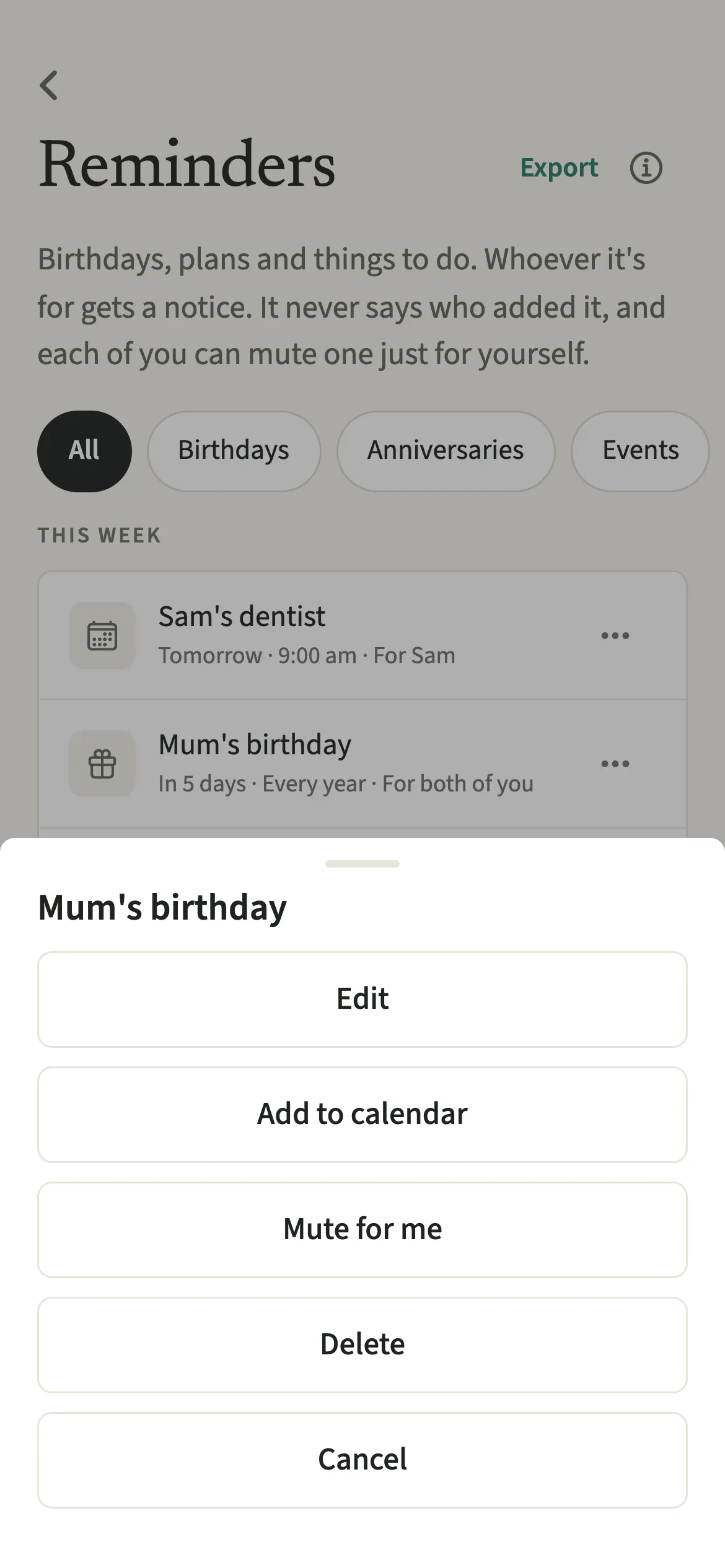
- Or add just oneOpen a single reminder and tap “Add to calendar”, or press and hold it in the list, or tap its … button, and choose “Add to calendar” there.
- Pick your calendar appChoose your calendar app from the share sheet. Most calendar apps show the entries first and ask you to confirm before adding them. On an Android phone, a single reminder opens straight in your calendar app as a new event, already filled in, for you to save there.
What does your partner see?
Nothing changes for your partner. The file is made and shared from your phone, nothing is uploaded to EvenUS or anywhere else, and your partner is not told that you exported anything.
The file never says who set a reminder: there is no organiser, no attendee and no author in it, only the date, the title and any note. Each entry carries the reminder’s note, in its description, so if you share the file with someone else, they will see the notes too. It is worth a look before you send it anywhere. Exporting one reminder at a time keeps the file to exactly what you mean to send.
Tips for calendar export
- It is a copy made on this phone, and each entry carries the reminder’s note too. Later changes in EvenUS don’t reach your calendar, so export again after an edit.
- Birthdays, anniversaries and documents go in as all-day entries. A to-do goes in once it has a time.
- A repeating entry with a time can show an hour out after the clocks change. The EvenUS notification stays on time.
- All-day entries are marked as free time, so a birthday never blocks your day in a work calendar.
- If you see “Nothing to add yet”, the only reminders are to-dos without a time. Give one a time and try again.
What goes into the calendar, and how?
Birthdays and anniversaries become all-day entries that repeat every year. Events go in at their time, an hour long, or as all-day entries, with the repeat you chose. To-dos go in only when they have a time and are not yet done. Documents become an all-day entry on the expiry date, titled "Expires: Sam's passport", so the calendar shows the deadline, while the earlier notice stays with EvenUS's own document renewal notifications.
One small difference: a monthly reminder on the 31st moves to the last day of shorter months in EvenUS, while calendar apps skip those months.
Is Add to calendar free?
Add to calendar keeps working after the 7-day free week, whether or not you subscribe. The computed views, such as the household balance and this week’s idea, are part of EvenUS Pro: $9.99 a month or $79.99 a year, with one subscription covering both partners. The free week needs no card, and nothing is charged when it ends.
Questions about Add to calendar
Does EvenUS sync with Google Calendar?
Not as a live sync. EvenUS makes a calendar file on your phone that Google Calendar, Apple Calendar or Outlook can import. Changes made later in EvenUS do not follow, so export again after editing a reminder.
Does EvenUS read my calendar when I export?
No. Exporting only writes a file from your EvenUS reminders. Reading a calendar is a separate feature, Calendar busy time, which is off until you switch it on and only ever counts busy hours, never events.
Will my partner's reminders end up in my calendar?
Export shares every reminder on the household list, including ones set for your partner alone. To send only your own, open each one and use “Add to calendar” on that reminder instead.
Why is my repeating event an hour out in my calendar?
Timed repeating entries are written with a fixed clock time, so after the clocks change some calendar apps show them an hour out. All-day entries never move, and the EvenUS notification itself always arrives at the right time.
Does calendar export need EvenUS Pro?
No. Add to calendar keeps working after the 7-day free week, with or without a subscription, along with the reminders themselves.
Related features
Other parts of EvenUS that work alongside Add to calendar.
Related reading
Articles on the questions behind this feature.