Document renewals: notice months before a passport or visa expires
Document renewals in EvenUS are expiry reminders for the household's papers: passports, visas, driving licences, insurance, car MOT or PUC, and warranties. You enter whose document it is and the date it expires, and EvenUS sends notice three months, one month and one week before. It never stores the document number, because the expiry date is all a reminder needs.
What do document renewals do?
They give you enough warning to renew a document before it becomes urgent. A passport or a visa can take weeks to renew, and the expiry date is usually printed somewhere nobody looks until a trip is booked. Often one person keeps all of these dates in their head, the admin described in the one who books everything.
A document reminder is a reminder of the Document type, with longer notice built in. Instead of an hour or a day ahead, it starts three months out, so there is time to find the forms, book an appointment and wait for the post.
A notification reads "Sam's passport expires in a month", with the expiry date underneath. It names the document, never who added the reminder.
Who are document renewals for?
Households with papers that take time to sort out: couples who travel, partners on a visa, families renewing children's passports, and anyone with a car that needs its MOT or PUC certificate each year.
How do you add a document renewal in EvenUS?
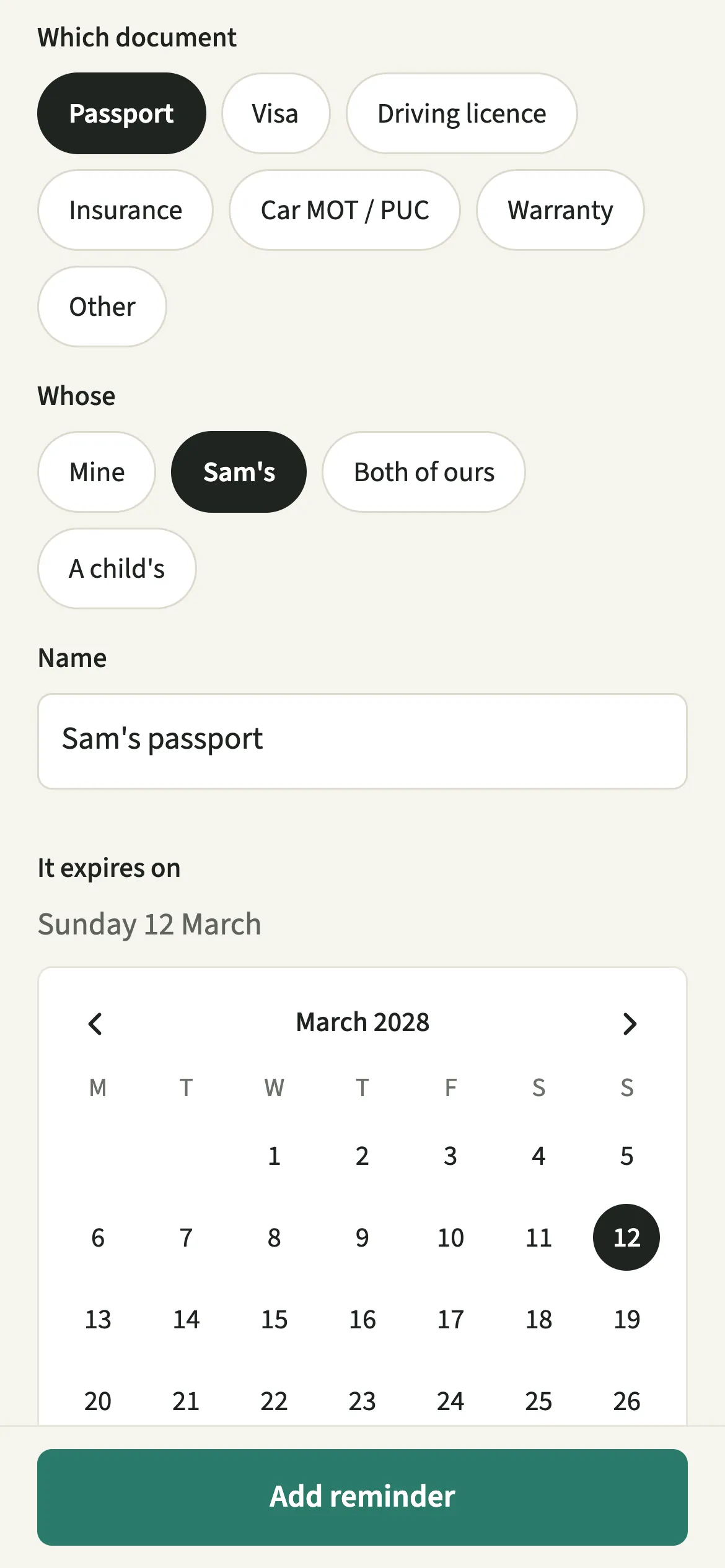
Open Reminders and dates from the Us tab, tap “Add a reminder”, pick Document, choose the document and whose it is, enter the expiry date and tap “Add reminder”.
- Start a new reminderOpen Us, then Household → Reminders and dates, and tap “Add a reminder”.
- Pick Document and the typePick Document. Under Which document choose Passport, Visa, Driving licence, Insurance, Car MOT / PUC, Warranty or Other.
- Say whose it isUnder Whose choose Mine, your partner's, Both of ours or A child's, then pick which child if it is theirs. Give it a name such as "Sam's passport", and leave the number out.
- Enter the expiry date and who is remindedFill in It expires on, today or later, then under For choose who should be reminded: Me, Both of us or your partner. Documents start set to both of you.
- Check the notice and saveUnder Remind, Three months before, A month before and A week before are already selected. Add On the day if you like, then tap “Add reminder”.
What does your partner see?
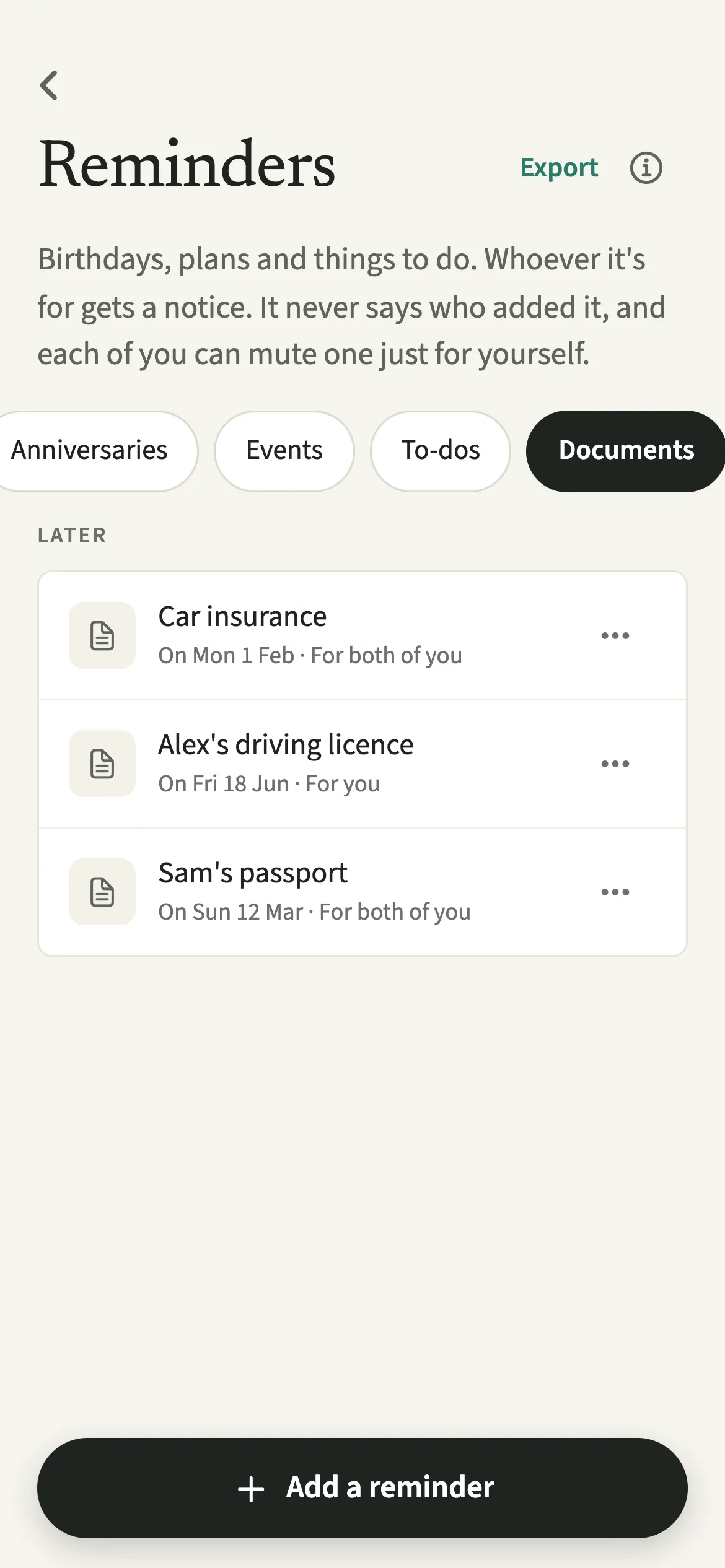
If the reminder is for both of you, your partner gets the same three notices, with no name on who set them. If it is for you alone, only you are notified, though the document still appears on both of your lists in Reminders and dates, labelled with who it is for.
Anything you write in Note shows inside the app, and in a calendar file if you export one, but never in a notification, because a lock screen is not a private place. Either of you can mute a document reminder just for yourself with “Mute for me”, and the other is not told.
Tips for keeping documents in date
- Leave the document number out. EvenUS never stores it, and it turns away a name or note that looks like one. The expiry date is all a reminder needs.
- Notice comes 90, 30 and 7 days ahead by default, and you can add one for the day itself.
- After you renew, open the reminder and change It expires on to the new date. Once an expiry date has passed, the reminder moves to Past reminders, where you can still open, change or delete it.
- Add documents quickly with Tell EvenUS: type "passport expires 12 March 2028" and check the draft before saving.
- For something that renews on a cycle and costs money, Subscriptions is the better home.
Why won't EvenUS store a passport number?
Reminders are shared between two phones and turned into notifications, and a document number has no reason to travel that far. Nothing about a renewal needs it: the date tells you when to act, and the number is on the document itself when you sit down to fill in the form.
So the app checks the name and the note. A run of letters and digits that looks like a passport, licence or policy number is turned away with a plain line, "That looks like a document number", and the reminder saves as soon as it is removed.
Is Document renewals free?
Document renewals keeps working after the 7-day free week, whether or not you subscribe. The computed views, such as the household balance and this week’s idea, are part of EvenUS Pro: $9.99 a month or $79.99 a year, with one subscription covering both partners. The free week needs no card, and nothing is charged when it ends.
Questions about Document renewals
How far ahead does EvenUS remind me before a passport expires?
By default, three months, one month and one week before the expiry date. You can untick any of these or add a notice on the day itself. Left as All day, each notice arrives at 9:00 am in your household's time zone.
Can I add my child's passport?
Yes, once the child is added under Children on the Us tab. Under Whose, choose A child's and pick them; the form asks which child before it saves. Then choose who is reminded under For.
Does EvenUS keep a copy of my documents?
No. There is no upload, scan or photo of the document. A renewal reminder holds the type, whose it is, a name you choose and the expiry date, and refuses anything that looks like a document number.
Can I put document expiry dates in my calendar?
Yes. Use “Add to calendar” on the reminder, or Export on the list. Each document goes in as an all-day entry on the expiry date, titled with the word Expires and the name you gave it, and its note goes into the file too.
Do document renewals keep working after the free week?
Yes. Reminders of every type, documents included, keep working after the 7-day free week whether or not you subscribe to EvenUS Pro.
Related features
Other parts of EvenUS that work alongside Document renewals.
Related reading
Articles on the questions behind this feature.