Subscriptions: everything that renews, in one list with a monthly total
Subscriptions in EvenUS is one shared list of everything your household pays for on repeat: streaming, the gym, cloud storage, the phone plan. Each entry has its cost, how often it renews, the next renewal and who pays it. EvenUS adds them up into one figure a month, and can send whoever pays a reminder a day or a week before a renewal.
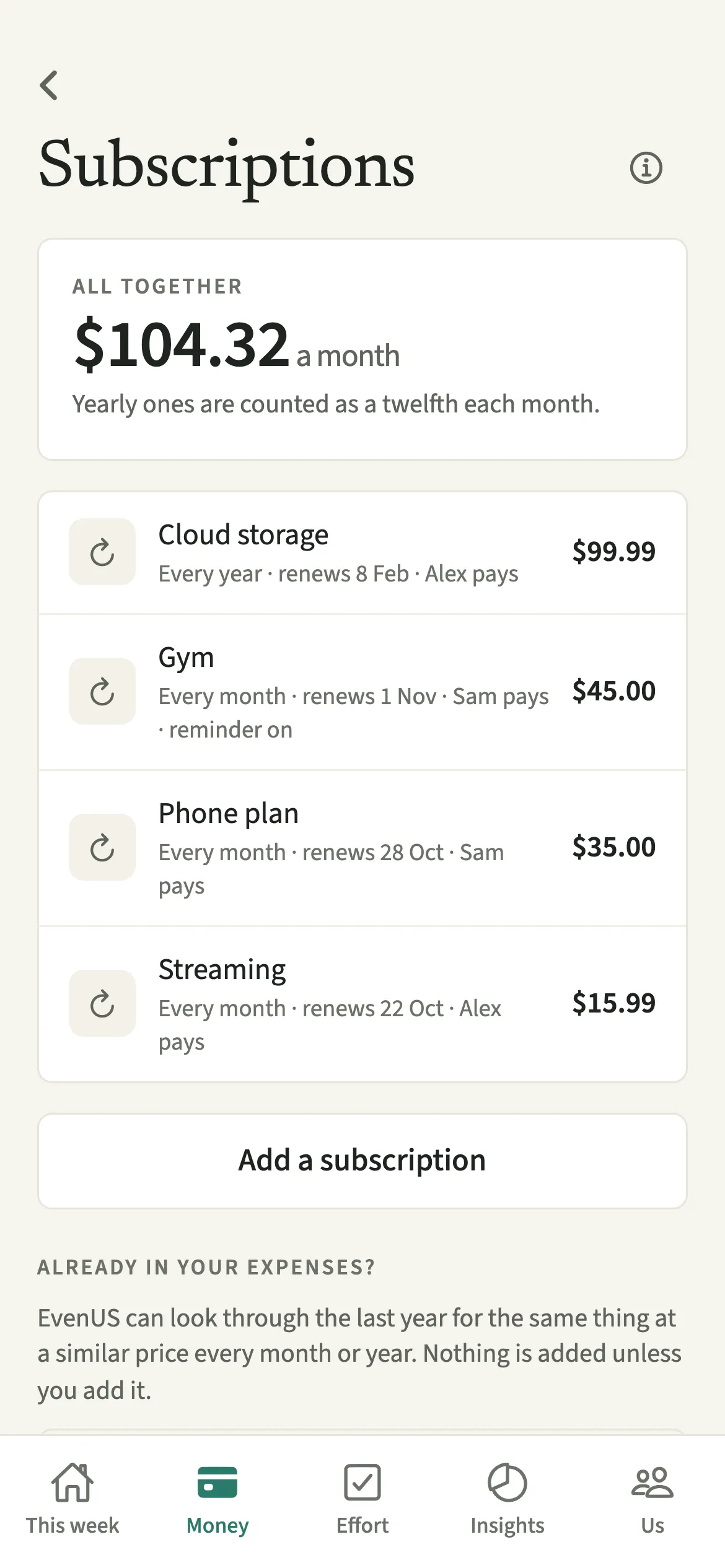
What does Subscriptions do?
It puts every renewing payment in one place, with the total they come to each month, so nothing quietly carries on in the background. Subscriptions are easy to start and easy to forget. One of you starts a trial, the other already has a similar service, and a year later both are still renewing.
In EvenUS, each subscription is a line on a list you both see: the name, what it costs each time, whether it renews every week, month or year, the next renewal date and who pays it. At the top, “All together” shows what the whole list comes to a month. Yearly ones are counted as a twelfth each month, so an annual cloud storage plan sits next to a monthly gym membership on the same scale.
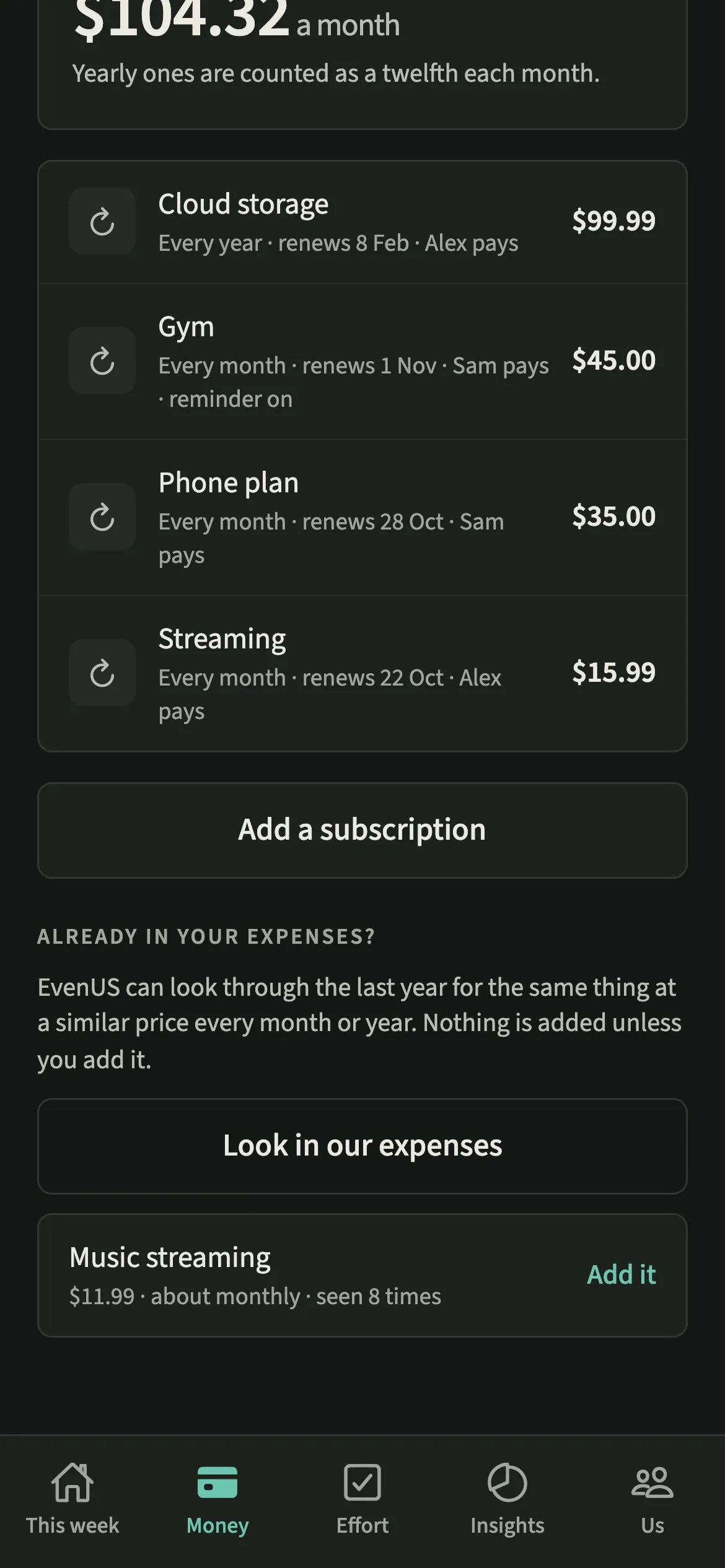
“Look in our expenses” checks the shared expenses you have already recorded for anything that looks like a subscription. The list itself does not record an expense: the money you spend is still added the usual way, through Shared expenses or Regular bills.
Who is Subscriptions for?
Anyone with streaming, a gym, cloud storage or a phone plan renewing in the background, which is most households. It suits couples who have each brought their own accounts into the relationship and want to see the overlap, and couples who want a calm look at what the household commits to every month before setting Budgets.
How do you add a subscription in EvenUS?
Open Money, tap Subscriptions under Track, tap “Add a subscription”, fill in the details and save.
- Open the listOpen the Money tab, then under Track tap Subscriptions.
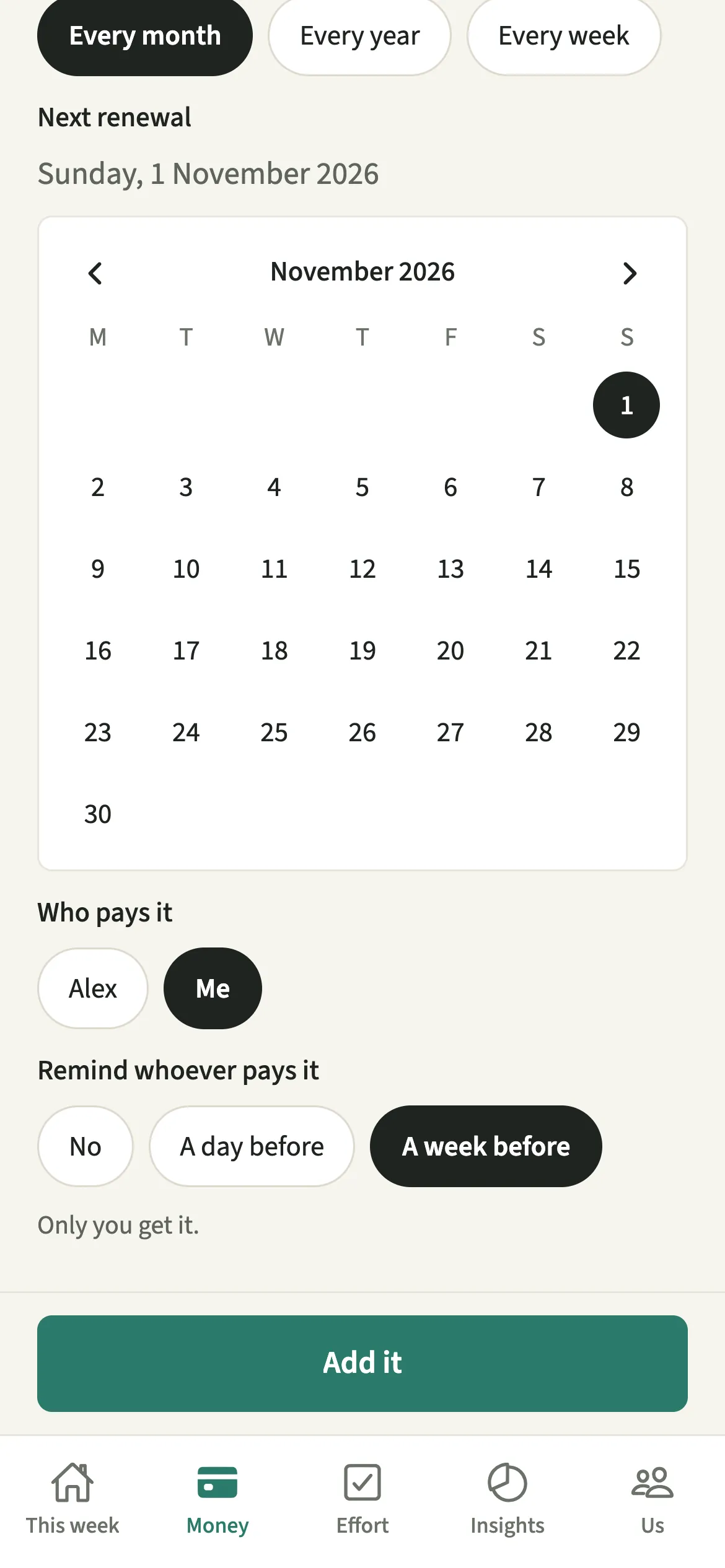
- Add one by handTap “Add a subscription”. Enter the name, what it costs each time, how often it renews (every week, month or year), the next renewal and who pays it.
- Choose a reminder if you want oneUnder “Remind whoever pays it”, pick “A day before” or “A week before”, or leave it with no reminder. The reminder goes only to the person who pays it.
- Or let EvenUS look for themTap “Look in our expenses”. EvenUS’s server checks the last year of shared expenses for the same thing at a similar price every month or year, and lists what it finds.
- Add the suggestions you recogniseTap “Add it” beside any suggestion that really is a subscription. Anything you leave is simply not added.
What does your partner see?
You both see the same list and the same monthly total. Either of you can add a subscription, and each row shows who pays it, so the list describes the household’s commitments rather than one person’s spending.
Reminders are quieter. A renewal reminder reaches only the person who pays that subscription. If you set one for your partner’s gym, it goes to them, it does not say who set it, and they can switch it off. There is no way to send a nudge from one phone to the other.
If your partner uses Hide my personal spending detail, their hidden personal spending is left out before EvenUS looks for subscriptions, so a private purchase can never turn up as a suggestion on your screen.
Tips for a useful subscriptions list
- Suggestions from “Look in our expenses” are only suggestions. Nothing is added until you tap “Add it”, so skip anything that was a one-off.
- Yearly subscriptions count as a twelfth each month in the total. Set a week’s reminder on those, since the full amount lands at once.
- Look at the list together now and then and ask of each line whether you both still use it.
- Rent, energy and other bills that should become expenses on their own belong in Regular bills, not here.
How does “Look in our expenses” find subscriptions?
It looks for the same title or merchant at a similar amount, roughly every month or every year, seen at least twice in the last year of shared expenses. A gym that took the same amount each month for eight months shows as about monthly, seen eight times. Anything you already track, and anything set up as a regular bill, is skipped.
The check runs on EvenUS’s server because it needs a full year of expenses. EvenUS never connects to a bank, so it can only find what you have already recorded.
Is Subscriptions free?
Subscriptions keeps working after the 7-day free week, whether or not you subscribe. The computed views, such as the household balance and this week’s idea, are part of EvenUS Pro: $9.99 a month or $79.99 a year, with one subscription covering both partners. The free week needs no card, and nothing is charged when it ends.
Questions about Subscriptions
Does adding a subscription record it as an expense?
No. The subscriptions list tracks what renews and what it all comes to a month. The payments themselves are added as shared expenses in the usual way, or set up as a regular bill if you want EvenUS to add them each time they are due.
Can my partner see the reminders I set?
A reminder goes only to whoever pays that subscription. If it is your partner, they get it without being told who set it, and they can switch it off. You both see on the list that a reminder is on.
What happens if I remove a subscription from the list?
It goes from the list for both of you, along with its reminder. Any expenses you already recorded for it stay exactly as they were, so your shared numbers do not move.
Is Subscriptions part of EvenUS Pro?
No. Subscriptions keeps working after the 7-day free week, with or without EvenUS Pro, including reminders and suggestions from your expenses.
Related features
Other parts of EvenUS that work alongside Subscriptions.
Related reading
Articles on the questions behind this feature.