Regular bills: rent and utilities added once, recorded each time they’re due
Regular bills in EvenUS is a list of the household costs that come round again, such as rent, electricity, internet or a loan repayment. You add each bill once with its amount, how often it is due and the due day. EvenUS then records it as a shared expense each time it falls due, and shows both whose account it leaves and who keeps an eye on it.
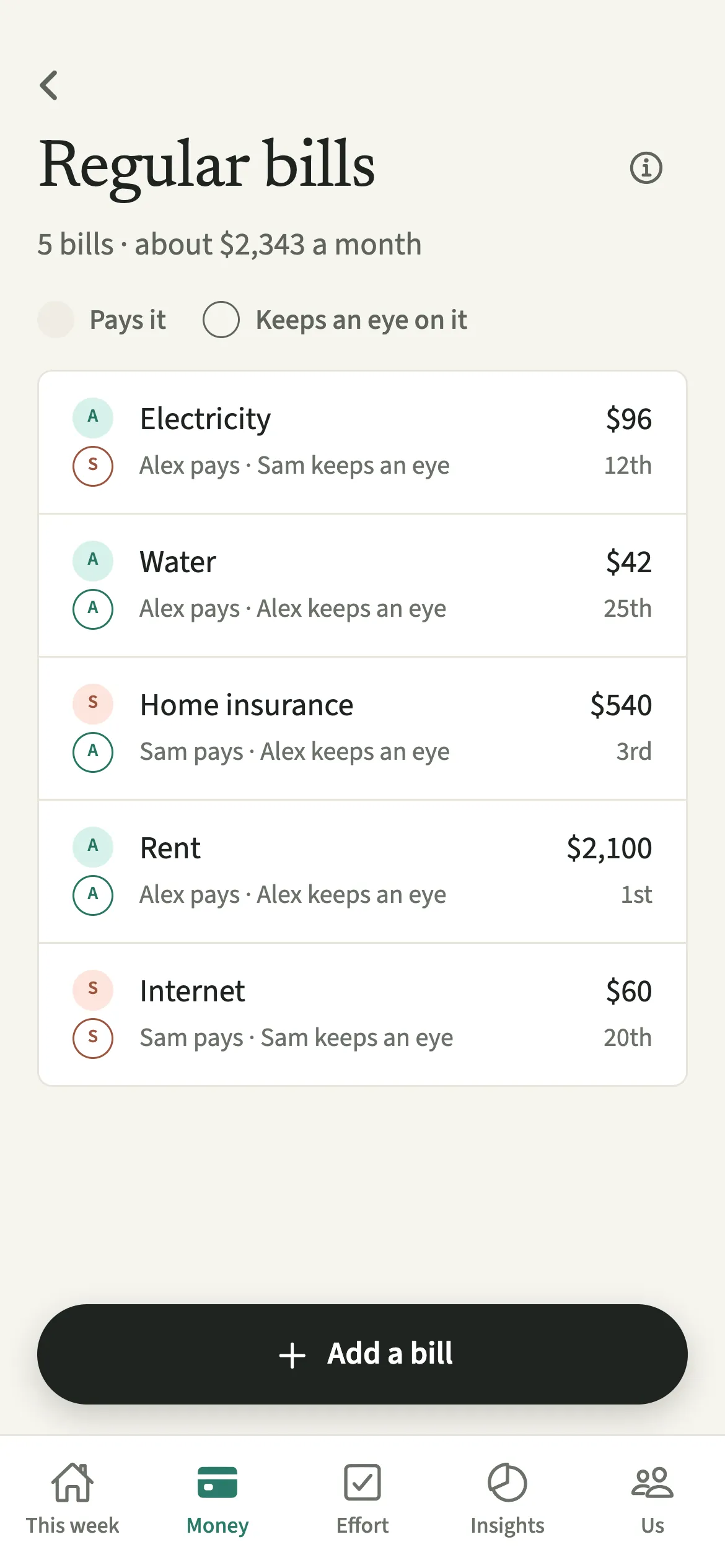
What do Regular bills do?
They take the repeating costs off your to-do list: each bill is entered once and turns into a shared expense on its due day, split the way you set. Without it, the rent has to be typed in every month, and the one month nobody does it, the Even up figure is quietly wrong.
Each bill also records two people who are often different: whose account the money leaves, and who keeps an eye on it. A direct debit pays itself. Noticing that the broadband deal has ended, comparing providers, or chasing a payment that bounced is real work that usually goes unseen. The list shows both, side by side.
Who are Regular bills for?
Households with costs that repeat monthly, quarterly or yearly, from rent and council tax to an EMI or a child’s club fees, and especially couples where one person quietly manages most of them.
How do you add a regular bill in EvenUS?
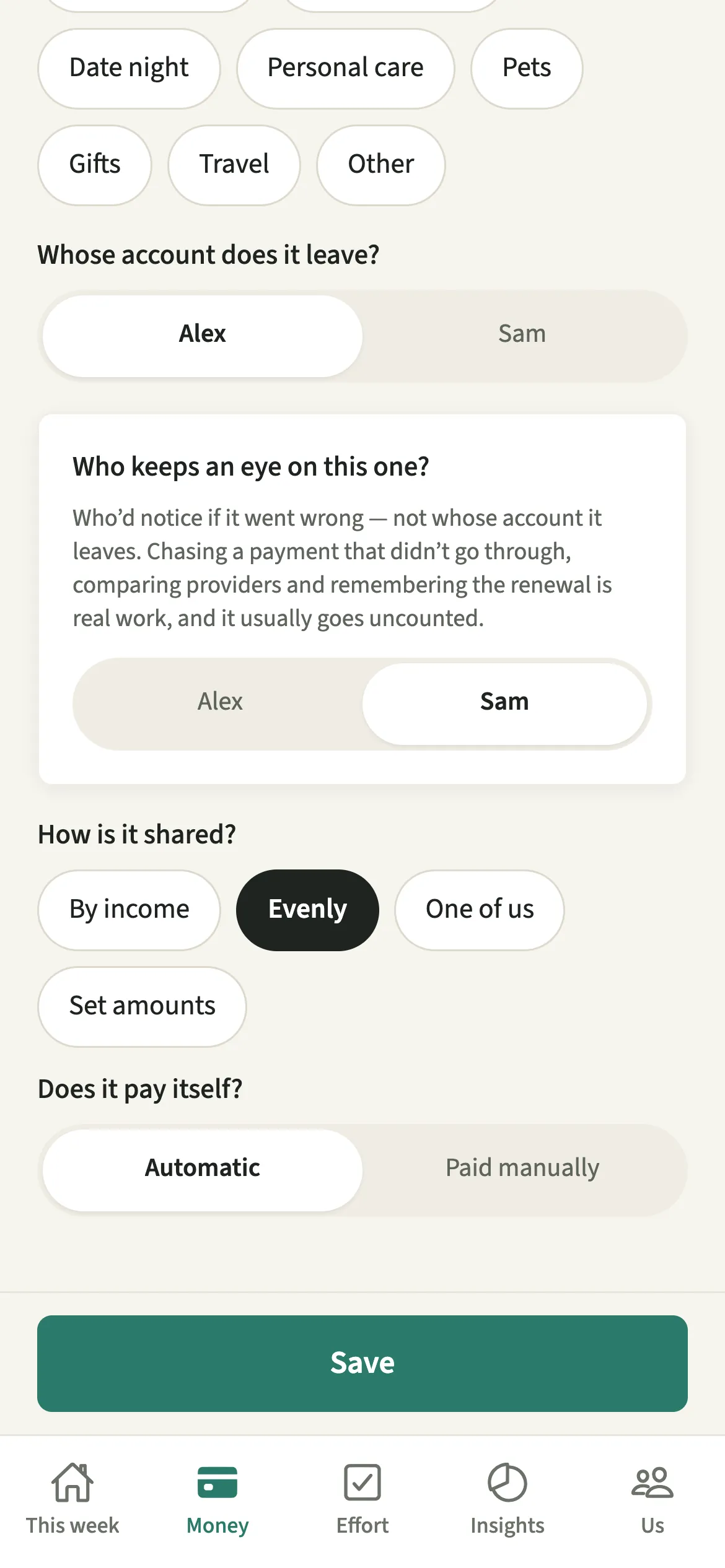
Open the Regular bills card on Money, tap “Add a bill”, fill in the amount, timing and the two people involved, choose how it is shared and save.
- Open Regular billsOpen the Money tab and tap the Regular bills card. While a bill is due soon, the card is called Bills coming up.
- Describe the billTap “Add a bill”. Fill in “What is it?”, the amount, “How often” (Monthly, Quarterly or Yearly) and the due day. For a quarterly or yearly bill, pick the month it falls in or starts in.
- Name the two peopleAnswer “Whose account does it leave?” and “Who keeps an eye on this one?”. They can be different people.
- Choose how it is sharedUnder “How is it shared?” pick By income, Evenly, One of us, or “Set amounts” to enter each person’s part, which together make the bill’s amount. Under “Does it pay itself?” choose Automatic for a direct debit or Paid manually.
- Pick the children, if it is for themIf you have added children, “For which children?” lets you pick the ones this bill is for. Switch on “Depends on when the children are with us” for costs like food or activities.
- Save itSave the bill. When it falls due, it’s added to Expenses the next time the paying partner opens EvenUS.
What does your partner see?
You both see every bill, whose account it leaves, who keeps an eye on it and the expenses it adds. When one of you keeps an eye on most of the bills, the summary says so as a plain count, for example “Sam keeps an eye on 7 of your 9 regular bills.” It carries no judgement, and it does not appear when the work is spread fairly evenly.
A bill paid by one of you just for themselves follows Hide my personal spending detail: with detail hidden, your partner sees “A personal bill” instead of its name, and its name, account and split stay as you set them.
Tips for keeping bills accurate
- Keeping an eye on a bill is the noticing: renewals, comparing providers, chasing a payment that didn’t go through. Give it to whoever really does that, not whoever pays.
- If the due day is the 31st, shorter months use their last day, so you never need a second bill for February.
- “Stop tracking this bill” takes it off the list. The expenses it already added stay, so past months are not rewritten.
- For streaming, the gym and app plans, use Subscriptions, which totals what renews each month.
Do Regular bills send reminders?
Only for bills marked Paid manually; an Automatic bill sends nothing. For a manual bill, EvenUS reminds the person who keeps an eye on it and the person who pays it, two days before it is due, in the morning. The notification names the bill and when it is due but never the amount, because a lock screen is not a private place. Each phone schedules its own reminders. For birthdays and other dates, see Reminders.
How do bills for children work when they are not always with you?
With “Depends on when the children are with us” switched on, each month counts only the share of the week the children you picked are here, so a food or activities bill follows their time in your home. Leave it off for costs like school fees, which count in full every month. Their weeks come from Children.
Is Regular bills free?
Regular bills keeps working after the 7-day free week, whether or not you subscribe. The computed views, such as the household balance and this week’s idea, are part of EvenUS Pro: $9.99 a month or $79.99 a year, with one subscription covering both partners. The free week needs no card, and nothing is charged when it ends.
Questions about Regular bills
Does EvenUS pay my bills or connect to my bank?
No. EvenUS never connects to a bank and never moves money. A regular bill is a record: on its due day it becomes a shared expense in the app, so your split and the Even up figure stay right.
Why is a bill not showing in Expenses yet?
A due bill is added the next time the partner whose account it leaves opens EvenUS, dated for when it was due.
What is the difference between who pays and who keeps an eye on a bill?
Who pays is whose account the money leaves. Who keeps an eye on it is the person who would notice if it went wrong: renewals, price rises, a failed payment. The second is real work that usually goes uncounted.
Can I add a quarterly or yearly bill?
Yes. Choose Quarterly or Yearly under How often and pick the month it falls in or starts in. In the monthly summary at the top, a quarterly bill counts as a third and a yearly bill as a twelfth each month.
Related features
Other parts of EvenUS that work alongside Regular bills.
Related reading
Articles on the questions behind this feature.