Chore reminders: let the app hold the remembering, not either of you
Chore reminders in EvenUS put a time on a chore so the app does the remembering. Either of you can set one, but only the chore’s owner is reminded, and the reminder never says who set it. It only arrives when the chore is about due, never after 9:30 pm or before 8 am, and the owner can switch it off whenever they like.
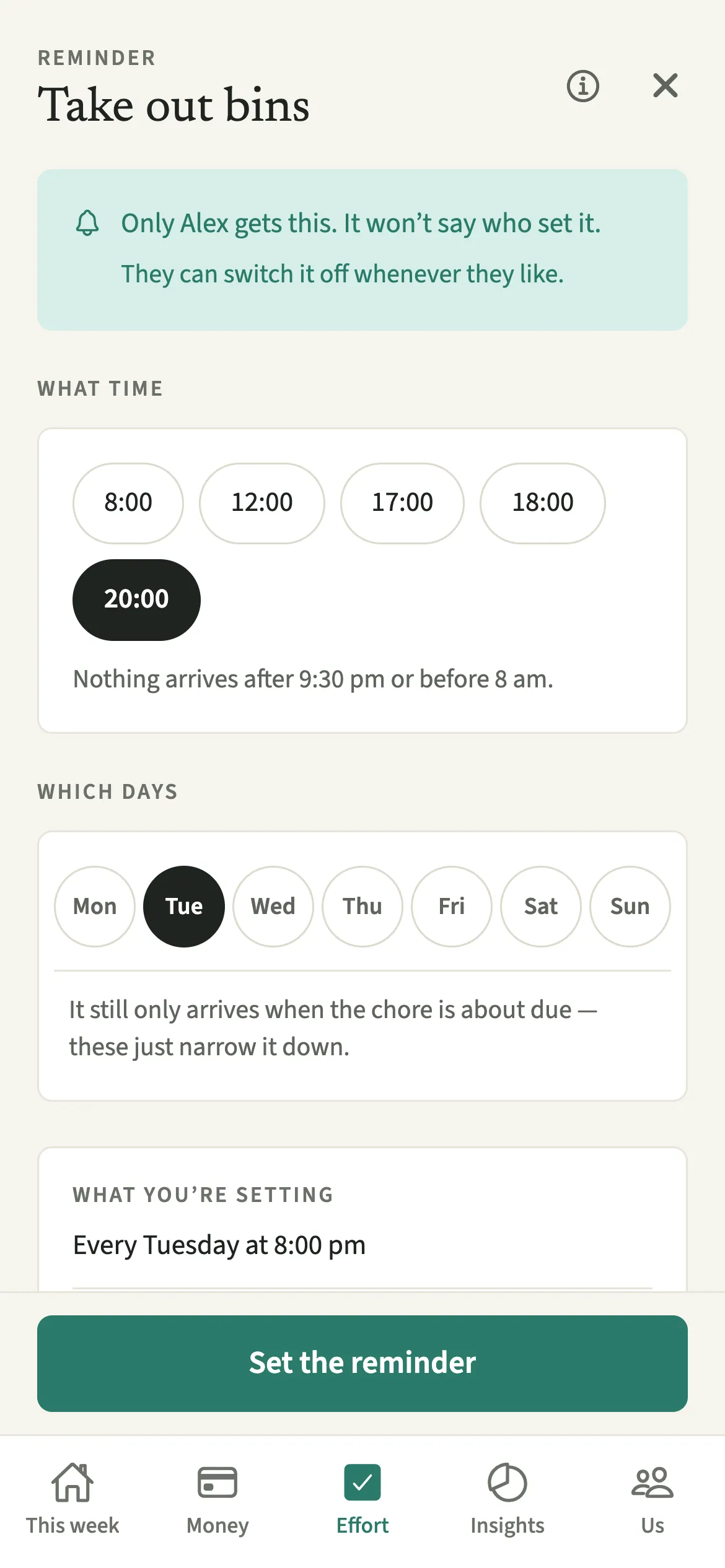
What do chore reminders do?
They move the job of remembering a chore from a person to the app. Some chores slip not because anyone minds doing them but because nobody is holding the schedule: the bins on a Tuesday night, the plants on a Sunday. In many homes, one partner ends up remembering for both, which is its own quiet piece of work.
In EvenUS, a reminder lives on the chore, not on either of you. You choose a time and, if you like, the days, and the chore’s owner gets a notification when it is about due. Because it comes from the app rather than from a partner, it reads as information rather than a request.
Reminders are deliberately limited. A daily chore reminds at most once a day, a weekly one at most once a week, and nobody gets more than two chore reminders a day across everything. There is no “remind them now” button.
Who are chore reminders for?
For the jobs that slip because nobody is holding the schedule, like the bins or the plants. They suit the partner who would rather be reminded by their phone than by a person, and the partner who is tired of being the one who remembers.
How do you set a chore reminder in EvenUS?
Open the chore on the Effort tab, tap “Add a reminder”, choose a time and, optionally, days, then tap “Set the reminder”.
- Open the choreOpen the Effort tab and tap a chore. It needs an owner first: if it says nobody owns it, choose one under “Who owns this?”.
- Add a reminderTap “Add a reminder”. The screen tells you who will get it, and says it won’t say who set it.
- Choose the time and daysChoose “What time” and, if you like, “Which days”, then tap “Set the reminder”.
- Switch it off or back onIf the reminder is for you, “Turn this off” on the chore switches it off, and “Turn it back on” brings it back. To change it, tap “Change the reminder”.
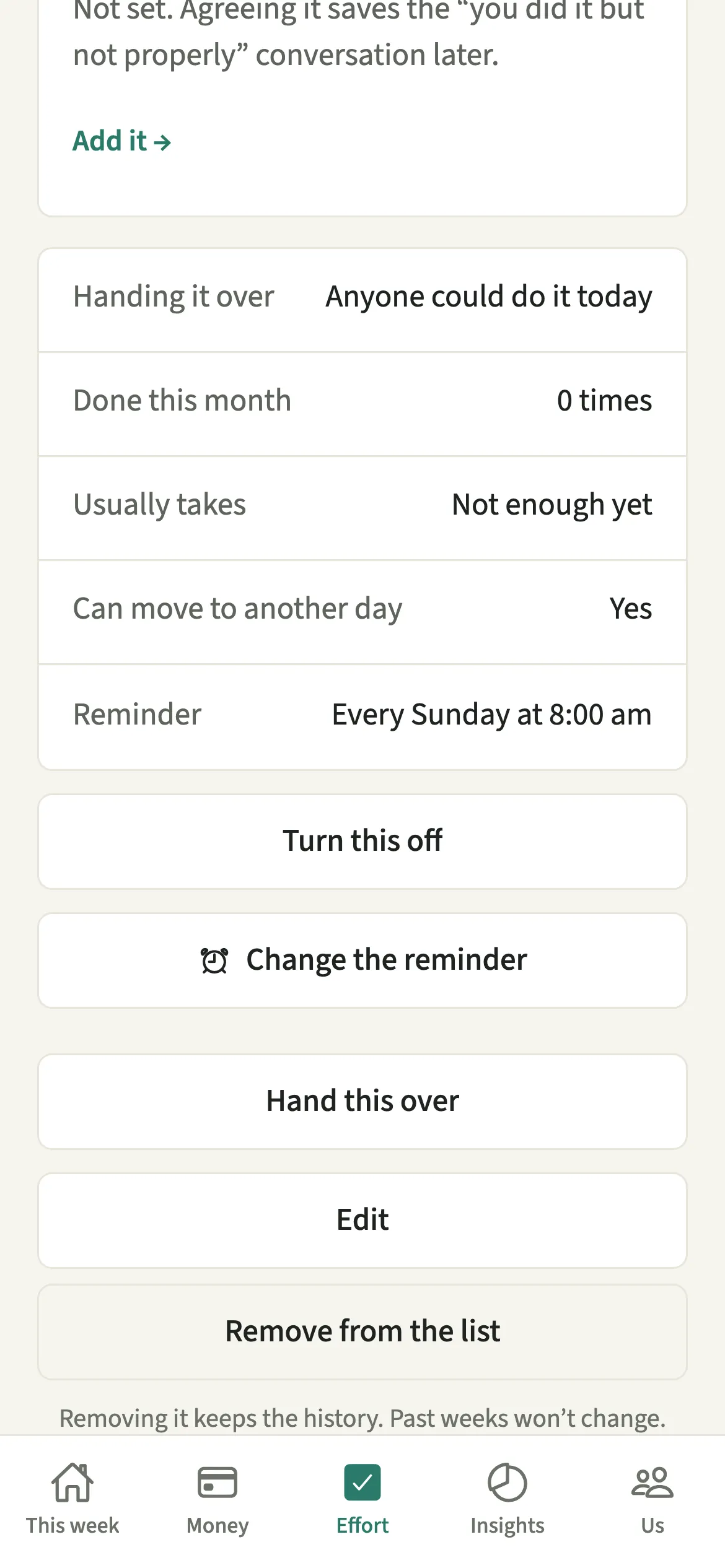
What does your partner see?
Only the chore’s owner gets the reminder, and it never says who set it. If you set a reminder on a chore you own, it is a note to yourself, not a message. If you set one on your partner’s chore, the screen tells you plainly that they can switch it off whenever they like.
The owner can turn a reminder off at any time, and nobody is told. Both of you see the reminder time on the chore, so there are no hidden schedules. What EvenUS will not do is let one partner send the other a nudge, or mark a chore as late. See why reminders from a partner feel like nagging.
Tips for chore reminders that help
- Leave the days blank and it only comes up when the chore is actually about due. Setting days narrows it down further, it never adds extra reminders.
- Nothing arrives after 9:30 pm or before 8 am, so pick a time in your waking day, such as 7:30 pm for the bins. On Android, a reminder can come a few minutes late while the phone is saving battery.
- A chore needs an owner first. Reminders live on the chore, not on either of you, so handing a chore over moves the reminder with it.
- For dates rather than chores, such as birthdays or a passport renewal, use household reminders instead.
Why can either partner set a reminder but only the owner receive it?
Setting a reminder on your partner’s chore can be genuinely helpful: they may not know the bin day changed. But a reminder from a person, with their name on it, at a time they picked, tends to read as an instruction. That is how a helpful nudge turns into nagging, one of the patterns underneath the “just ask me” problem.
So EvenUS keeps the useful part and removes the rest. The notification carries no name, the owner can switch it off without anyone knowing, and the person who set it is told so before they save. If Sam sets a 7:30 pm reminder on Alex’s bins, Alex gets a quiet prompt from the app, and whether it is useful stays Alex’s call.
Is Chore reminders free?
Chore reminders keeps working after the 7-day free week, whether or not you subscribe. The computed views, such as the household balance and this week’s idea, are part of EvenUS Pro: $9.99 a month or $79.99 a year, with one subscription covering both partners. The free week needs no card, and nothing is charged when it ends.
Questions about Chore reminders
Can I set a chore reminder for my partner?
Yes, on a chore they own. Only they get the reminder, it never says who set it, and they can switch it off whenever they like without you being told. Both of you see the reminder time on the chore itself.
Will EvenUS send reminders late at night?
No. Nothing arrives after 9:30 pm or before 8 am. Each chore reminds at most once each time it comes round, and nobody gets more than two chore reminders a day across everything.
Why can’t I add a reminder to a chore?
The chore needs an owner first, because a reminder goes to the person who owns it. If nobody owns the chore yet, open it on the Effort tab and choose an owner, then tap Add a reminder.
Does EvenUS tell my partner if I turn a reminder off?
No. The owner can turn a reminder off whenever they like and nobody is told. The time stays visible on the chore, so turning it back on later is one tap with Turn it back on.
Related features
Other parts of EvenUS that work alongside Chore reminders.
Related reading
Articles on the questions behind this feature.