Hosting: plan an occasion together, from the guest list to the washing up
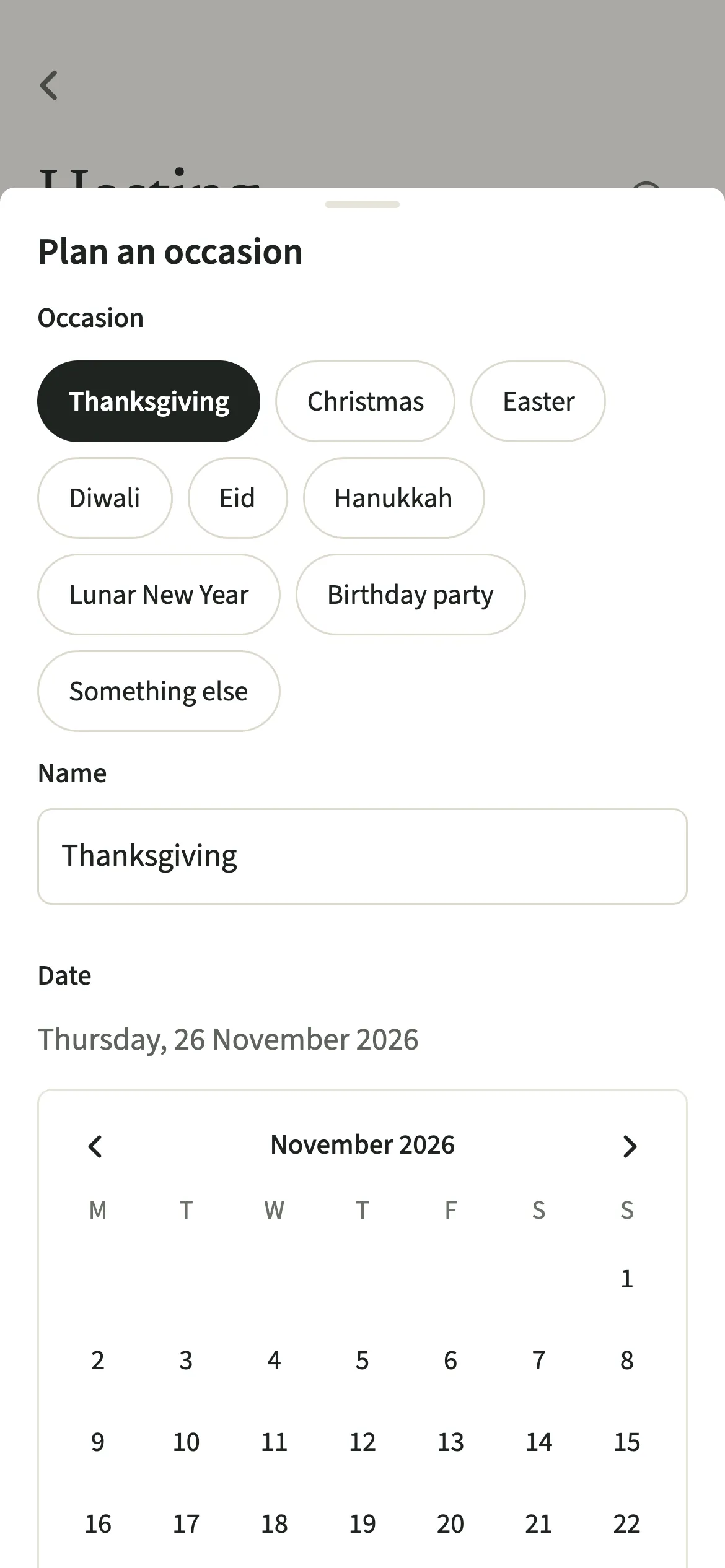
Hosting in EvenUS is a shared plan for an occasion a couple is hosting, such as Thanksgiving, Christmas, Diwali, Eid or a birthday party. It holds the date, the number of guests, a budget, who is doing which task, and the menu, which goes on the shared shopping list. Tasks count as household work for whoever does them, and nobody is shown as doing the most.
What does Hosting do?
It turns an occasion into one plan you can both see, so the work of hosting is shared rather than carried in one head. Hosting is mostly invisible work: the invitations, the menu, the big shop, the cleaning, the cooking, remembering who does not eat what. It often shows up only as tiredness on the day.
A plan collects the date, how many guests are coming, an optional budget and notes. Choose an occasion and it can start with the usual tasks and menu: for Thanksgiving that includes ordering the turkey, for Diwali the diyas, the sweets and the rangoli, for Lunar New Year the red envelopes and the dumplings. Every item can be changed or removed.
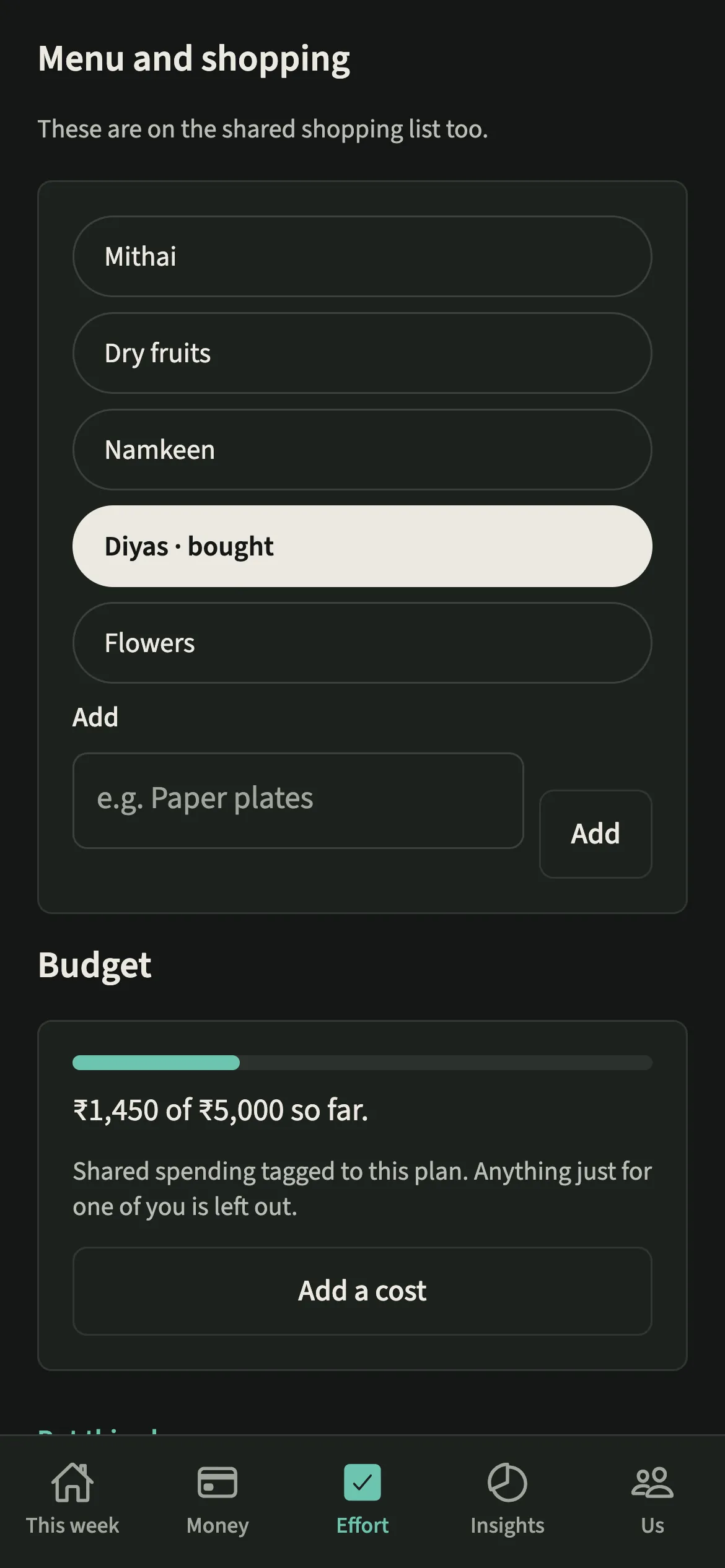
Each task is a one-off chore with a day, given to one of you or to “Either of you”. Menu items go on the shared shopping list. Costs you add are shared expenses tagged with the plan, so the budget adds itself up.
Who is Hosting for?
Couples hosting Thanksgiving, Christmas, Easter, Diwali, Eid, Hanukkah, Lunar New Year, a birthday party or something of their own. It is especially useful the first time you host together, or for a big family occasion where one of you has always done it.
How do you plan an occasion in EvenUS?
Open Effort, then Hosting, tap “Plan an occasion”, fill in the basics, tap “Create the plan”, then share out the tasks and add the menu.
- Start a planOpen the Effort tab, then Hosting, and tap “Plan an occasion”.
- Fill in the basicsPick the occasion and the date, and add guests and a budget if you like. Leave “Start with the usual tasks and menu” on for a ready-made list, or switch it off to start blank.
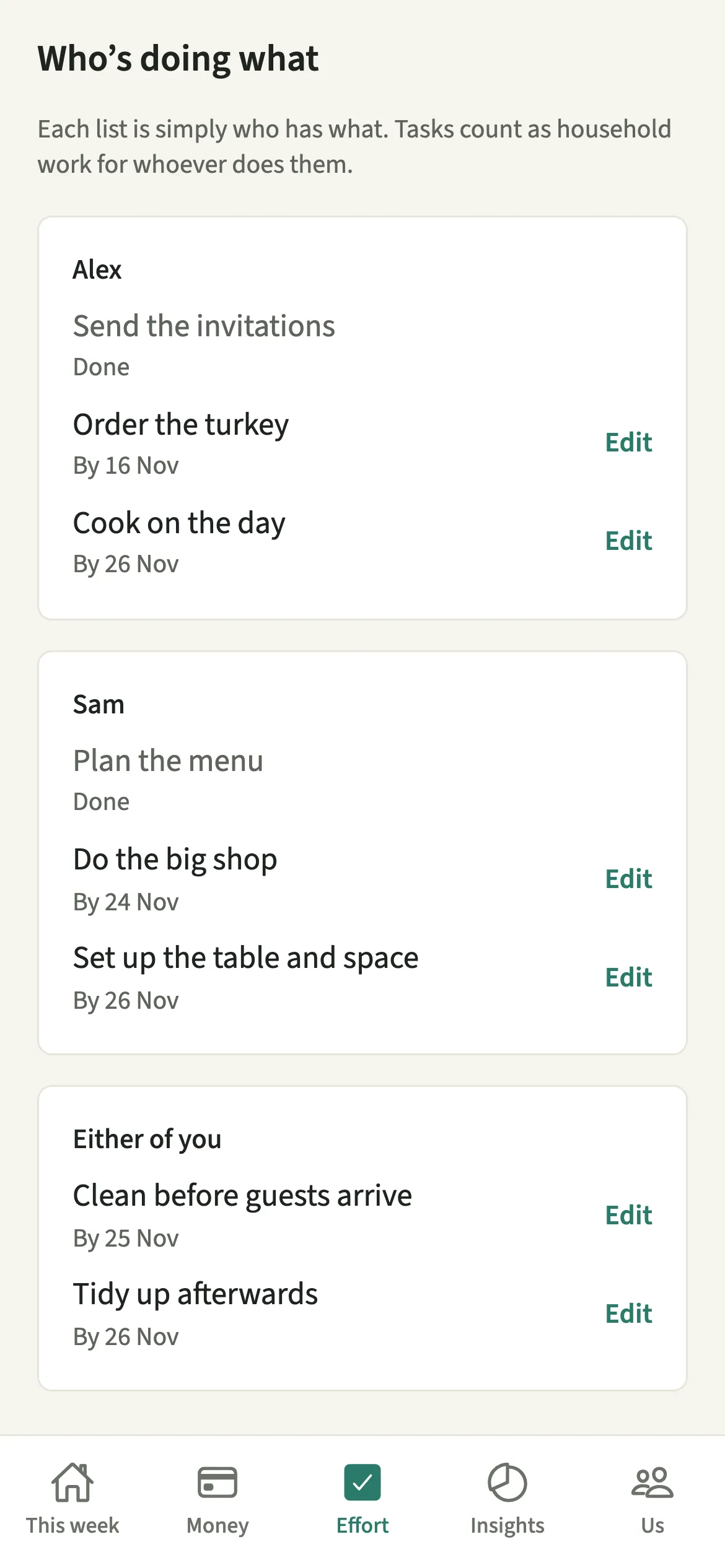
- Share out the tasksTap “Create the plan”, then give each task to one of you or to “Either of you”. Use “Add a task” for anything the template missed, with a day to have it done by.
- Mark tasks done with the real timeWhen a task is finished, tap “Done”, put in when you started and finished, then tap “Save”.
- Build the menu and add costsAdd to the menu under Menu and shopping; it goes on the shared shopping list too. Tap “Add a cost” to record spending for the occasion.
- Set a reminderTap “Remind us the day before” if a reminder would help.
What does your partner see?
Your partner sees the same plan, with each person’s list side by side and the “Either of you” tasks after them. Under Who’s doing what, there is no count beside a list and nothing ranks one against the other, so nobody is shown as doing the most.
The budget only adds up shared spending tagged to the plan. Anything just for one of you, or the personal part of a mixed purchase, is left out.
A task marked Done is logged like any chore, with the time you put in, and counts as household work for whoever did it in the household balance.
Tips for hosting together
- Every task and menu item from the template can be changed or removed. Trim it to what your household actually does.
- Hand over whole parts rather than single jobs: one of you takes the food from menu to shop to cooking, the other the house and the guests. Sharing cognitive labour explains why.
- Put the planning on the list too, such as “Plan the menu” and “Send the invitations”. They are real work and count once done.
- A shop made only of this plan’s menu items is tagged to the plan when you tap Done shopping, so the budget includes it.
What happens when the date moves or the occasion is over?
If you change the date, each task not done yet moves by the same number of days, and the reminder moves with it. Tasks already done stay where they were. A plan made late never starts with anything marked as missed: a task whose day has already passed is moved to today.
Once the occasion is over, it moves from Coming up to Earlier. If a plan is no longer needed, “Put this plan away” takes its unfinished tasks off your chores and removes its reminder, while the list and the spending stay. Before you start, who actually does Christmas is worth a read.
Is Hosting free?
Hosting keeps working after the 7-day free week, whether or not you subscribe. The computed views, such as the household balance and this week’s idea, are part of EvenUS Pro: $9.99 a month or $79.99 a year, with one subscription covering both partners. The free week needs no card, and nothing is charged when it ends.
Questions about Hosting
Which occasions does Hosting have templates for?
Thanksgiving, Christmas, Easter, Diwali, Eid, Hanukkah, Lunar New Year and a birthday party, each with the usual tasks and menu. Choose Something else for any other occasion and add your own tasks.
Do hosting tasks count toward the household balance?
Yes. Each task is a one-off chore, so when it is marked Done with the time you put in, it counts as household work for whoever did it, exactly like any other chore in Effort.
Does the hosting budget include personal spending?
No. The budget adds up only shared spending tagged to the plan. Anything marked as just for one of you, or the personal part of a purchase, is left out of the total.
Does the menu go on our shopping list?
Yes. Items under Menu and shopping are added to the shared shopping list, tagged with the occasion, so either of you can buy them and mark them bought.
Related features
Other parts of EvenUS that work alongside Hosting.
Related reading
Articles on the questions behind this feature.