Shopping list: one shared list that becomes one expense
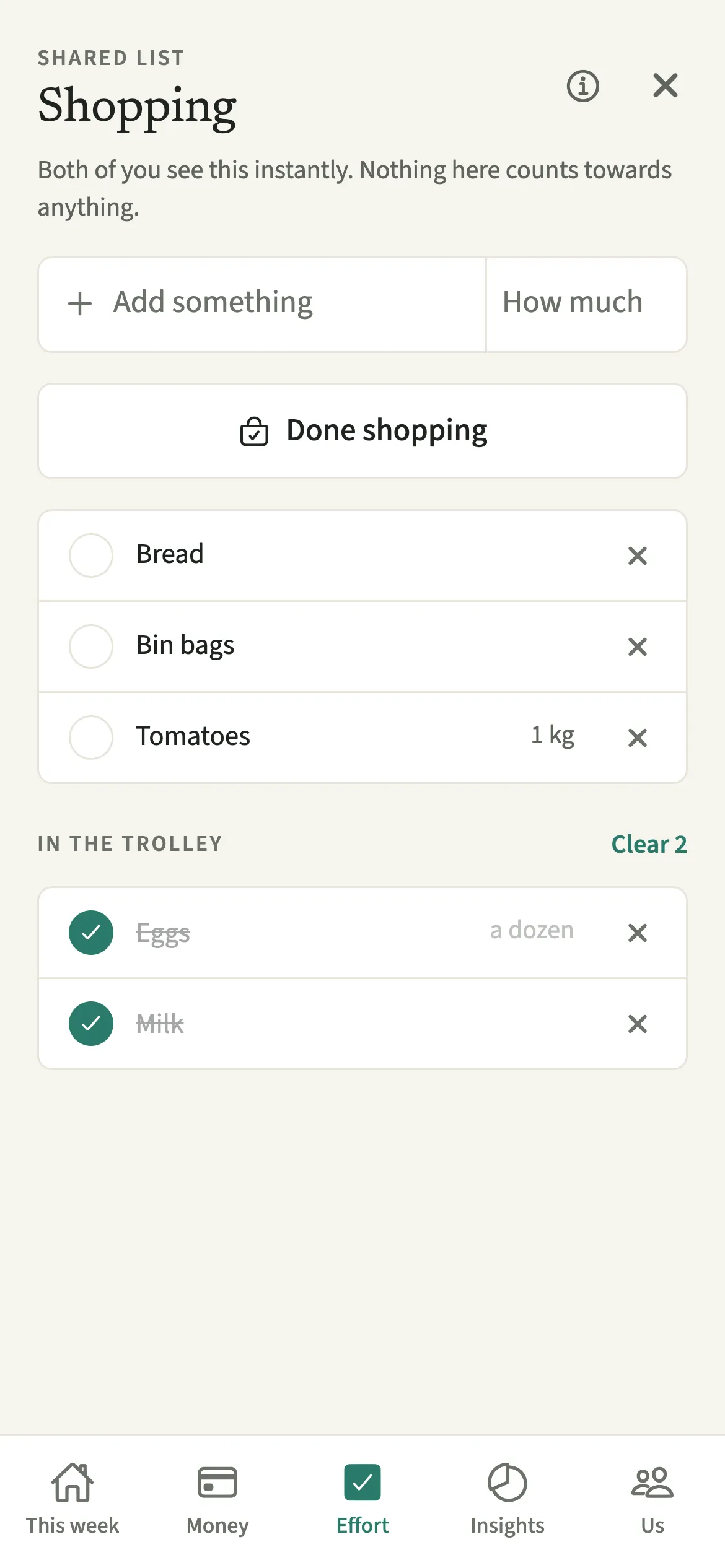
The Shopping list in EvenUS is one shared list that either partner can add to, and it changes on both phones straight away. In the shop you tick things off as they go in the trolley. When you tap Done shopping and enter the total, it becomes one ordinary shared expense, paid by whoever did the shop, which you check before it is saved.
What does the Shopping list do?
It replaces the “we need milk” messages with one list you both see, and turns the finished shop into one expense without retyping anything. One of you notices the washing up liquid is low and adds it. The other is near the supermarket and sees it a moment later.
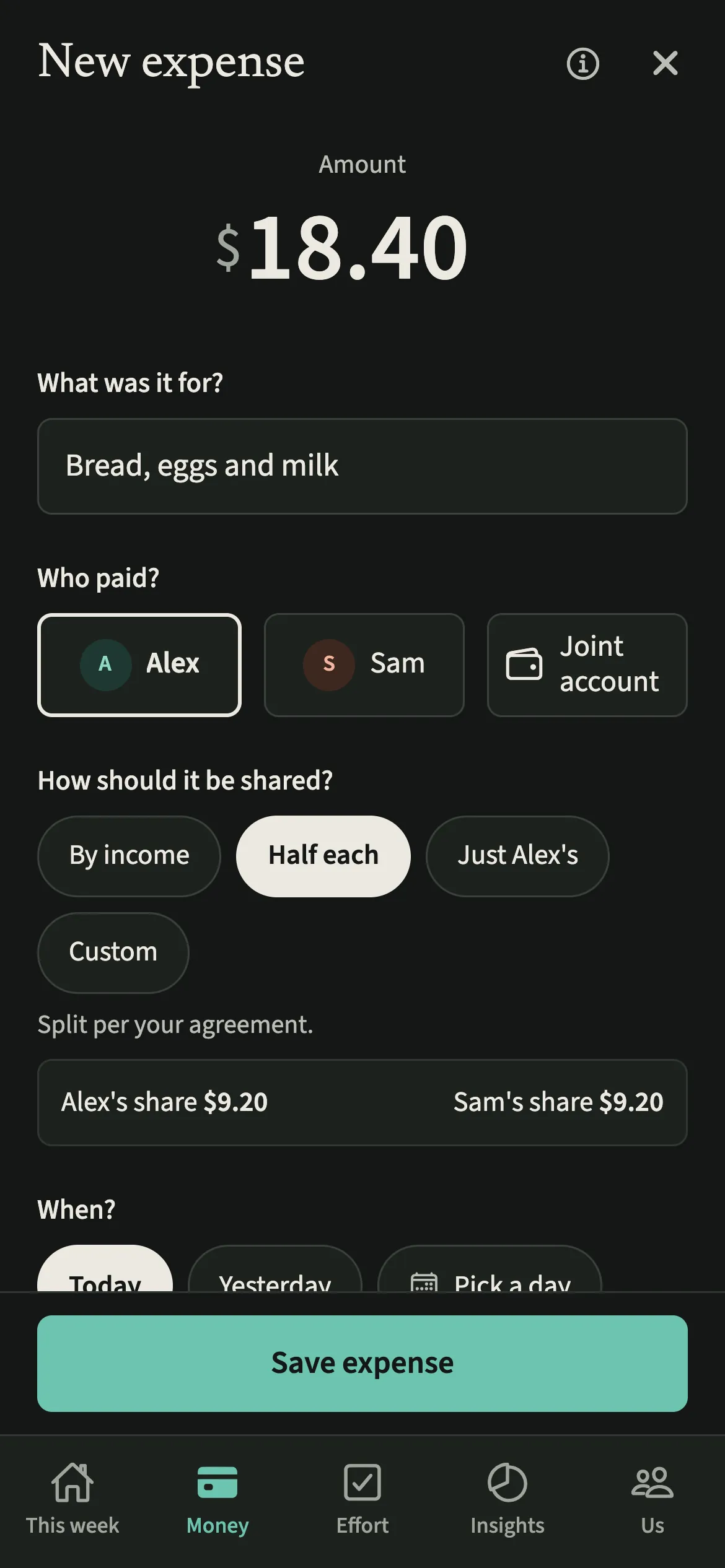
When the shop is done, the bought items become a single entry in Shared expenses, filed under Groceries with a title made from the items, such as “Milk, eggs and bread”. It splits the way your household shares costs and feeds the Even up card. A shop made only of one hosting plan’s menu items is tagged to that plan, so its budget includes it.
The list itself is just a list. EvenUS does not count who added items or who ticked them off.
Who is the Shopping list for?
For couples who keep texting each other “we need milk”, and for households where one of you tends to notice what is running out. It also suits couples who take turns doing the big shop, because the expense lands with whoever paid.
How do you use the Shopping list?
Open the Effort tab, tap “Shopping list”, add items, tick them off in the shop, then tap “Done shopping”, enter the total and check the expense.
- Open the listOpen the Effort tab and tap “Shopping list”.
- Add what you needType in “Add something”, add How much if you like, such as 2 kg, and tap Add. “Milk, eggs and bread” goes on as three items. Press and hold an item later to change it.
- Tick things off in the shopTap each item as it goes in the trolley. Ticked items move under “In the trolley”, with no pop-up to dismiss. Tap ✕ beside an item to take it off the list, and Undo puts it straight back.
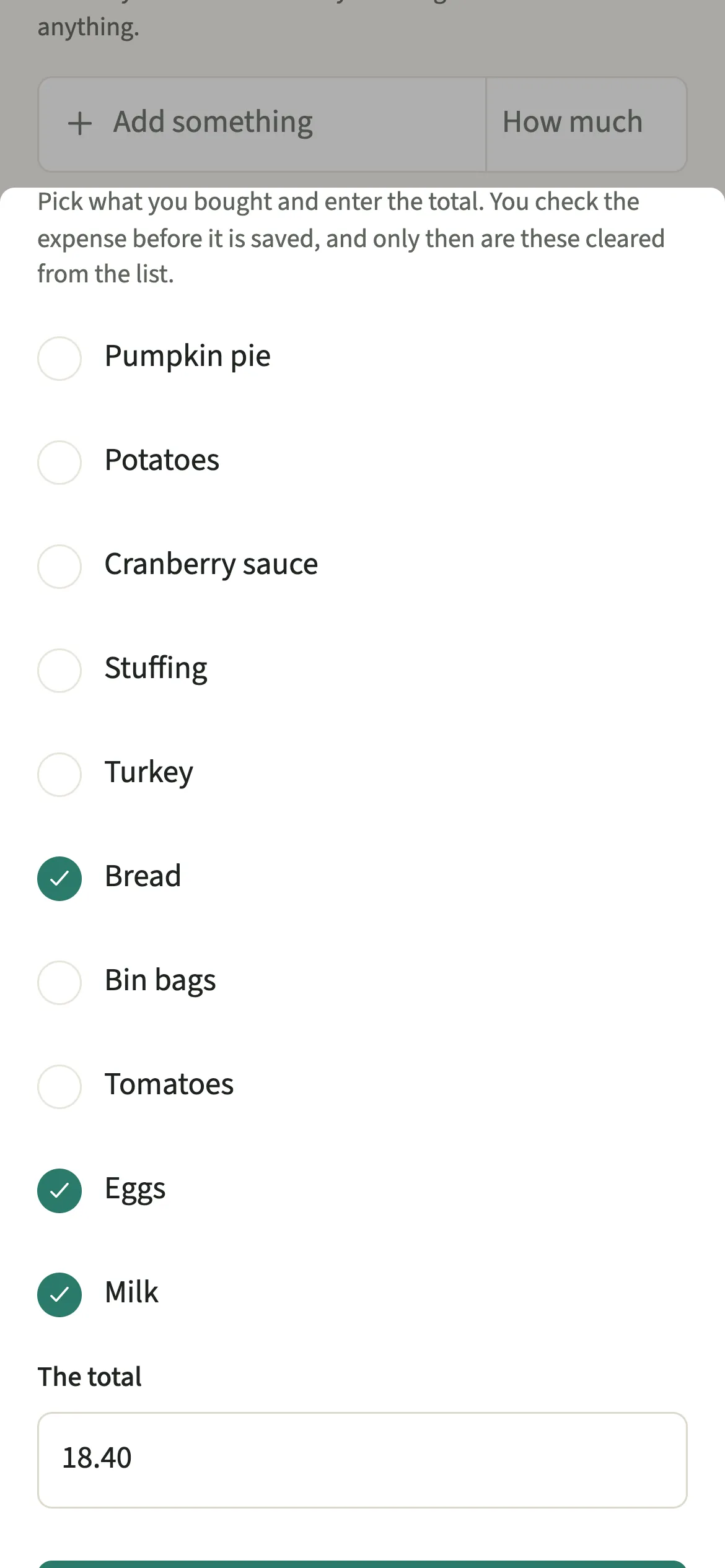
- Finish the shopTap “Done shopping”. Pick what you bought (what you ticked is chosen already), enter the total under “The total”, and tap “Check the expense”.
- Save the expenseThe expense form opens filled in: Groceries, a title from the items, and you as the payer. Check it and save. Only then are those items cleared from the list.
What does your partner see?
Your partner sees the list change straight away: new items, ticks and anything removed. In different aisles of the same shop, you can each tick what you pick up.
The finished shop arrives as one ordinary expense, paid by whoever did the shop, after that person has checked it. The one exception is a shop with a personal part when you have switched on Hide my personal spending detail: then your partner sees the whole shop as “A personal expense”, with its full amount but not its title or category. There is no record of who added which item.
Tips for a list that actually gets used
- Add from Tell EvenUS too: type “add milk and eggs to the list” and both items go on as separate lines.
- Removed something by mistake? “Removed” shows with Undo for a few seconds.
- If you cancel the expense form after Done shopping, the list stays exactly as it was, ticks included.
- Buying some things just for yourself in the same shop? Use “Part of this was just for me” on the expense so only the rest is shared.
Why does nothing on the list count?
Noticing that the milk is running low is a small piece of the mental load, and it is tempting to score it. EvenUS deliberately does not. Counting who added items would reward typing fast and turn a shared list into something to compete over.
The work behind the shopping is counted elsewhere. Keeping track of what is running low is the Groceries area in Who keeps track of what, and the time spent doing the shop can be logged as a chore in Effort. The money is the expense. The list just holds the items.
Is Shopping list free?
Shopping list keeps working after the 7-day free week, whether or not you subscribe. The computed views, such as the household balance and this week’s idea, are part of EvenUS Pro: $9.99 a month or $79.99 a year, with one subscription covering both partners. The free week needs no card, and nothing is charged when it ends.
Questions about Shopping list
Can my partner and I both add to the same shopping list?
Yes. There is one list per household and either of you can add, tick or remove items. Changes appear on the other phone straight away, so you can both shop from it at the same time.
Who is the payer when the shop becomes an expense?
Whoever taps Done shopping is filled in as the payer, because they did the shop. You can change it on the expense form before saving if your partner paid, just as with any expense.
What happens to items I did not buy?
Only the items you pick in the Done shopping sheet are cleared, and only after the expense is saved. Anything you did not get stays on the list for next time, on both phones.
Does the Shopping list affect the household balance?
The list itself does not count towards anything. Once a shop is saved as an expense, that expense is part of your shared spending like any other, which is what feeds the money side of the household balance.
Related features
Other parts of EvenUS that work alongside Shopping list.
Related reading
Articles on the questions behind this feature.