Household help: days, pay and advances for anyone you employ at home
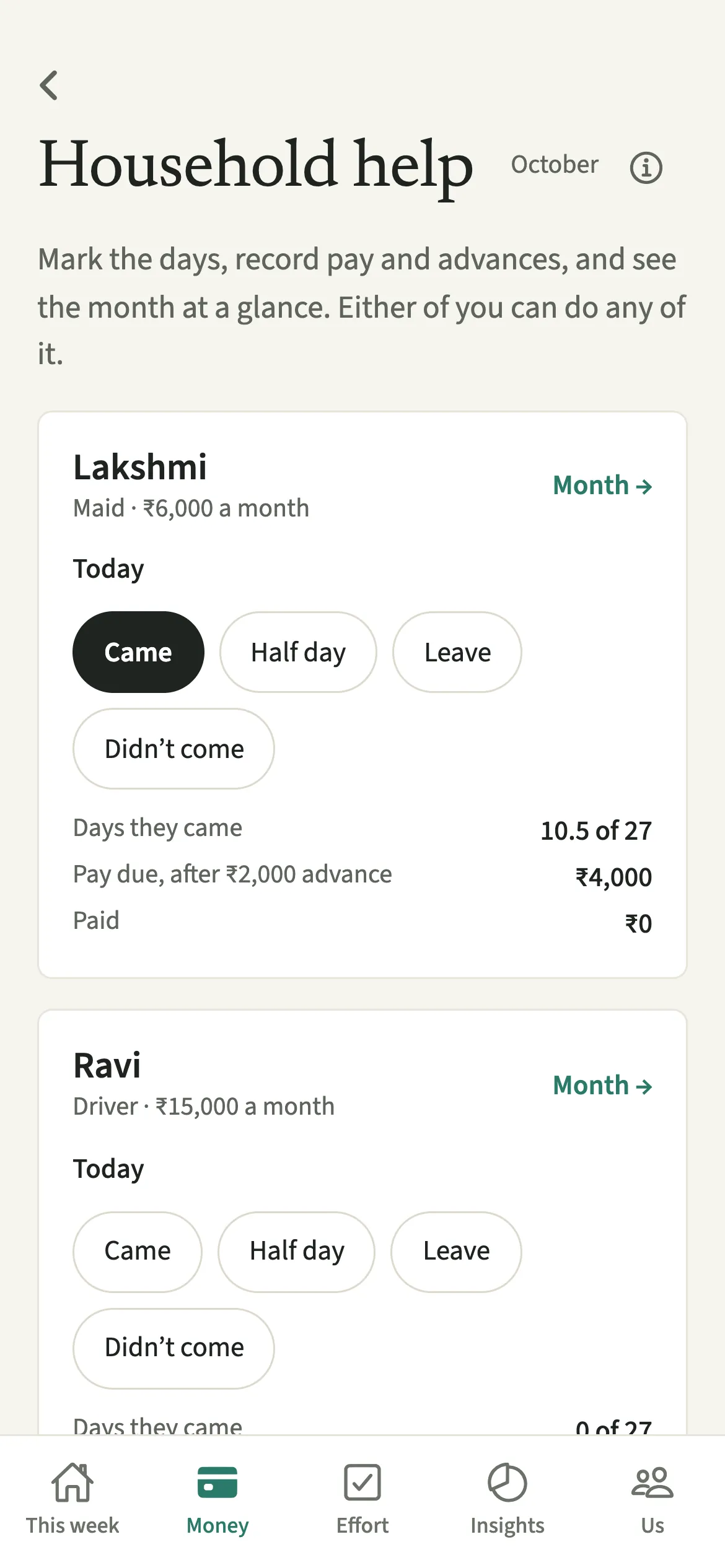
Household help in EvenUS keeps track of anyone you employ at home, such as a maid, cook, nanny, driver, gardener or cleaner. You add their pay and usual days once, then tap Came, Half day, Leave or Didn’t come each day. EvenUS works out the month’s pay, takes off any advance, and records payments as shared Household help expenses that either partner can see.
What does Household help do?
It keeps the days, the pay and the advances for the people who work in your home straight, with a tap a day. Paying household help usually means a running tally in someone’s head: how many days the cook came, whether the mid-month advance has come off yet, and which of you already handed over the salary.
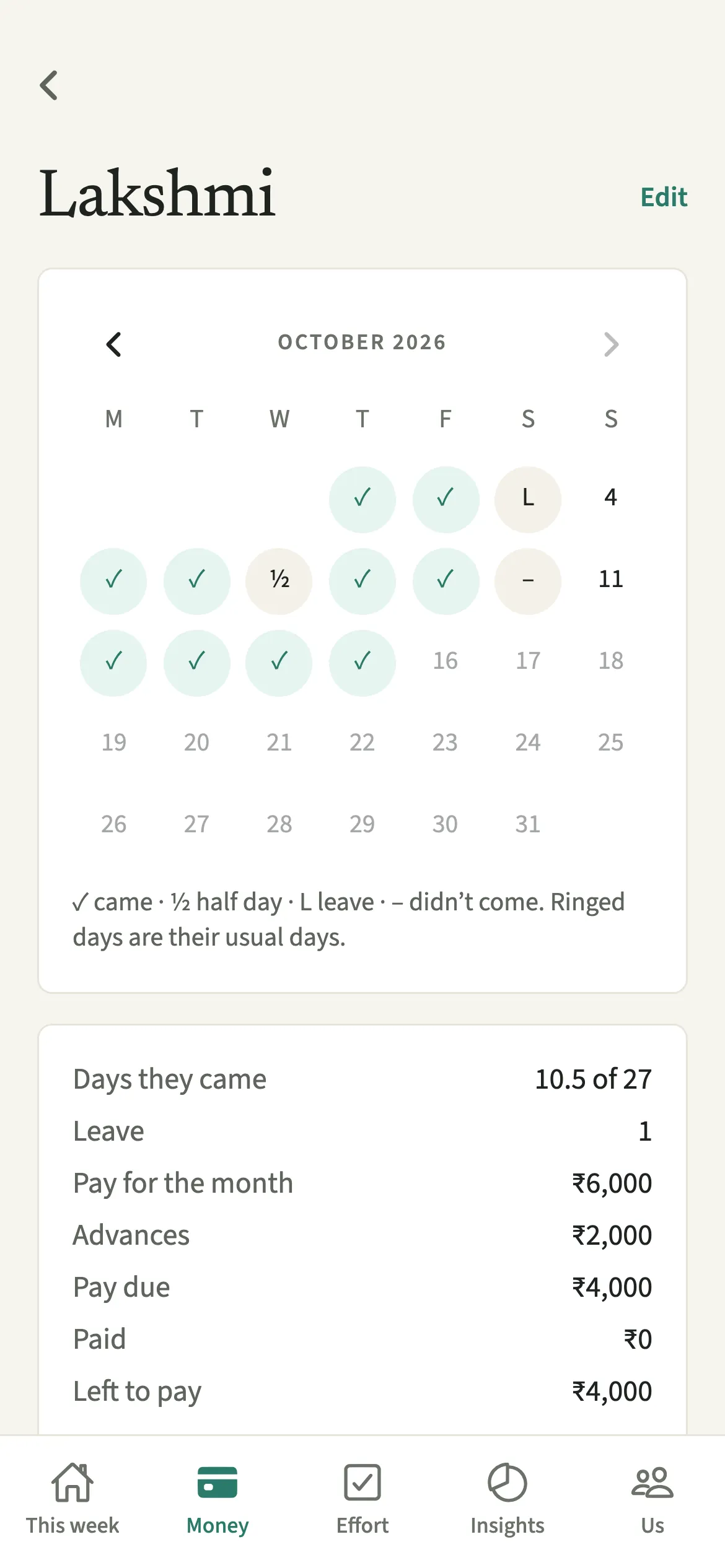
In EvenUS, each person has a card with today’s status and the month so far. The month view shows a calendar with their usual days ringed, then the pay for the month, any advances, and what is left to pay. Pay and advances are saved as Household help expenses and split the way you split shared costs, so they flow into the Even up card like any other shared cost.
It works whether someone is paid by the month, by the week or by the visit.
Who is Household help for?
Households with a maid, cook, nanny, driver, gardener or cleaner, paid by the month, the week or the visit. It is common in Indian homes with daily help, and just as useful for a weekly cleaner anywhere. For daycare or a nanny you pay as a fixed bill, Childcare may fit better.
How do you set up household help in EvenUS?
Open Money, tap “Household help” under Track, tap “Add someone”, enter their details, then mark each day on their card.
- Open Household helpOpen the Money tab, then under Track tap “Household help”, then “Add someone”.
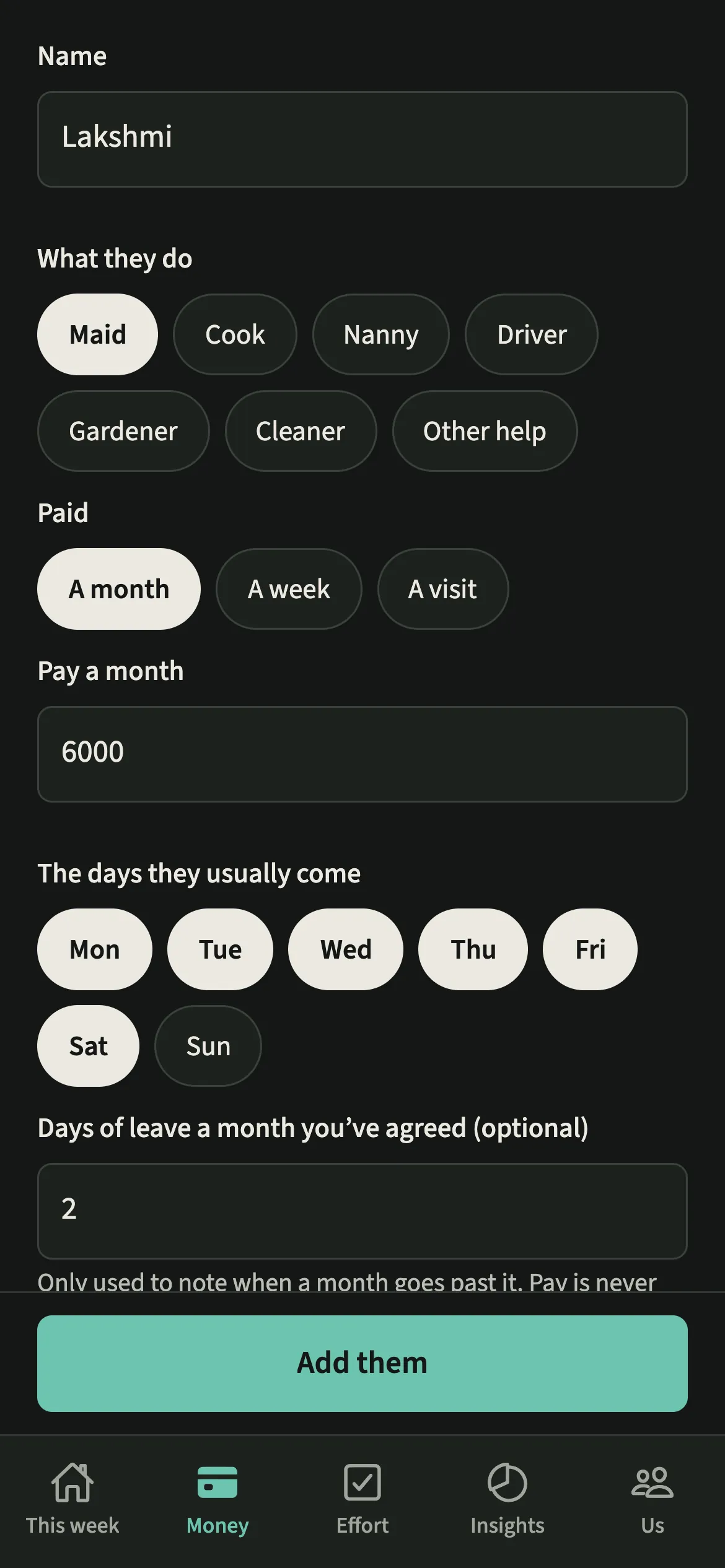
- Add their detailsEnter their name, what they do, their pay (a month, a week or a visit) and the days they usually come. Add the days of leave a month you have agreed, if you like, then tap “Add them”.
- Mark each dayEach day, tap Came, Half day, Leave or Didn’t come under Today on their card. Tapped the wrong one? Tap the same one again to clear the day.
- See the monthTap Month to see the calendar, the pay for the month, any advances and what is left to pay.
- Record pay or an advanceOn the month view, tap “Record pay” or “An advance”. Pick the month it is for, enter how much, choose who paid and under “When” the day it was paid, then save.
What does your partner see?
Household help is shared, like bills: you both see the same days and payments, and either of you can mark a day or record pay. Each payment shows who paid it, so the month never gets paid twice by accident.
Those taps are not counted as anyone’s chores, and the screen describes the month, not either of you. If one of you recorded some of a month’s pay as a private personal expense, the month view notes that part of the pay is in a private entry, so you can check together before paying again.
Tips for keeping the month straight
- An advance comes off that month’s pay. Whatever goes beyond that month’s pay comes off the months after, until it is used up.
- If you set the days of leave you have agreed, the card notes when a month goes past it. The pay stays as it is; that is for you to talk over with them.
- Starting or finishing mid-month? In Edit, set “First day working for you” or “Last day”. For monthly or weekly pay, that month becomes a part month, paid for their days.
- When someone leaves, “No longer working for us” in Edit moves them to Past help, with their months kept. “Bring back” returns them to the list.
How does EvenUS work out the month’s pay?
It depends on how they are paid. A monthly salary is the salary. Weekly pay becomes a month’s worth of weeks: the weekly rate times 52, divided by 12. Pay by the visit is the rate times the days they came, with a half day counting as half. In a part month, monthly and weekly pay count only the days they worked for you. Advances, including any earlier advance that went beyond a month’s pay, come off before what is left to pay.
Say a cook is paid 6,000 a month and took a 2,000 advance mid-month. The month shows 6,000 pay, 2,000 in advances and 4,000 left to pay.
Why does leave never change the pay?
Because that decision belongs to you and the person you employ. EvenUS notes when a month goes past the leave you agreed, but it never docks anyone’s wages.
Is Household help free?
Household help keeps working after the 7-day free week, whether or not you subscribe. The computed views, such as the household balance and this week’s idea, are part of EvenUS Pro: $9.99 a month or $79.99 a year, with one subscription covering both partners. The free week needs no card, and nothing is charged when it ends.
Questions about Household help
Can both of us mark attendance for our maid?
Yes. Household help is shared, like bills. Either of you can mark a day as Came, Half day, Leave or Didn’t come, and you both see the same calendar.
How are advances handled?
An advance is recorded with An advance on the month view and comes off that month’s pay. If it is more than the month’s pay, the rest comes off the following months in order, until it is used up.
Does marking attendance count towards our chores?
No. Marking days and recording pay for household help is not counted as either partner’s chore. The payments are shared expenses and show who paid them.
Does EvenUS pay our household help?
No. EvenUS never moves money and never connects to a bank. You pay them as usual, in cash or by bank transfer, then tap Record pay and pick the day you paid.
Related features
Other parts of EvenUS that work alongside Household help.
Related reading
Articles on the questions behind this feature.