Maple Is Closing: Best Maple Alternatives (2026)
Maple says it will shut down on December 31, 2026. What to do before then, and the best alternatives: Cozi, FamilyWall, Ohai, TimeTree, Skylight and more.
Maple, the family organizer, says it has been acquired by Wander and will shut down on December 31, 2026, after which all data will be deleted. The closest replacements are Cozi for an all-in-one family organizer, FamilyWall if you want meal planning and a locator too, and Ohai if you relied on an assistant that reads school emails. TimeTree and Google Calendar cover the shared calendar on its own, and Skylight puts it on a screen in the kitchen. EvenUS is not an organizer, but it is worth a look if Maple was really about sharing the load more fairly.
EvenUS is our own app, and we have no affiliate deal with any app on this page. What we say about Maple comes from its own website and two independent write-ups, and what we say about the others comes from their own websites and US App Store listings, all checked on 3 November 2026. Ratings are the US App Store figures shown that day.
What is happening to Maple, and when
Maple's website says it "has been acquired by Wander and will sunset on December 31, 2026." It also says:
- Your account stays active until December 31, 2026, then it is closed and cannot be accessed.
- All data will be deleted, with no way to recover it.
- Connections to outside services, such as Google Calendar, Apple Calendar, Outlook and TeamSnap, end too.
- Annual subscriptions will no longer renew, and monthly subscriptions stay active until December 31, 2026.
Maple recommends exporting or moving your data to other apps before it shuts down, but when we checked it had not published step-by-step export instructions or named any replacement apps. Its App Store page in the US no longer loads, so new families cannot install it.
One thing to watch: a review that checked the app on 21 September 2026 reported that the notice inside the app gave November 30, 2026, not December 31. We could not see the in-app notice ourselves. To be safe, plan to have moved by the end of November.
Before Maple closes: a short checklist
- Check the date in your own app and plan around whichever is earlier.
- Copy what lives only in Maple. Lists, recipes, notes and anything you typed in yourself will be deleted. If there is no export option in your app, screenshots or copying text into your new app are the fallback.
- Check your connected calendars. If you linked a Google, Apple or Outlook calendar, open that calendar directly and see which events are actually stored there, because Maple says those connections end.
- Check your subscription. Annual plans will not renew. If you pay monthly through the App Store or Google Play, you can see the end date in your store subscriptions.
- Move together. Pick the new app with your partner, and set it up on both phones the same week, so nobody keeps two systems going.
Maple alternatives compared
| App | Best for | Platforms | Price (USD) | US App Store rating (3 Nov 2026) |
|---|---|---|---|---|
| Cozi | An all-in-one family organizer | iPhone, Android, web | Free with ads; Gold $39 a year; Max $79 a year | 4.8 (402K) |
| FamilyWall | Organizer with meals, budget and locator on Premium | Phone, tablet, web | Free; Premium $44.99 a year | 4.8 (25K) |
| Ohai | An AI assistant for school emails and meals | iPhone, Mac | Free version; paid plans (site and App Store prices differ) | 4.4 (228) |
| TimeTree | A shared calendar first | iPhone, Android, web | Free; Premium $4.49 a month or $44.99 a year | 4.9 (93K) |
| Google Calendar | Free shared calendars | iPhone, Android, web | Free | 4.5 (133K) |
| Skylight | A wall calendar screen | App plus Skylight screen | Screens from $149.99; Plus $79 a year on its site | 4.8 (53K) |
| EvenUS | Sharing the household load fairly between two partners | iOS, Android (closed testing) | $9.99 a month or $79.99 a year, 7-day trial | Not yet on the App Store |
1. Cozi: the closest all-in-one swap
Best for: families who used Maple as the household's shared calendar and lists.
Cozi gives the whole family one account with a color-coded calendar, shopping and to-do lists, meal planning and a recipe box, on iPhone, Android and the web. The free plan has ads. Gold, $39 a year, removes them for everyone and, according to its App Store listing, lets you work with events more than 30 days ahead. Max, $79 a year on its site, adds AI event import and AI meal planning, which is the nearest thing to Maple's assistant features. See Cozi alternatives and Cozi vs FamilyWall.
2. FamilyWall: the most features in one place
Best for: families who want one app for the calendar, lists, meals and more.
FamilyWall's free features include a shared calendar, shopping and task lists, recipes, messaging and a photo gallery. Premium, $44.99 a year with a 30-day free trial on its site, adds a meal planner, budget, documents, Google and Outlook calendar sync and a family locator, and one subscription covers the whole family circle. See FamilyWall alternatives.
3. Ohai: if you used Maple as an assistant
Best for: parents who forwarded emails and want the dates pulled out for them.
Ohai is an AI household assistant: forward school newsletters and it adds the dates to a shared family calendar, plans meals, and can send a grocery list to Instacart. It has a free version and a free trial. Its site lists Individual, Duo and Group plans by the month, but the App Store shows different prices, so check in the app. It is listed for iPhone and Mac on the US App Store.
4. TimeTree: if the calendar is what you need
Best for: couples and families who mostly coordinate who is where.
TimeTree is a shared calendar for families, couples and other groups, with memos, to-do lists and chat inside events. It is free; Premium removes ads and is $4.49 a month or $44.99 a year, with the first month free. It runs on iPhone, Android and the web.
5. Google Calendar: the free fallback
Best for: families who already use Google and want to move quickly.
Google Calendar is free, lets you share calendars so family members can view, add or change events, and runs on iPhone, Android and the web. If Maple was connected to a Google calendar, some of your events may already be there.
6. Skylight: if the children need to see it
Best for: families who want the plan on the kitchen wall.
The Skylight app activates and manages a Skylight Calendar, so you need to buy a screen; the 10-inch starts at $149.99 on its site. Skylight Plus, $79 a year on its site ($39.99 a year in the App Store), adds importing events from forwarded emails and meal plans, and the app lists recurring chores and routines.
Where EvenUS fits
Best for: couples for whom Maple was a way of getting the planning out of one person's head.
EvenUS is our app, and it does not replace Maple's calendar. It has no shared calendar. It does have a shared shopping list, reminders for birthdays, events and document renewals that you can export to Google, Apple or Outlook calendar, and a shared chore list with an owner on each chore. What it adds is a measure of how the work is shared: it estimates the planning each of you carries, counts it as hours next to paid work and chores, and suggests one swap a week.
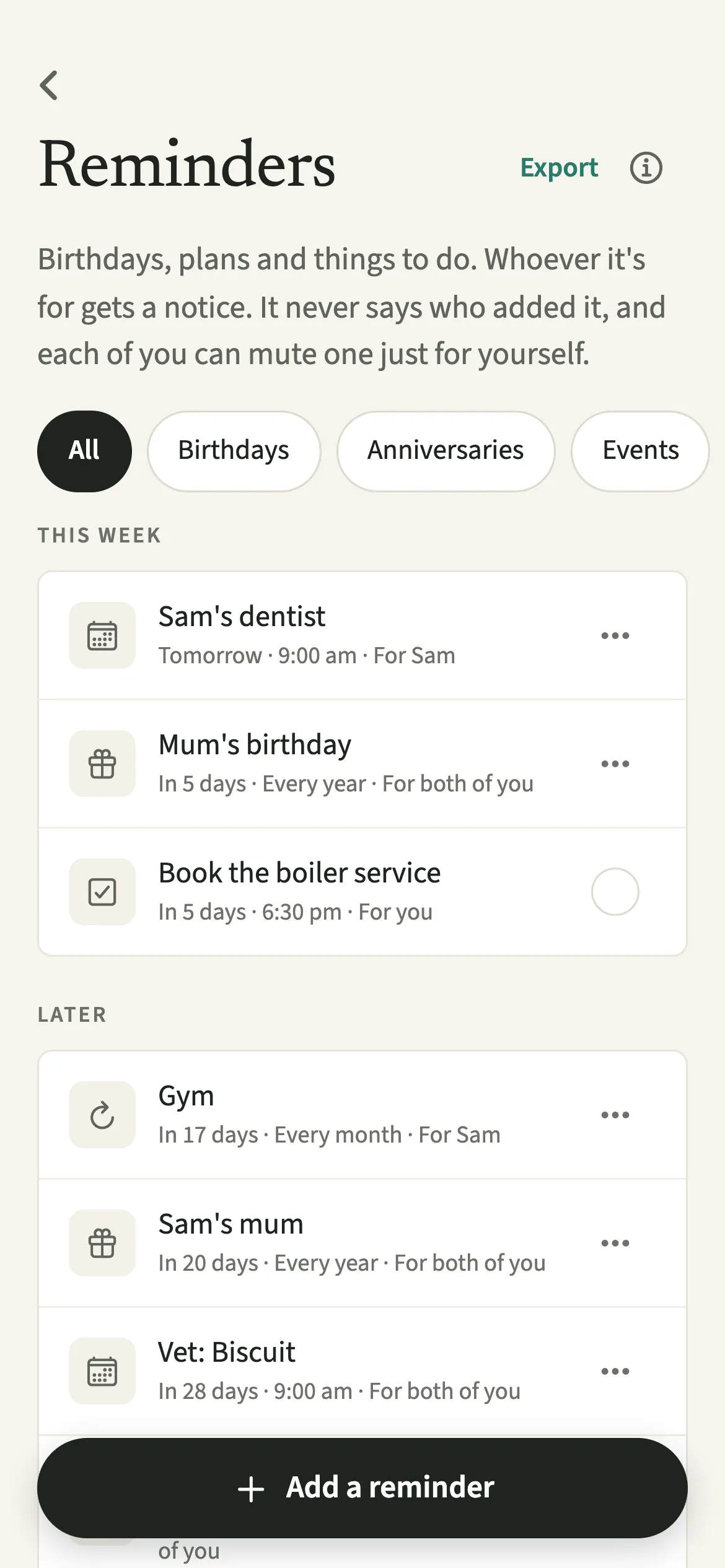
Its limits: it only works for two partners, not the whole family, it needs both of you to take part, and it is in closed testing, so it is not on the app stores yet. Many families would run an organizer such as Cozi alongside it. One subscription covers both of you: a 7-day free trial with no card, then $9.99 a month or $79.99 a year (USD reference prices, set per region by the app stores). Maple vs EvenUS explains the difference between the two kinds of tool.
Which one should you pick?
- "We want something that feels like Maple." Cozi or FamilyWall.
- "We loved forwarding emails to it." Ohai, or Cozi Max or Skylight Plus for AI event import.
- "We only used the calendar." TimeTree or Google Calendar.
- "The kids should see the plan." Skylight.
- "One of us still does all the remembering." Read how to offload your mental to-do list and look at EvenUS.
Frequently asked questions
When is Maple shutting down?
Maple's website says December 31, 2026. One review reported that the notice inside the app, as seen on 21 September 2026, gave November 30, 2026, so plan for the earlier date.
Will my Maple data be kept?
No. Maple's site says all data will be deleted once it shuts down, with no way to recover it, and recommends exporting or moving your data before then.
Can I still download Maple?
No. Its US App Store page no longer loaded on 3 November 2026.
What is the closest alternative to Maple?
For a shared family organizer, Cozi or FamilyWall. For an AI assistant that reads emails, Ohai.
Do I need to cancel my Maple subscription?
Maple's site says annual subscriptions will no longer renew and monthly ones stay active until December 31, 2026. Check your App Store or Google Play subscriptions to be sure of your own end date.
How we compared them
We read Maple's website on 3 November 2026 and checked its closing date against two independent write-ups that give the same date. Several articles on this topic are written by companies with competing apps, so we used them only to confirm dates, not for recommendations. For every other app we read its own website and its US App Store listing on the same day and only state a fact when both agreed or the app's own page said it. Ratings are the US App Store figures shown that day; Google Play stars are left out. We have not run a timed test of these apps. EvenUS facts come from our own feature documentation. If anything here is wrong or out of date, email support@evenus.app.
Sources, accessed 3 November 2026: growmaple.com, AlphaMa write-up, Carly roundup, Mama Copilot review, AppGoblin, Cozi plans, Cozi on the App Store, FamilyWall Premium, FamilyWall on the App Store, Ohai, Ohai on the App Store, TimeTree Premium, TimeTree on the App Store, Google Calendar help, Google Calendar on the App Store, Skylight calendars, Skylight on the App Store.
Want to try EvenUS with your partner?
It is in closed testing on iPhone and Android. Leave an email and we will send you both an invite. The first 7 days are free, with no card.
EvenUS is our own app. We have no affiliate deals with any app on this page and earn nothing if you choose one of them. Prices change, so check the store listing before you pay.