Chore templates: set up your home’s chores in a couple of taps
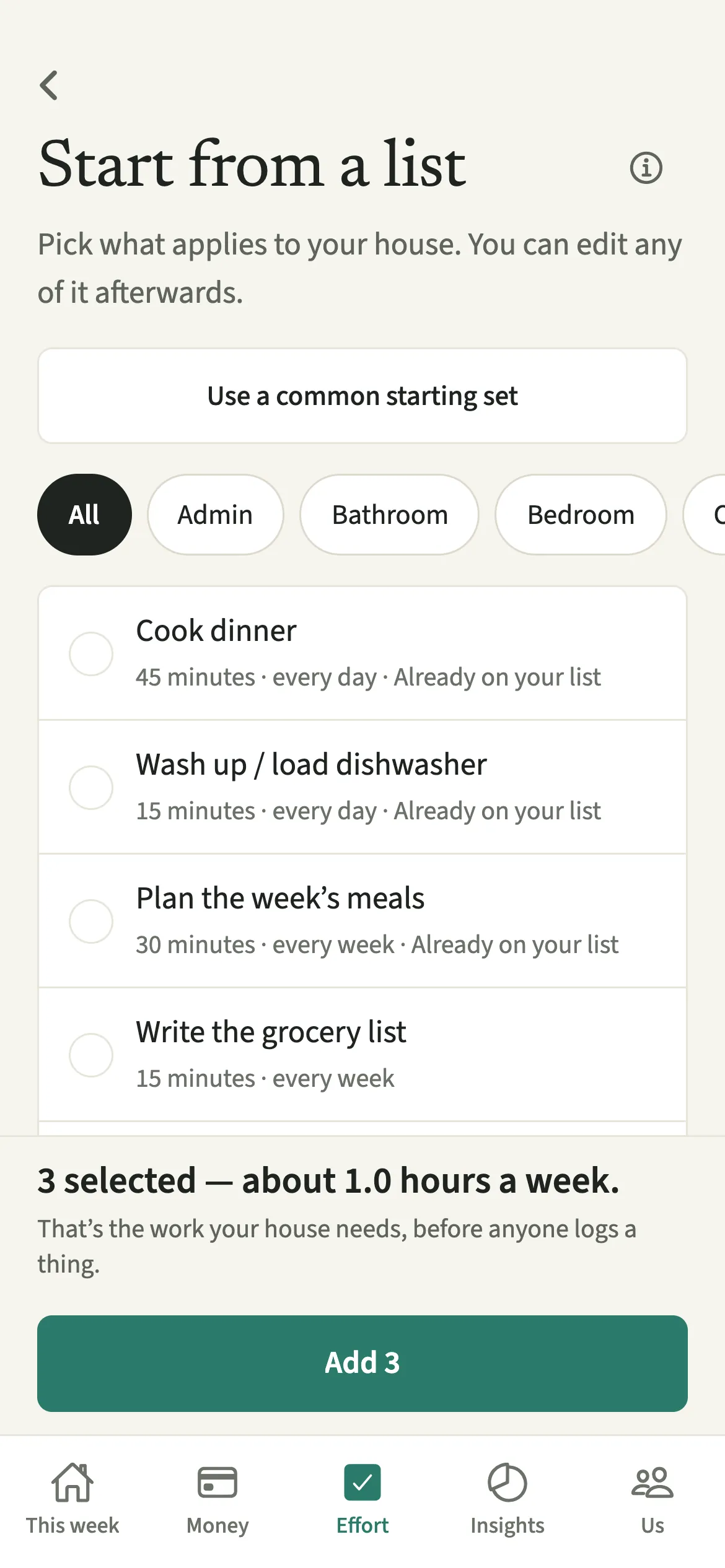
Chore templates in EvenUS are a ready-made list of common household chores, each with a typical time and how often it comes round. You tap the ones that apply to your home, or take a common starting set, and the screen adds up the weekly hours as you pick. Tap the Add button and they appear on the shared Effort list on both phones.
What do chore templates do?
They get your household’s chores into EvenUS in about the time it takes to read the list, and show how much work the house needs each week. Writing out every job by hand is where most chore systems stall: forty chores is a lot of typing, and the list you give up on halfway is the one that never gets used.
The templates cover the kitchen, cleaning, laundry, shopping, planning, admin, maintenance, pets and, for families, childcare. Each comes with a sensible number of minutes and a rhythm, such as every day or every 2 weeks, and some include a suggested “What does done look like?” so the standard is agreed from the start.
As you pick, the screen keeps a running total in hours a week. That figure is the work your house needs, before anyone logs a thing, and for many couples it is the first time anyone has seen it written down.
Who are chore templates for?
A couple setting up Effort for the first time, or anyone who would rather not write out forty chores by hand. They also help when your home changes, for example after moving into a house with a garden or when a baby arrives, and you want to add a group of new jobs at once.
How do you set up chores from templates?
On the Effort tab, tap “Chore templates”, pick the chores that apply or tap “Use a common starting set”, then tap the Add button, which shows how many you picked, like “Add 12”.
- Open the templatesOpen the Effort tab and tap “Chore templates”. If you have no chores yet, “Browse templates” opens the same list.
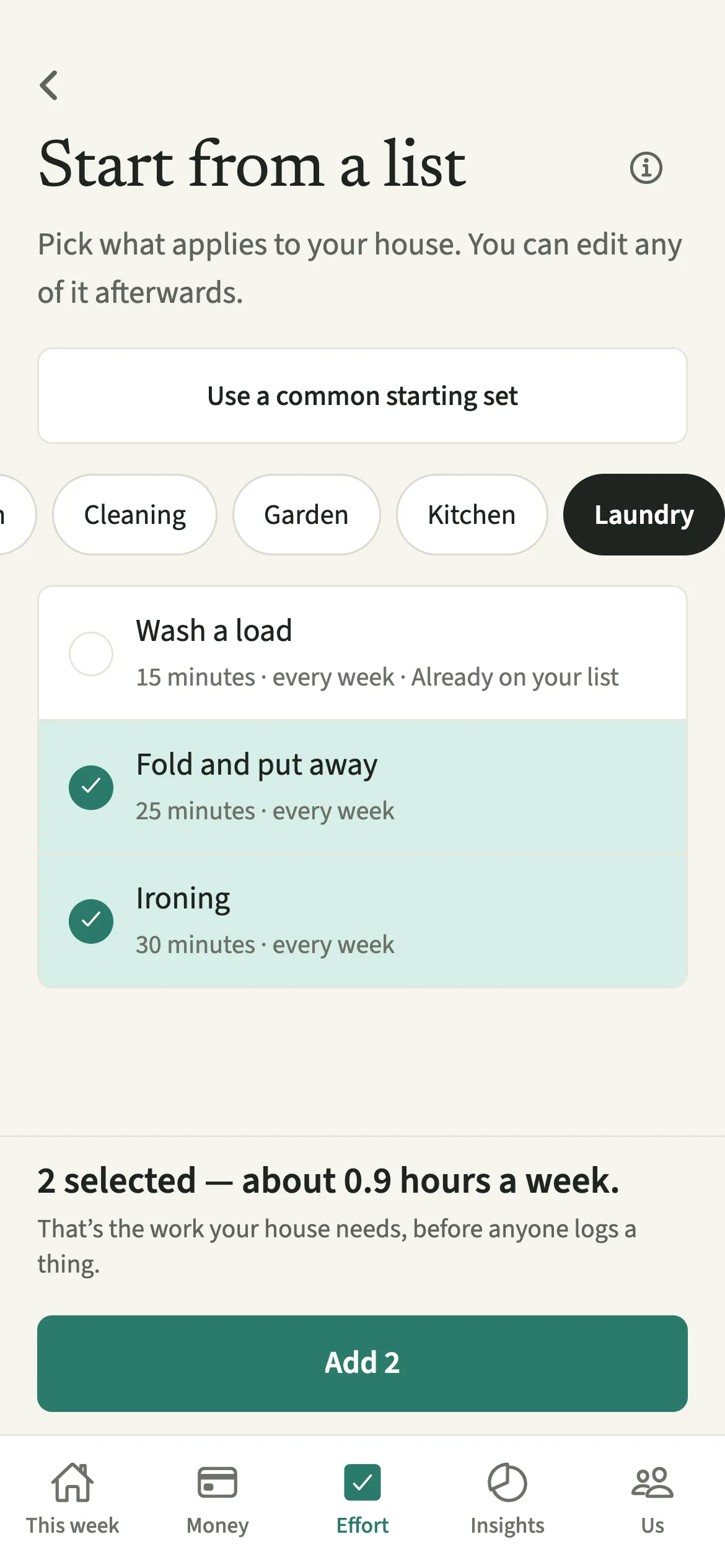
- Pick your choresTap “Use a common starting set”, or pick chores one at a time. The chips at the top narrow the list by area, such as Kitchen or Laundry.
- Check the weekly hoursWatch the weekly hours add up at the bottom of the screen as you pick or untick chores.
- Add themTap the Add button at the bottom. It shows how many you picked, like “Add 12”. The chores go onto the Effort list for both of you.
- Give each chore an ownerTemplates arrive without an owner. Open each chore and choose under “Who owns this?”, and adjust the minutes or how often it comes round if your home differs.
What does your partner see?
The chores appear on your partner’s phone straight away, on the same Effort list. Adding them from templates is shown once in the activity feed rather than as a stream of separate entries.
A chore keeps the name it was added with, in the language the app was in at the time. A chore added in Hindi keeps its Hindi name on both phones. Nothing about the templates you browsed but did not add is shared.
Tips for choosing chore templates
- The hours are the work your house needs, before anyone logs a thing. That is often the most useful number to talk about together.
- Start with the common starting set and remove what does not apply. Chores already on your list are marked “Already on your list” and are never added twice.
- Everything added can be edited afterwards: the minutes, how often, and who owns it.
- Templates for children only show up once you’ve added children under Us, and school ones only with a child of school age. See Children.
- Planning jobs such as meal planning are on the list too. For the wider picture of who keeps track of what, use the planning and remembering questions.
How are the weekly hours worked out?
Each template’s minutes are spread over its rhythm and turned into hours a week. A 30-minute job every day is 3.5 hours a week; a 60-minute job every 2 weeks is half an hour a week. One-off jobs are real work but are left out of the weekly figure. If Alex and Sam pick fourteen chores, the bottom of the screen might show about 9 hours a week.
This total is never credited to anyone. The household balance uses only time someone actually logs, so the templates’ estimates shape the list and the “Done” button, not the numbers. Once a chore has been logged a few times, its detail screen shows how long it usually takes in your home.
Is Chore templates free?
Chore templates keeps working after the 7-day free week, whether or not you subscribe. The computed views, such as the household balance and this week’s idea, are part of EvenUS Pro: $9.99 a month or $79.99 a year, with one subscription covering both partners. The free week needs no card, and nothing is charged when it ends.
Questions about Chore templates
Who owns the chores I add from templates?
Nobody, at first. Templates are added without an owner so neither of you is assigned work by default. Open each chore on the Effort tab and choose under Who owns this. Agreeing owners together tends to work better than one person deciding.
Can I change a template chore after adding it?
Yes. Every chore added from a template is an ordinary chore. You can change its name, minutes, how often it comes round, its owner and what done looks like, or remove it from the list. Removing it keeps its history.
Why don’t I see any childcare templates?
Childcare templates only show once you have added children under Us, then Household, then Children. The school run and similar jobs appear only with a child of school age, so the list fits your family.
Does the weekly hours figure count towards the household balance?
No. The hours on the templates screen describe the work your home needs. Only time either of you actually logs counts towards the household balance, never an estimate, so adding chores never changes anyone’s numbers on its own.
Related features
Other parts of EvenUS that work alongside Chore templates.
Related reading
Articles on the questions behind this feature.