Import a bank statement: tick the shared payments, add only those
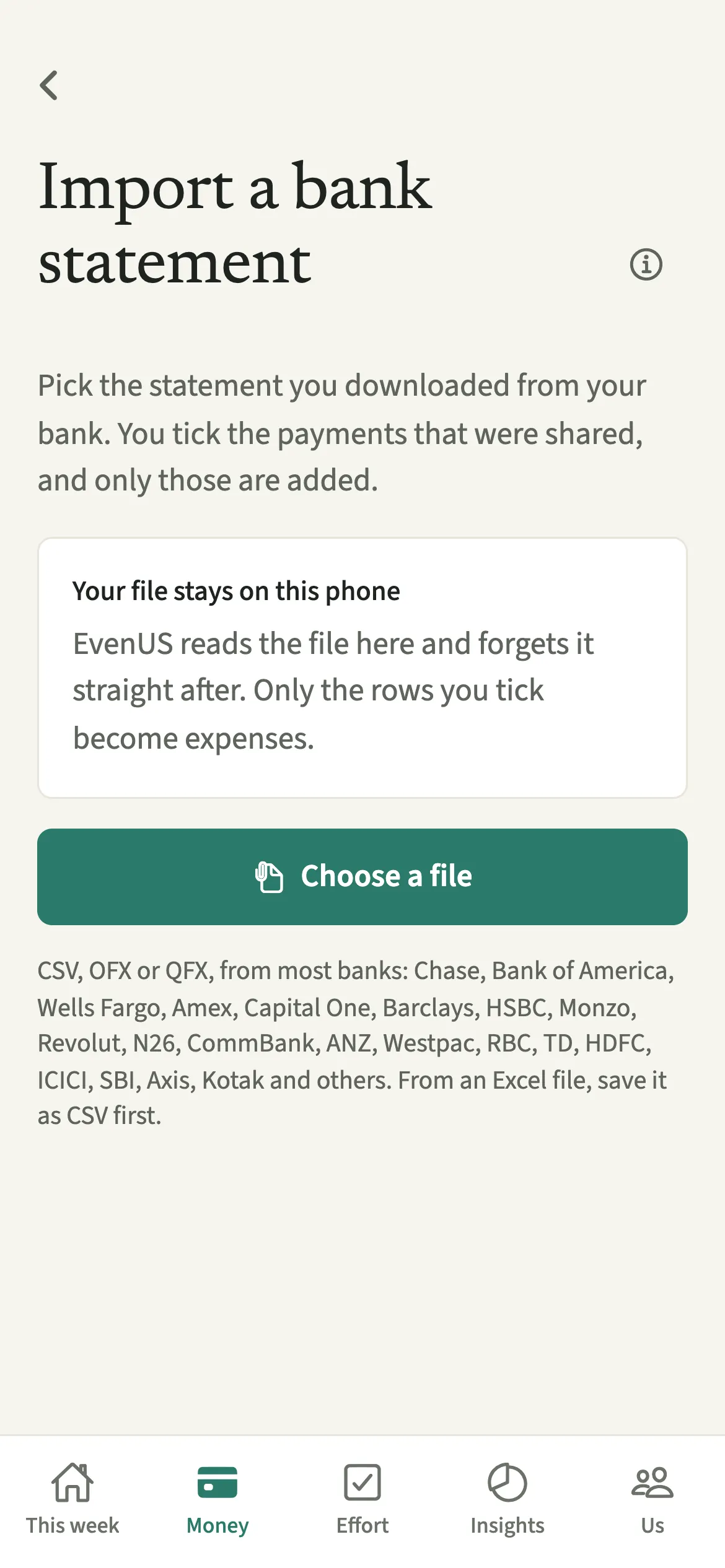
Import a bank statement is how EvenUS catches up on card spending without connecting to a bank. You download a CSV, OFX or QFX file from your bank, choose it in EvenUS, and tick the payments that were shared. Only the ticked ones become shared expenses, each split the way you pick. The file is read on your phone and forgotten straight after.
What does Import a bank statement do?
It turns a statement you already have into a list you can tick, so a month of shared card spending goes in at once.
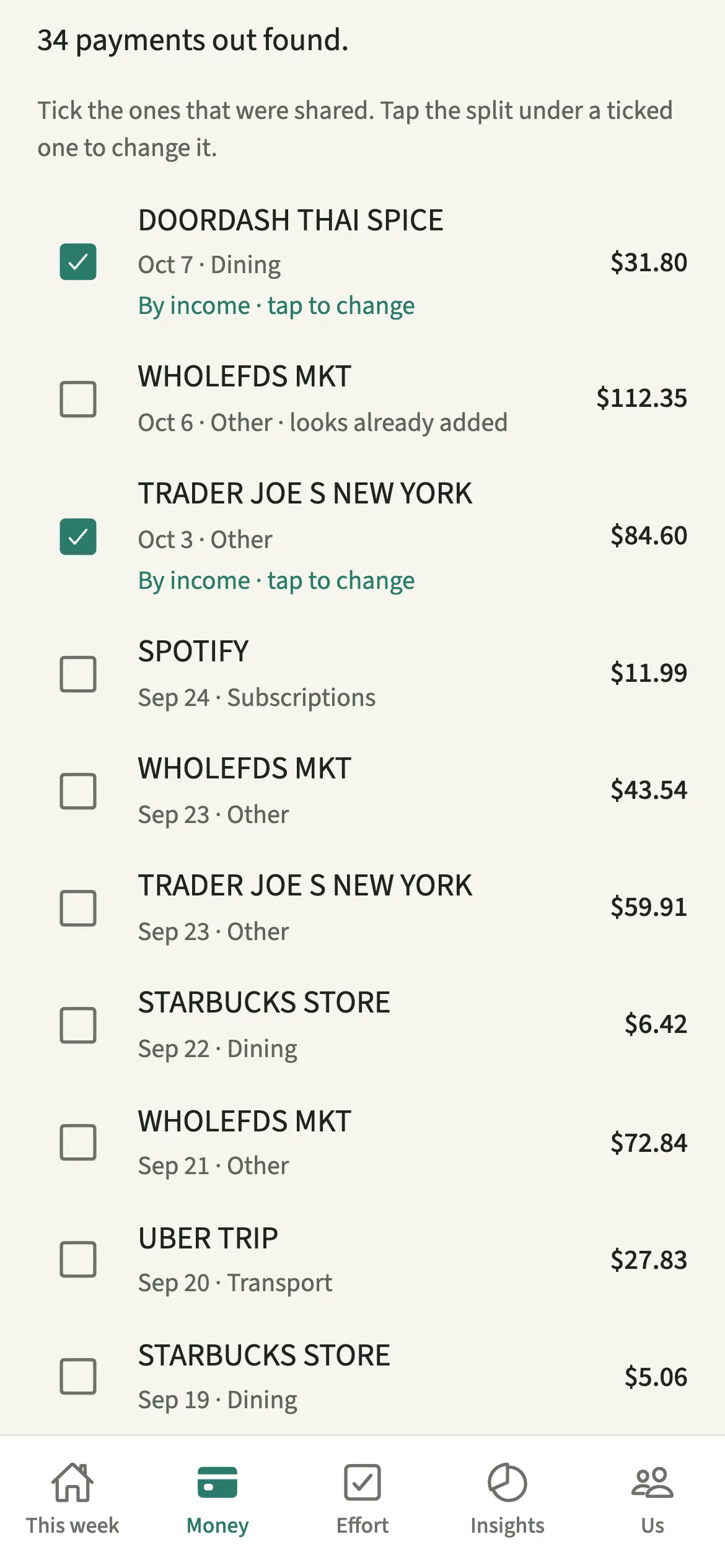
EvenUS reads the file on your phone and lists each payment out with its date, the payee and a likely category. Nothing is ticked to start with, because most of a statement is usually personal. You tick the payments that were shared, adjust the split on any that differ, and add them. They become ordinary shared expenses, saved as paid by you.
Payments that look as if they are in EvenUS already are marked “looks already added”, so an expense someone typed in last Tuesday does not go in twice.
Who is Import a bank statement for?
For catching up on a month of card spending in one go. Each of you imports your own statement, because every ticked row is saved as paid by the person importing it, or by the joint account for a joint statement.
How do you import a bank statement into EvenUS?
Download a CSV, OFX or QFX statement, open Money, tap “Import a bank statement” under Track, choose the file, tick the shared payments and tap Add.
- Download the statementDownload a CSV, OFX or QFX statement from your bank’s website or app and save it to this phone.
- Open the import screenOpen Money, scroll to Track and tap “Import a bank statement”, then “Choose a file”.
- Say whose account it isIf you have a joint account set up in EvenUS, answer “Whose account is this?” with Mine or Joint account.
- Tick the shared paymentsTick the payments that were shared. Tap the split under a ticked one, such as “Half each · tap to change”, to change it.
- Add themTap the Add button at the bottom, for example “Add 12 shared expenses”, to save the ticked ones.
What does your partner see?
Your partner sees the expenses you add, like any others, and one line in the activity feed for the import, not a notice for each. Each imported expense shows “Added from: A bank statement”.
They never see the file, your balance, or the rows you left unticked. EvenUS keeps only what you tick and forgets the rest.
Tips for a tidy import
- Nothing is ticked to start with. Payments that seem to be in EvenUS already are marked “looks already added”, so you can leave them.
- Payments from before the week you joined are marked “before you joined” and left out, and so is a payment too small to record in your household’s currency; the screen counts both. Anything that could not be added is named, so you can add it by hand.
- For a long file, choose a shorter date range. The check for things already added covers about six months, and one import adds up to 300 expenses.
- Only money going out can be ticked. Record a refund on its expense with “This was paid back”.
Which banks and countries does statement import support?
It recognises downloads from most large banks in the US, UK, Europe, Australia, Canada and India, and usually reads other banks’ CSV files too. That includes Chase, Bank of America, Wells Fargo, Amex and Capital One; Barclays, HSBC, Monzo and Revolut; N26 and German banks; CommBank, ANZ and Westpac; RBC and TD; and HDFC, ICICI, SBI, Axis and Kotak, along with the layout most other Indian banks use, with Narration, Withdrawal and Deposit columns and amounts in lakhs.
Indian banks often give an Excel (XLS) file: open it and save it as CSV first. Dates follow the bank’s format, then your phone’s region. Payments in a currency other than your household’s are listed but not added, and PDF statements can’t be read.
Why doesn’t EvenUS just connect to my bank?
EvenUS never connects to a bank, by design. A bank link would hand a third party a live view of every payment either of you makes, when the household only needs the shared ones. What you add counts towards the household balance like anything typed in.
Is Import a bank statement free?
Import a bank statement keeps working after the 7-day free week, whether or not you subscribe. The computed views, such as the household balance and this week’s idea, are part of EvenUS Pro: $9.99 a month or $79.99 a year, with one subscription covering both partners. The free week needs no card, and nothing is charged when it ends.
Questions about Import a bank statement
Does EvenUS connect to my bank account?
No. EvenUS never connects to a bank. You download a statement file yourself and choose it in the app. It is read on your phone, only the payments you tick are saved, and the file is forgotten straight after.
Can my partner see my whole bank statement?
No. Your partner sees only the payments you tick and add, as ordinary shared expenses, plus one line in the activity feed for the import. The file and every row you left unticked stay with you.
Can I import a PDF bank statement?
No. PDF statements can’t be read. Download a CSV, OFX or QFX file from your bank’s website or app instead. If your bank only offers Excel, open the file and save it as CSV first.
Can I import payments from before we started using EvenUS?
If you joined your partner’s household, payments dated before the week you joined are left out, and the screen says how many. They stay in your bank’s records, just not in your shared ones.
Is statement import part of EvenUS Pro?
No. Importing a statement is a way of adding expenses, so it keeps working after the 7-day free week, with or without a subscription.
Related features
Other parts of EvenUS that work alongside Import a bank statement.
Related reading
Articles on the questions behind this feature.