Help and feedback: ask a question, report a problem or suggest a feature
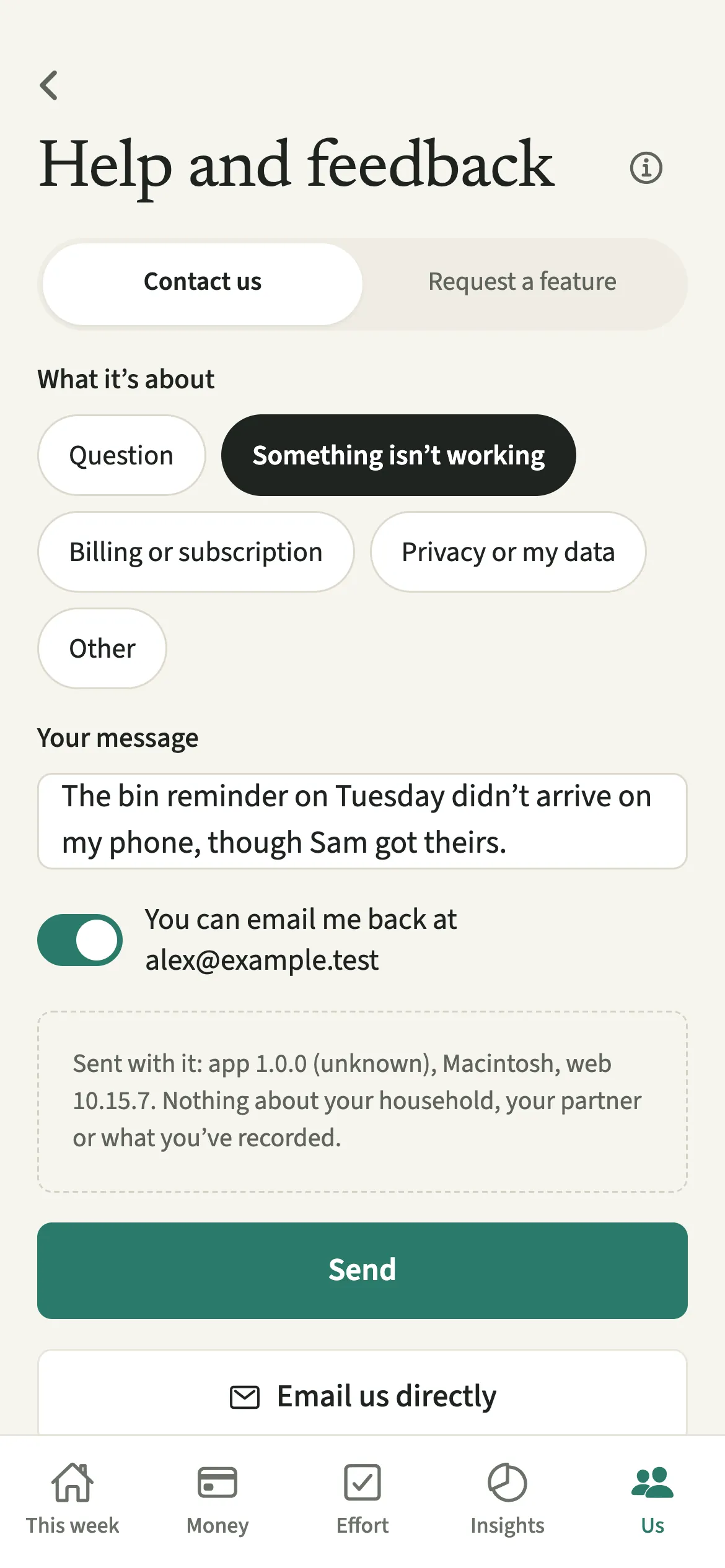
Help and feedback is the screen in EvenUS for writing to the EvenUS team from inside the app. Choose Contact us to ask a question or report a problem, or Request a feature to suggest an idea. Your message goes with the app version and phone model only, never anything about your household or partner, and you can ask for an email reply.
What does Help and feedback do?
It sends a message from the app straight to the people who build EvenUS, without you hunting for an address. The easiest moment to report something odd is while the screen is still in front of you.
There are two kinds of message. Contact us is for a question, something that is not working, a billing or subscription worry, or a question about privacy and your data. Request a feature is for an idea: you give it a short name and, if you like, say why it would matter in your home. That second part is optional, and it is the part that helps most when deciding what to build.
Every message is read by a person. If you switch on the reply option, the answer comes to the email address on your account.
Who is Help and feedback for?
Anyone with something they would like a person to read: a question about how the household balance (the fairness score) came out, a problem with an expense or a reminder, a worry about a charge, a question about your data, or an idea for something EvenUS does not do yet. You do not need a subscription to use it, and it works the same during the free week and afterwards.
How do you contact EvenUS from the app?
Open Us, tap Help and feedback near the bottom, choose Contact us or Request a feature, write your message and tap Send.
- Open Help and feedbackOpen the Us tab and tap Help and feedback near the bottom, in the Help section.
- Choose the kind of messageChoose Contact us or Request a feature at the top of the screen.
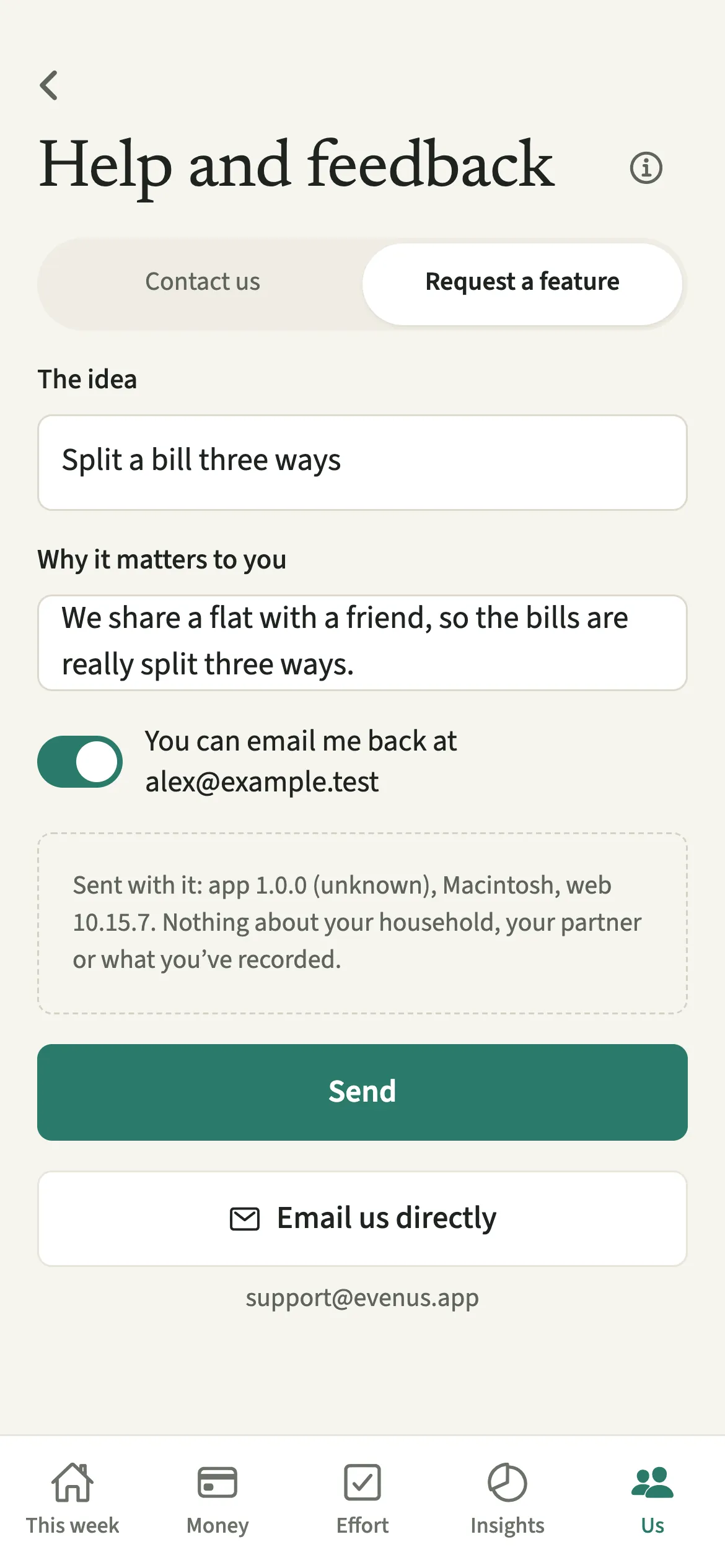
- Write itFor Contact us, pick what it’s about (Question, Something isn’t working, Billing or subscription, Privacy or my data, or Other) and write your message. For Request a feature, give the idea a short name and, under “Why it matters to you”, say why it matters to you.
- Decide whether you would like a replyLeave the reply option on, which reads “You can email me back at” followed by your account email, if you would like an answer by email. Switch it off to send without one.
- Send itTap Send. The screen says “Thank you. It’s with us.”, and “Send another” lets you write again.
Does your partner see what you send?
No. Messages go to the EvenUS team only, and your partner isn’t told you wrote. Nothing appears in the household’s activity, on This week or in any notification.
The message carries what you typed, whether you would like a reply, and a short technical line: the app version and build, your phone model, and the system version. The screen shows that line before you send, with the words “Nothing about your household, your partner or what you’ve recorded.” No expenses, chores, scores or names travel with it.
Tips for getting a useful answer
- For something that is not working, say which screen you were on and what you tapped just before. The app version and phone model are added for you.
- You can send five messages a day. After that, email support@evenus.app directly.
- Email us directly opens your mail app, addressed to support@evenus.app. It is handy for attaching a screenshot, which the in-app form does not take.
- Billing questions are quicker if you check Subscription first: it shows the renewal date, which store the purchase went through and a button to restore it.
- If the week seems to start or the Sunday summary to arrive at the wrong hour, check the household time zone in Us → Household → Your household first. Weeks start at 00:00 on Monday in that zone; either of you can change it, and a change takes over when the week you are in ends.
Why does the message carry nothing about your household?
Because support does not need it. Everything in EvenUS is built from two people’s information: incomes, spending, hours, private check-in answers. Sending any of it with a support message would mean sharing your partner’s data without them in the conversation, so the form carries only what you type and the technical line shown on screen.
The limit of five messages a day is counted per person, and it never blocks email: support@evenus.app is always there. If you are leaving EvenUS, Delete your account handles that in the app without writing to anyone.
Is Help and feedback free?
Help and feedback keeps working after the 7-day free week, whether or not you subscribe. The computed views, such as the household balance and this week’s idea, are part of EvenUS Pro: $9.99 a month or $79.99 a year, with one subscription covering both partners. The free week needs no card, and nothing is charged when it ends.
Questions about Help and feedback
How do I contact EvenUS support?
Open Us, tap Help and feedback, choose Contact us, pick what it is about and write your message, then tap Send. You can also email support@evenus.app from any email account, or tap Email us directly on the same screen.
Will I get a reply?
If the reply option is on, the team replies to the email address on your account when there is something to say. Every message is read, and feature requests are read even when no reply is needed.
Can I suggest a new feature?
Yes. On Help and feedback, choose Request a feature, give the idea a short name and say why it matters to you. The why is optional, but it is the most useful part when deciding what to build next.
Why can’t I send another message today?
Each person can send five messages a day from the app. When you reach the limit, the screen says so. You can send more the next day, or write to support@evenus.app at any time.
Related features
Other parts of EvenUS that work alongside Help and feedback.
Related reading
Articles on the questions behind this feature.