Delete your account: remove your login and private data straight away
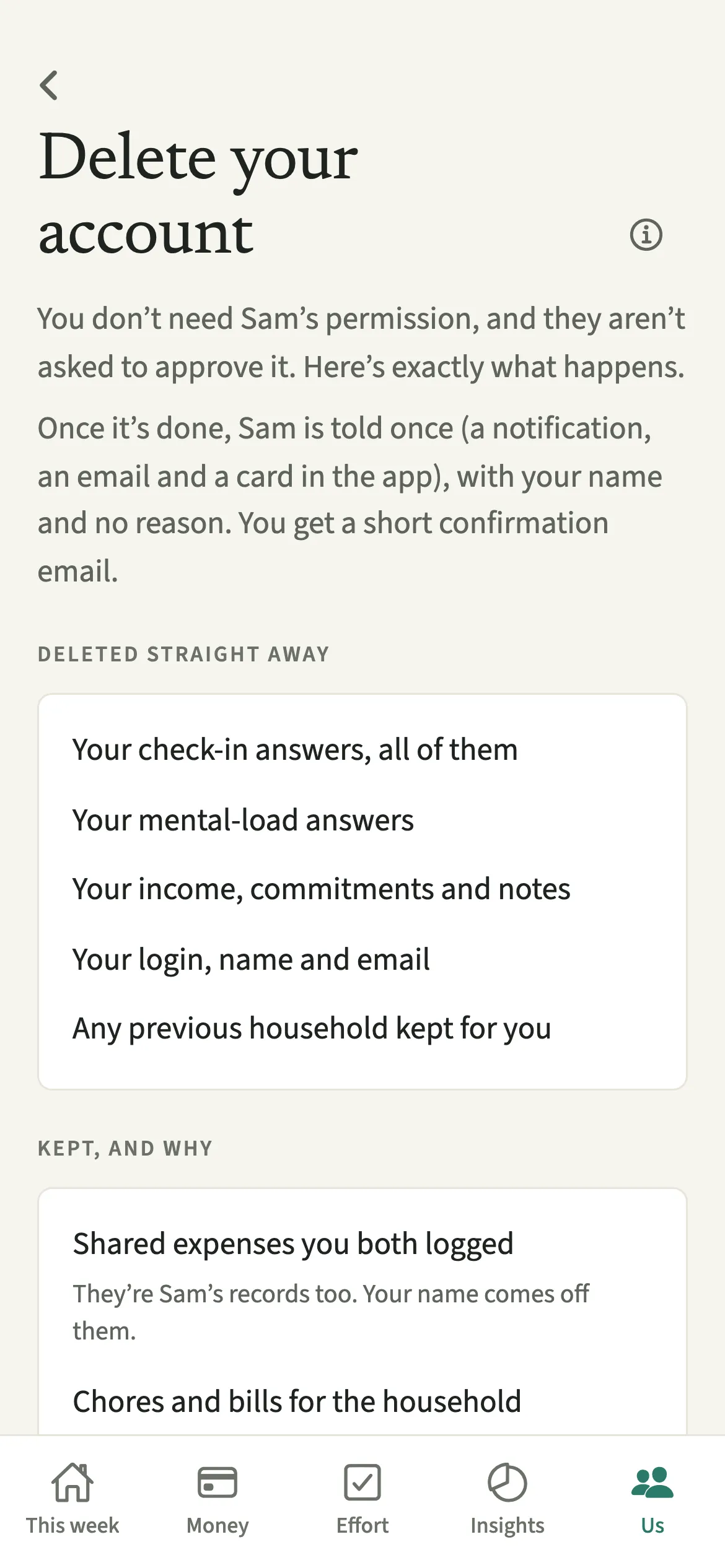
Delete your account is where you remove your login and your private data from EvenUS, from inside the app. It happens straight away, with no thirty-day holding period, and nobody is asked to approve it. Your check-in answers, mental-load answers, income, commitments, notes and login are deleted. If someone else is in the household, the shared expenses, chores and bills stay for them, with your name taken off.
What does Delete your account do?
It ends your EvenUS account and removes your private data, in one step you can take on your own. The screen first lists what is deleted straight away and, if someone else is in the household, what is kept for them and why.
Deleted straight away: your check-in answers, all of them; your mental-load answers; your income, commitments and notes; your login, name and email; and any Previous household kept for you. Kept, when someone else is there: the shared expenses you both logged, and the household’s chores and bills, because they are your partner’s records too. Your name comes off them, and they show you as a former member.
If you are the only one in the household, it is deleted with your account: every expense, chore, bill, reminder and stored week in it. Nobody else keeps a copy, so export one first if you might want it. The full policy, including asking by email, is on the delete your account page.
Who is Delete your account for?
Anyone who has finished with EvenUS, for any reason: you have stopped using it, you want your private answers gone, or the relationship has ended. You do not need to give a reason, or even a household: if you never finished setting one up, Sign out and Delete account are at the bottom of the welcome and setup screens.
How do you delete your EvenUS account?
Open Us, tap Delete your account at the bottom, read what will happen, then type delete and tap “Delete my account”.
- Open the screenOpen the Us tab and tap Delete your account at the bottom. No household yet? Tap Delete account at the bottom of the welcome or setup screen, or of Check your email while you confirm your address.
- Read what happensRead Deleted straight away and, if someone else is in the household, Kept, and why: what goes now, and what stays for them.
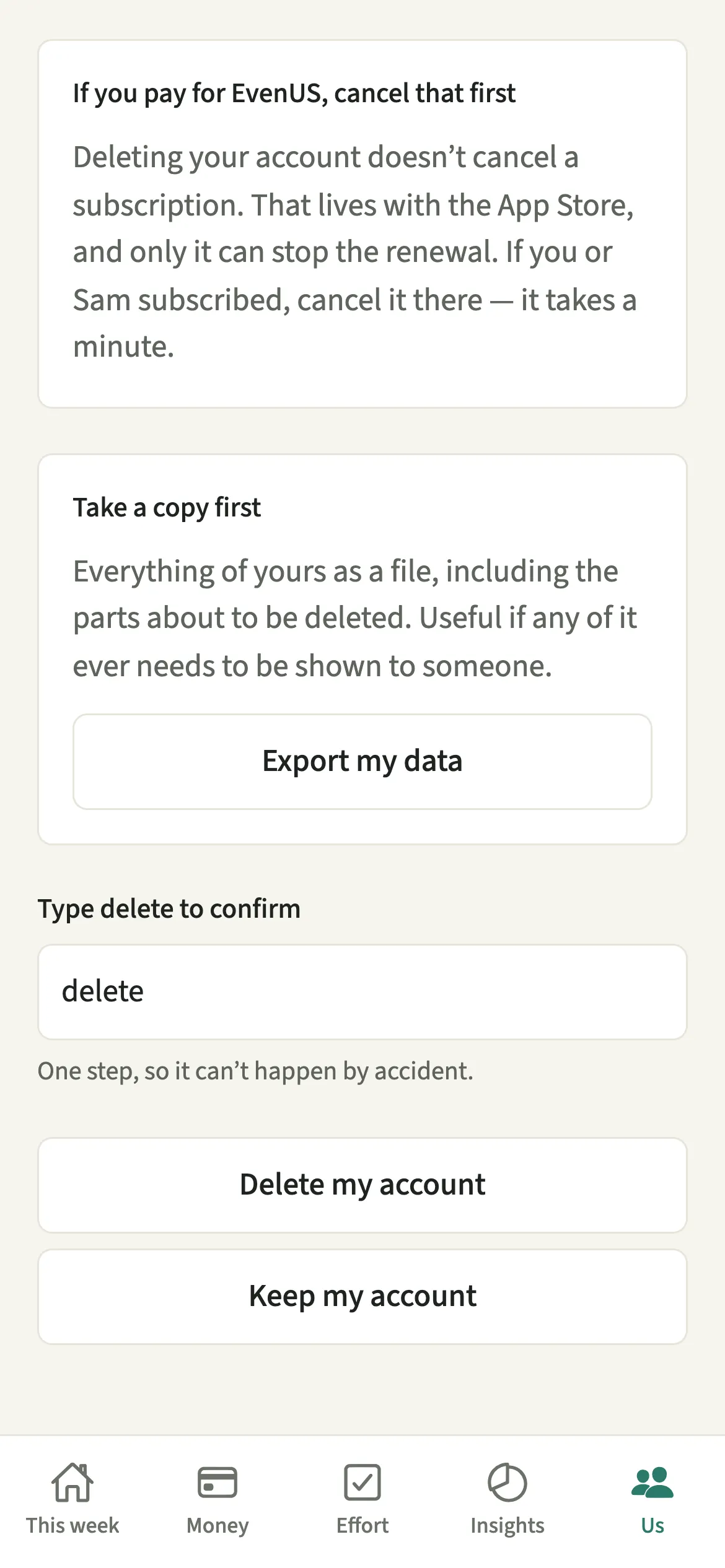
- Take a copy if you want oneIf you would like a copy, tap “Export my data” first. It includes the parts about to be deleted.
- Cancel a subscription in your storeIf you subscribe, cancel in your App Store or Google Play subscriptions, using the button on the screen. Deleting the account does not stop a renewal.
- ConfirmType delete to confirm, then tap “Delete my account”. If you change your mind, “Keep my account” takes you back with nothing changed.
What does your partner see after you delete your account?
They are not asked to approve it, and the shared history stays for them. They are told once, by a notification, an email to their verified address and a card in the app, that you deleted your account, with your name and no reason. You get a short confirmation email, which also says how to cancel a store subscription.
The shared expenses, chores, bills and Activity entries remain, with your name taken off. Your private check-ins were never readable to them, and afterwards they no longer exist.
If you paid for EvenUS Pro, your partner keeps it only until your paid period ends or someone new joins, whichever comes first. When someone leaves explains what they can do next.
Tips before you delete your account
- Export first if there is any chance you will want the records later. Export your data includes your own private records and any Previous household kept for you, and deletion cannot be undone.
- Cancel a subscription in the App Store or Google Play before you delete. One subscription covers both of you, so cancelling also ends Pro for your partner when the paid period ends.
- If you can no longer open the app, email support@evenus.app from the address you signed up with and ask for your account to be deleted.
Why are shared expenses kept when someone else is in the household?
Because they belong to two people. A shared expense records what the household spent and how it was split, and your partner relies on it for their history, their Even up figure and past weeks of the household balance. Deleting it would quietly rewrite every past split for them. So everything about you is removed, and the record of what the household did stays, with your name taken off. When nobody else is in the household, there is nobody to keep it for, so it goes too.
Is Delete your account free?
Delete your account keeps working after the 7-day free week, whether or not you subscribe. The computed views, such as the household balance and this week’s idea, are part of EvenUS Pro: $9.99 a month or $79.99 a year, with one subscription covering both partners. The free week needs no card, and nothing is charged when it ends.
Questions about Delete your account
Does deleting my account cancel my EvenUS Pro subscription?
No. A subscription lives with the App Store or Google Play, and only they can stop a renewal. Cancel it in your store subscriptions first. The delete screen has a button that opens them for you.
Is there a waiting period before my EvenUS account is deleted?
No. Deletion happens straight away, with no thirty-day holding period, no shadow copy and no reactivation window. Backups and server logs may persist for up to 30 days, as the delete your account page explains.
Can I delete my account if I never set up a household?
Yes. Sign out and Delete account sit at the bottom of the welcome and setup screens, so you can remove an account that never joined or created a household, without finishing setup first.
What happens to the household if I am the only one in it?
It is deleted with your account: its expenses, chores, bills, reminders and stored weeks. Nothing is kept for anyone, so tap Export my data first if you might want a copy.
Related features
Other parts of EvenUS that work alongside Delete your account.
Related reading
Articles on the questions behind this feature.