Siri and Shortcuts: add to EvenUS by voice on iPhone
Siri and Shortcuts let you add things to EvenUS by voice on iPhone. Say “Hey Siri, tell EvenUS”, and when Siri asks, say the details, like “I paid 30 for groceries”. EvenUS opens with the draft filled in for you to check and save. You can also add a reminder or open your chores the same way. It works on iOS 16 or later with no setup.
What can Siri do in EvenUS?
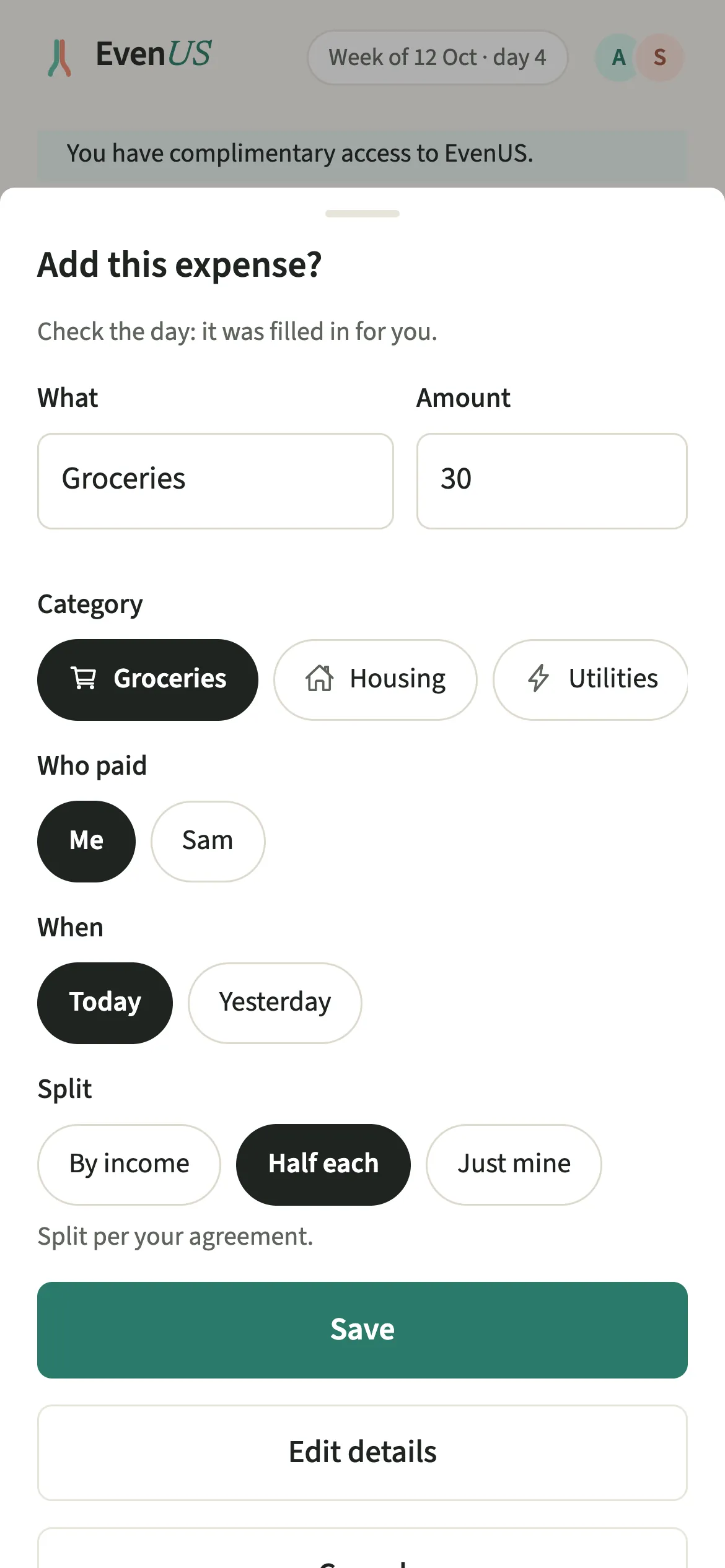
Siri opens EvenUS with what you said already filled in, so adding an expense, a chore or a reminder takes a sentence instead of a form.
There are three things to ask for. “Tell EvenUS” takes any line Tell EvenUS understands, such as an expense, a chore you did or a shopping item. “Add a reminder in EvenUS” turns what you say into a reminder. “Show my chores in EvenUS” opens Effort.
Siri never saves anything itself. Every request opens the app at a draft you check, with any guessed details flagged, and nothing is recorded until you tap Save.
Who is Siri for in EvenUS?
For iPhone users who would rather say it than type it: at the till, in the kitchen, in the car with the phone in its holder. There is nothing to set up. The phrases work as soon as EvenUS is installed on an iPhone with iOS 16 or later, and the same actions appear in the Shortcuts app for anyone who likes building their own.
How do you use Siri with EvenUS?
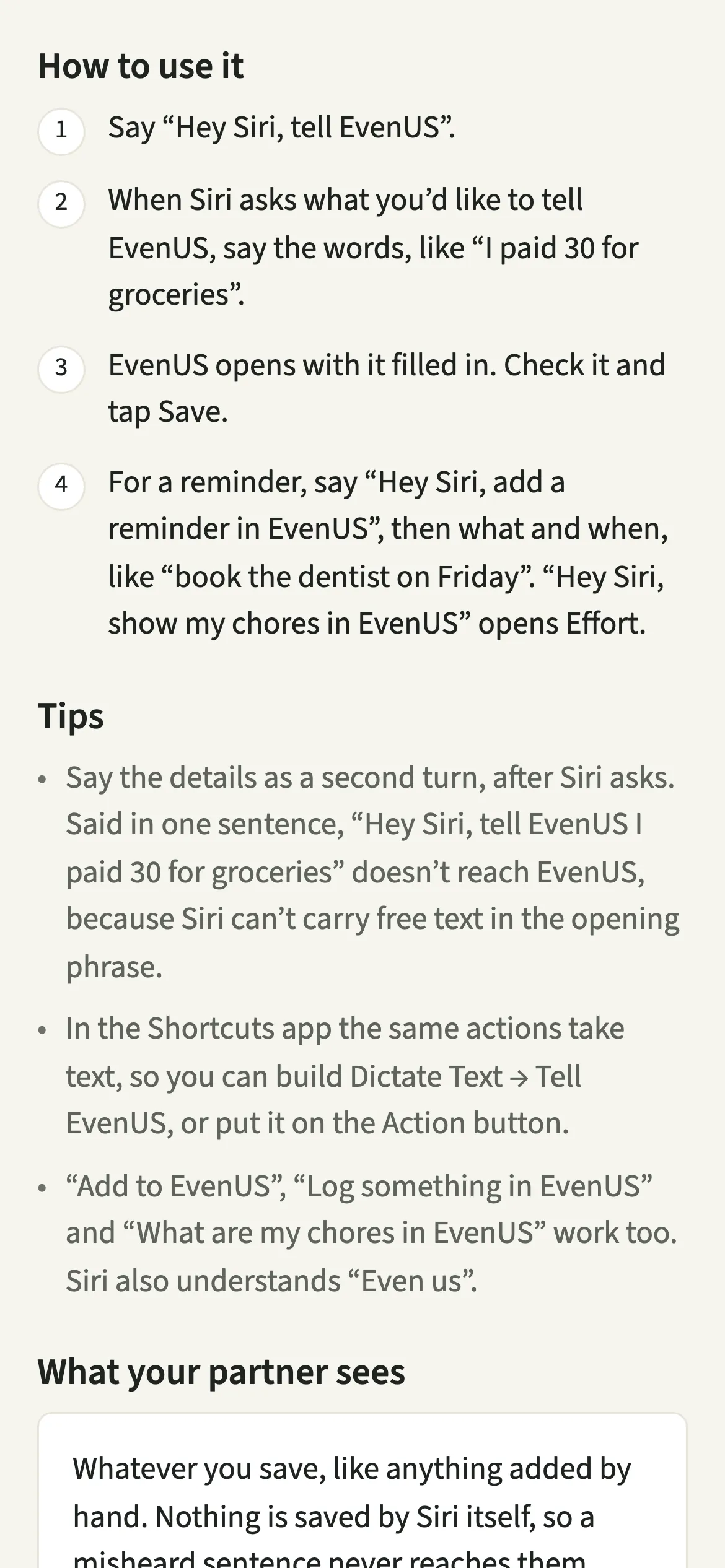
Say “Hey Siri, tell EvenUS”, wait for Siri to ask, say the details, then check the draft in EvenUS and tap Save.
- Start with the app’s nameSay “Hey Siri, tell EvenUS”.
- Say the details when Siri asksWhen Siri asks what you’d like to tell EvenUS, say the words, like “I paid 30 for groceries”.
- Check it and saveEvenUS opens with it filled in. Check the amount, the payer and anything flagged as a guess, then tap Save.
- Add a reminder the same waySay “Hey Siri, add a reminder in EvenUS”, then what and when, like “book the dentist on Friday”. Check the reminder that opens and save it.
- Open your choresSay “Hey Siri, show my chores in EvenUS” to go straight to Effort.
What does your partner see?
Whatever you save, like anything added by hand. An expense you dictated and saved appears on their phone exactly as if you had typed it, with no mark that Siri was involved.
Because Siri itself saves nothing, a misheard sentence never reaches your partner. If Siri writes “13” where you said “30”, you see it on the draft and fix it before tapping Save. Opening your chores with Siri only opens your own phone’s Effort tab; it sends your partner nothing.
Tips for using Siri with EvenUS
- Say the details as a second turn, after Siri asks. Said in one sentence, “Hey Siri, tell EvenUS I paid 30 for groceries” does not reach EvenUS, because Siri cannot carry free text in the opening phrase.
- In the Shortcuts app the same actions take text, so you can build Dictate Text → Tell EvenUS, or put it on the Action button on iPhones that have one.
- “Add to EvenUS”, “Log something in EvenUS” and “What are my chores in EvenUS” work too. Siri also understands “Even us”.
- On iPhone with iOS 17 or later, a Wallet automation can also offer each Apple Pay payment for you to add to shared.
Which iPhones and languages does it work with?
Siri and Shortcuts in EvenUS need an iPhone with iOS 16 or later. There is nothing to switch on. On Android, the equivalent is long-pressing the app icon, covered in Android shortcuts.
In India, Siri runs in English (India), so start with the English phrases. EvenUS reads the words that follow in English or Hinglish, as Siri writes them down, so “grocery ke liye 300 diye” works as well as “paid 300 for groceries”.
Why can’t you say it all in one sentence?
Apple only lets the opening phrase of an app’s Siri shortcut contain fixed words, not anything free-form you might say. So “Hey Siri, tell EvenUS” is what starts the action, and Siri then asks for the details as a second turn. It feels like a pause at first, but it means the words reach EvenUS whole. If you would rather say it in one go, the Shortcuts app lets you build your own Dictate Text → Tell EvenUS shortcut with whatever name you like.
Is Siri and Shortcuts free?
Siri and Shortcuts keeps working after the 7-day free week, whether or not you subscribe. The computed views, such as the household balance and this week’s idea, are part of EvenUS Pro: $9.99 a month or $79.99 a year, with one subscription covering both partners. The free week needs no card, and nothing is charged when it ends.
Questions about Siri and Shortcuts
Can I add an expense to EvenUS with Siri?
Yes. Say “Hey Siri, tell EvenUS”, and when Siri asks, say something like “I paid 30 for groceries”. EvenUS opens with the expense filled in for you to check, and nothing is saved until you tap Save.
Does Siri save things to EvenUS without asking me?
No. Siri only opens EvenUS with a draft. Nothing is recorded, and nothing reaches your partner, until you check the draft and tap Save yourself, so a misheard word can always be fixed first.
Do I need to set up Siri shortcuts for EvenUS?
No. The phrases work as soon as EvenUS is installed on an iPhone with iOS 16 or later. You only need the Shortcuts app if you want to build your own, such as Dictate Text then Tell EvenUS.
Is Tell EvenUS an AI assistant?
No. Tell EvenUS reads your words with fixed rules that run on your phone, offline, with no AI model. Siri turns your speech into text, and EvenUS shows you what it understood before anything is saved.
Does EvenUS work with Siri on Android or Google Assistant?
Siri is iPhone only. On Android, long-press the EvenUS icon for Tell EvenUS, Add expense, Add reminder or My chores, and Google Assistant can open EvenUS by voice.
Related features
Other parts of EvenUS that work alongside Siri and Shortcuts.
Related reading
Articles on the questions behind this feature.