Language: use EvenUS in English, Hindi, Spanish, French, German or Portuguese
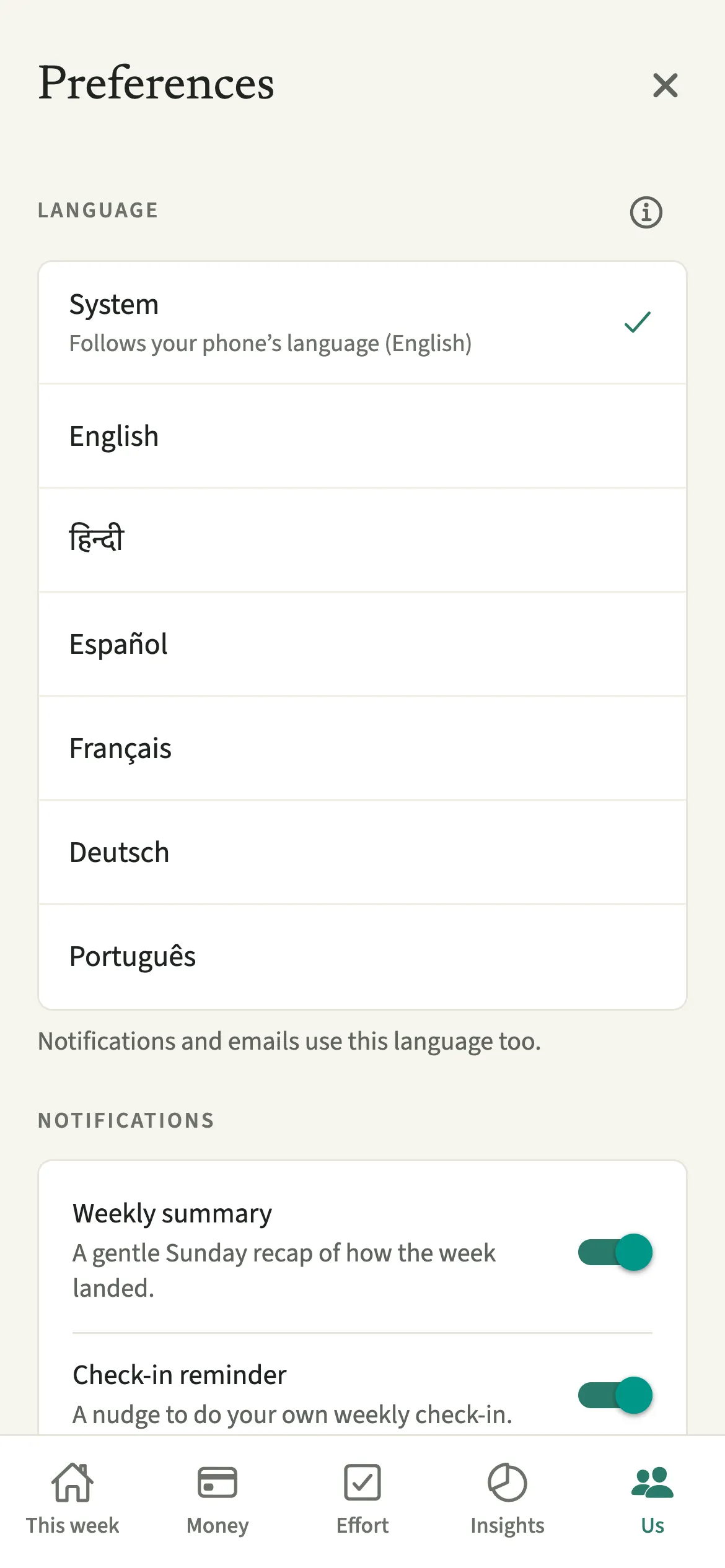
Language in EvenUS sets which language the app speaks to you: English, Hindi, Spanish, French, German or Brazilian Portuguese, or System to follow your phone. Each partner chooses separately, so a couple can use EvenUS in two different languages on one shared household. Notifications and emails follow your choice, while names and titles either of you typed stay exactly as written.
What does the language setting change in EvenUS?
It changes every word EvenUS writes to you: the screens, the explanations, the in-app guide, notifications and emails. Plenty of couples run a home across two languages, or share one language at home and use another on their phones. A household app that only speaks English leaves one of you reading the weekly picture second-hand.
Dates, times and numbers follow the language as well. In Spanish, French, German and Portuguese, times use the 24-hour clock and decimals use a comma, so a chore reads “1,5 h”. Hindi keeps the 12-hour clock and the Latin digits people see on Indian bank apps, with lakh grouping like 1,23,456. In English, EvenUS follows your phone’s region, so a phone set to India groups in lakhs and a phone set to the UK uses the 24-hour clock.
Money is not converted, and the household’s currency stays the one you chose at setup. Language does not move the week either: it starts at 00:00 on Monday in the household time zone, set in Us → Household → Your household, for both of you.
Who is the language setting for?
Households where one or both of you would rather read in a language other than English, and households where you each prefer a different one: a couple where one reads Hindi and the other English, or one reads German while the other is more comfortable in Portuguese.
How do you change the language in EvenUS?
Open Us, tap Preferences, then “Language, widget and privacy”, and tap your language under Language. The app changes straight away.
- Open the language screenOpen the Us tab, tap Preferences, then tap “Language, widget and privacy”.
- Find your language in its own wordsUnder Language, each option is listed in its own words: English, हिन्दी, Español, Français, Deutsch, Português. You can find yours even if you cannot read the screen around it.
- Tap your choiceTap your language, or System to follow your phone. Under System, a line shows which language your phone currently means, for example “Follows your phone’s language (English)”.
- Carry onThe app changes straight away, with nothing to save. As the note under the list says, “Notifications and emails use this language too.”
What does your partner see when you change language?
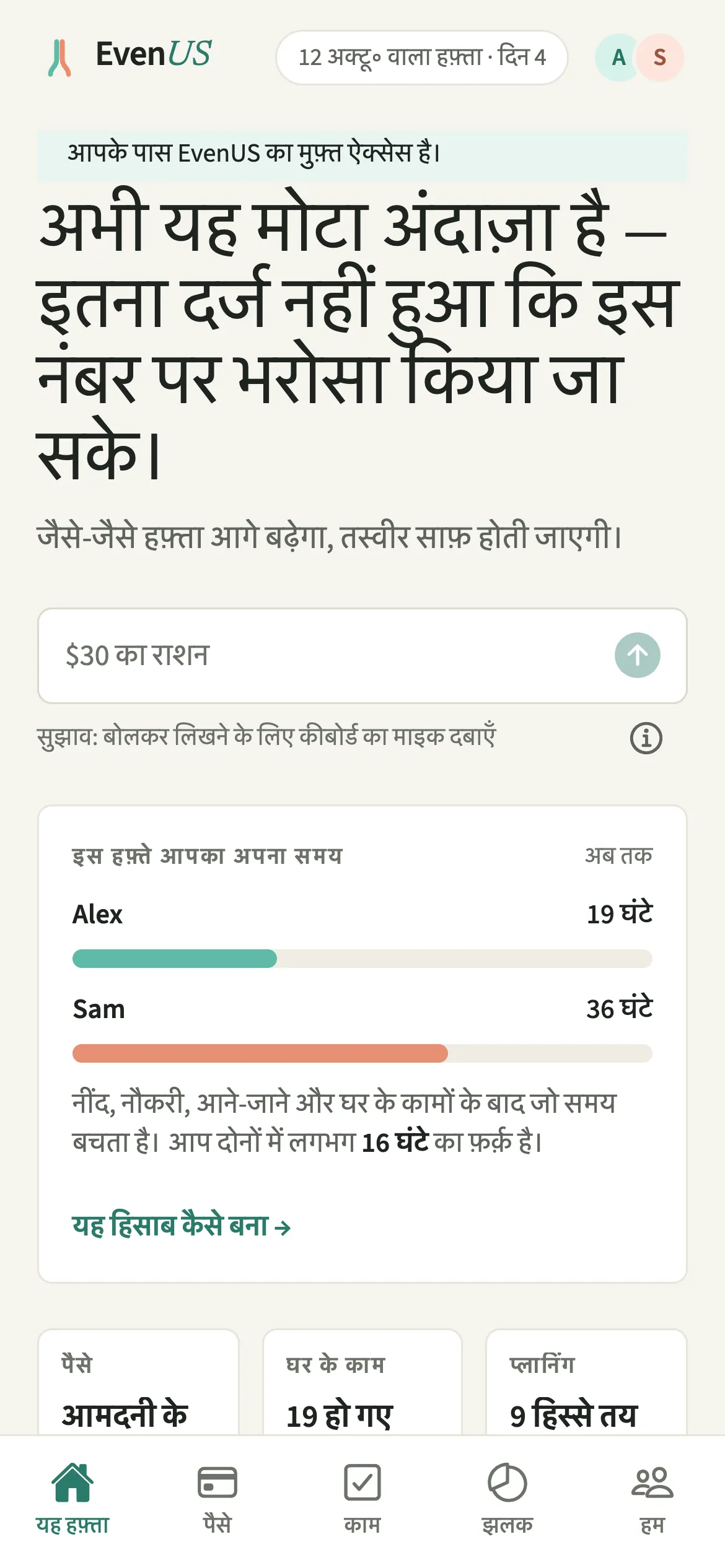
Your partner keeps their own language, and you each read EvenUS in yours. When EvenUS sends a notification to both of you, it writes the message once for each language in the household and sends each of you your own. A reminder you set for your partner arrives in their language, not yours.
What either of you types is never translated. If you name a chore “Mülltonne rausstellen” or note an expense as “kirana”, your partner sees exactly those words. Labels that belong to EvenUS, like expense and chore categories, appear in each reader’s own language.
Tips for using EvenUS in your language
- System follows your phone’s first language. If that is one EvenUS does not speak yet, such as Italian, the app uses English, so pick a language directly if you would rather.
- Your choice is saved to your account as well as the phone, so a new phone picks it up when you sign in.
- Tell EvenUS understands English, Hindi, Hinglish, Spanish, French, German and Portuguese, whichever language the app is in. Type “sabzi 120” in an English app and it still works.
- Siri and the long-press shortcuts follow your phone’s language rather than the setting inside EvenUS.
- Give shared chores names you both understand, since names stay as written for both of you.
What happens to past weeks when you switch language?
They switch with you. EvenUS does not store the weekly explanations as finished sentences. It stores which sentence was meant and the numbers that go in it, and writes the sentence when you read it, in your current language. Switch from English to Spanish and last month’s weekly summaries and the reasons for the household balance (the fairness score) are in Spanish too, with the same figures.
The Hindi translation writes everyday borrowed words such as app and budget in Devanagari, the way people type them on Indian phones. Portuguese uses Brazilian wording, dates and numbers.
One message is written in the sender’s language: the invitation email sent when you invite your partner, because they have no account and no language setting yet. Once they join, they choose their own.
Is Language free?
Language keeps working after the 7-day free week, whether or not you subscribe. The computed views, such as the household balance and this week’s idea, are part of EvenUS Pro: $9.99 a month or $79.99 a year, with one subscription covering both partners. The free week needs no card, and nothing is charged when it ends.
Questions about Language
Which languages does EvenUS support?
EvenUS is available in English, Hindi, Spanish, French, German and Portuguese (Brazilian). Each is listed in its own words in the language screen, and System follows your phone’s language when it is one of these, otherwise English.
Can my partner and I use EvenUS in different languages?
Yes. Language is a personal setting. You can read EvenUS in Hindi while your partner reads it in English, on the same household, and each of you gets notifications and emails in your own language.
Does EvenUS translate what my partner types?
No. Names, chore titles and expense notes stay exactly as they were written, for both of you. Only the words EvenUS writes itself, such as screens, categories, explanations and notifications, follow each person’s language.
Is changing the language part of EvenUS Pro?
No. Every language is available to everyone, during the free week and after it, whether or not you subscribe. The setting only changes how EvenUS speaks to you, not what it calculates.
Related features
Other parts of EvenUS that work alongside Language.
Related reading
Articles on the questions behind this feature.